
For many Benefits Administrators, the bridge between benefit elections and payroll processing is often shrouded in complexity. Traditionally, teams relied on the bulky Payroll Activity Report—a massive, non-actionable document that turned reconciliation into a reactive, manual nightmare. We recognized this gap and developed the Oracle Cloud Benefits Payroll Reconciliation Tool to provide a single source of truth. By automating the comparison between benefits and payroll data, this tool doesn’t just identify discrepancies; it explains the ‘why’ behind them, ensuring every dollar is accounted for with total confidence.
Configure Reconciliation Inputs
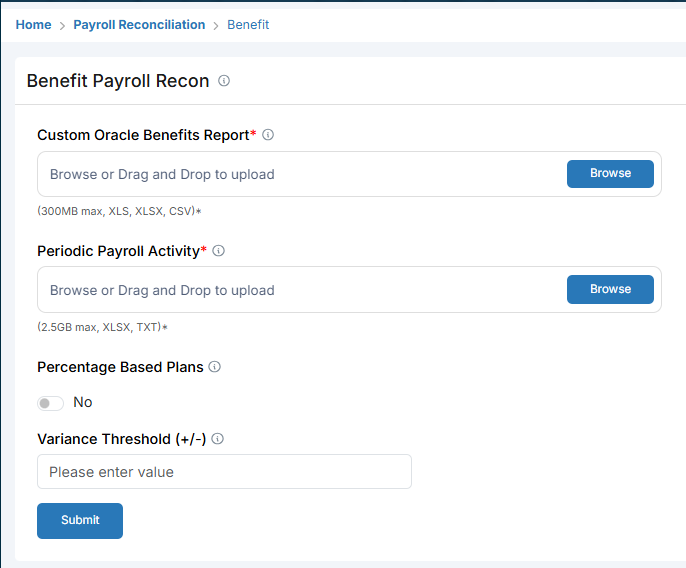
Start by setting up the tool with three simple inputs. You will need the Custom Oracle Benefits Report (built as part of this solution) and the Periodic Payroll Activity Report. After mapping these files—a one-time activity—set your Variance Threshold to define acceptable discrepancies.
Key Insight: Ensure your Variance Threshold is set to a value that filters out negligible rounding differences while capturing significant errors.
Identify Unprocessed Payroll Cases
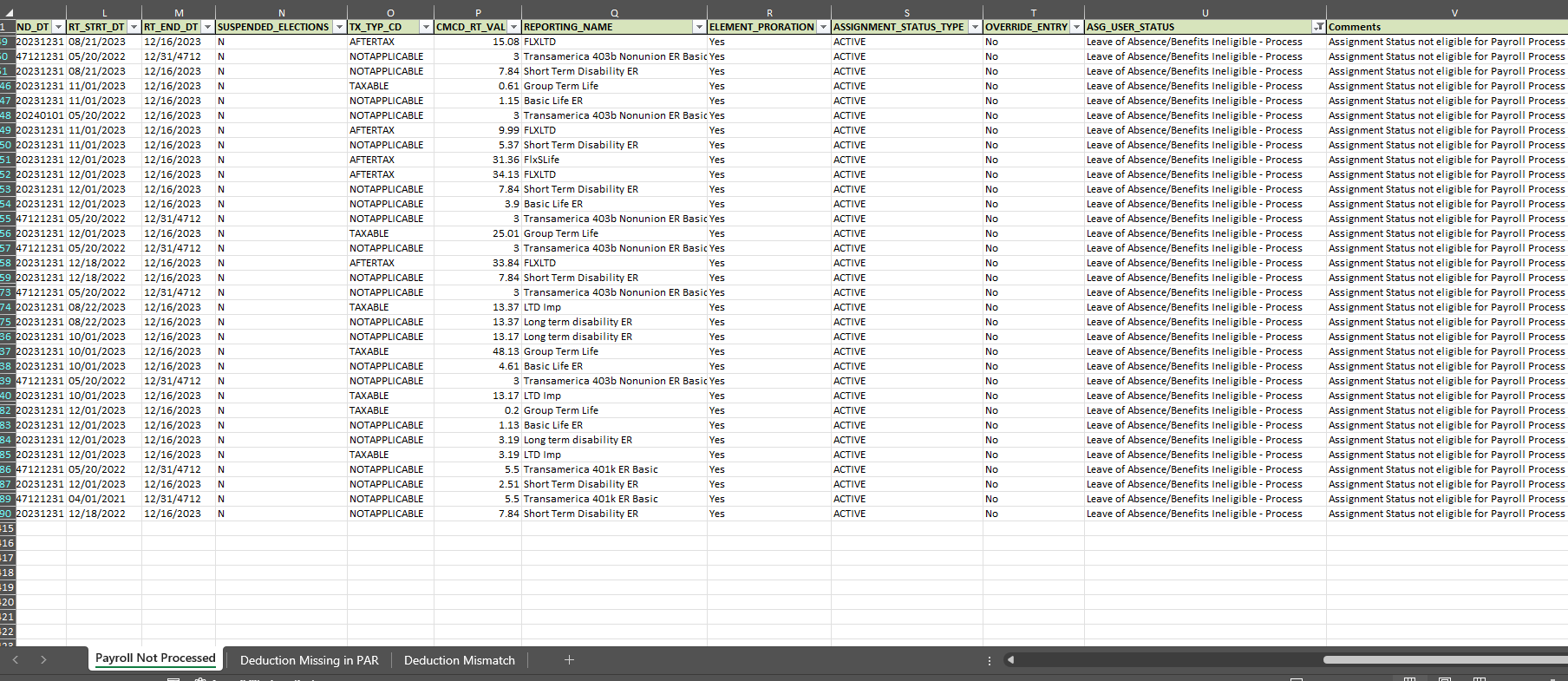
Within minutes of submission, the tool generates a view of cases where payroll was not processed. This section provides specific reasons for the gap, such as ‘Leave of Absence/Benefits Ineligible’ or assignment status issues, allowing you to address missed deductions before they become liabilities.
Key Insight: Use the ‘Comments’ column to quickly filter for assignment status issues that typically cause mass processing errors.
Analyze Deduction Mismatches
The tool presents a side-by-side comparison of the Payroll Amount versus the Benefits Amount. Discrepancies are highlighted in red, allowing Benefits and Payroll teams to see exactly where the dollar values diverge across different plan types like Flex Dental or Flex Medical.
Key Insight: Look for patterns in the ‘Plan Type’ column; often a mismatch in one plan type indicates a systemic configuration error rather than an individual data entry mistake.

Execute Detailed Root Cause Analysis
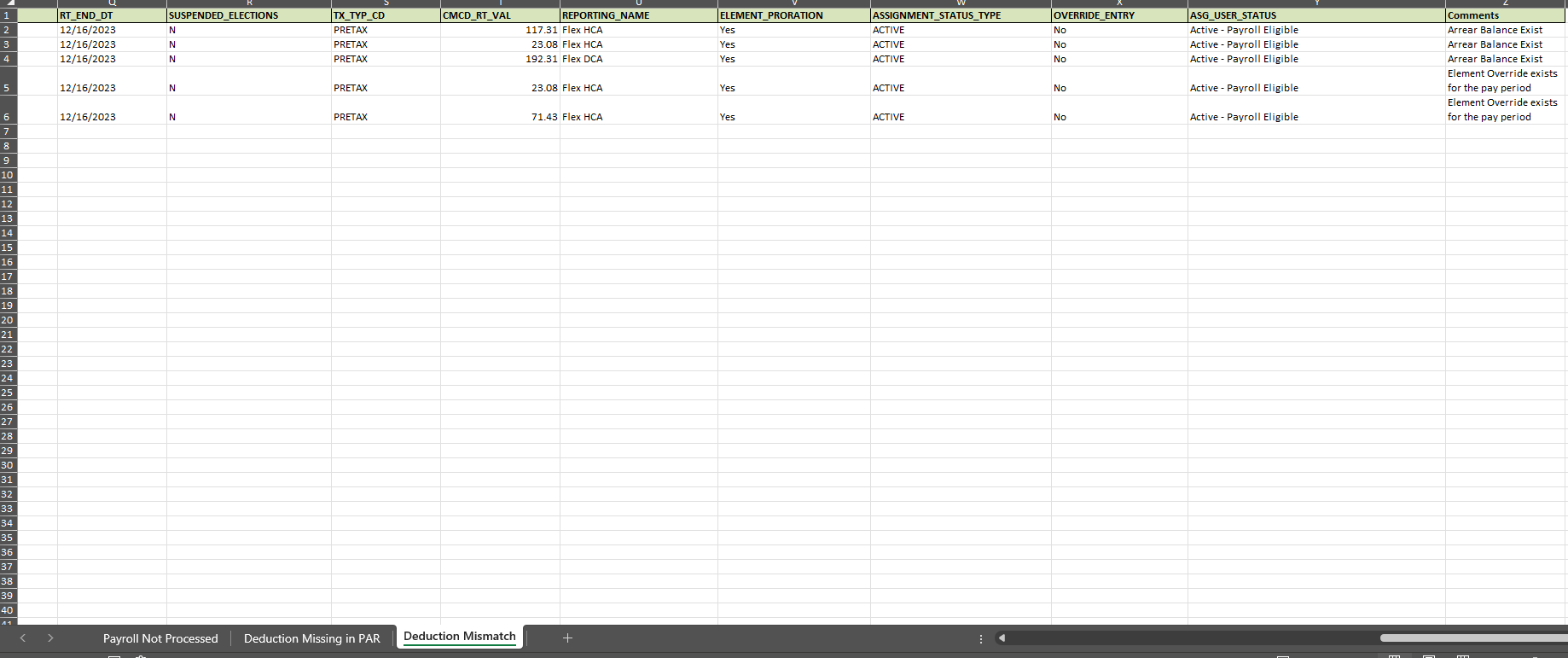
Beyond just finding errors, the tool explains them. The Detailed Root Cause Analysis view flags specific technical reasons for mismatches, such as existing Arrear Balances or Element Overrides that the team may have forgotten to terminate.
Key Insight: Pay close attention to the ‘Element Override’ flag; it is the most common reason for persistent mismatches in mature Oracle environments.
Frequently Asked Questions
Why is the standard Payroll Activity Report insufficient for reconciliation?
The standard report is designed for broad data export rather than targeted reconciliation. It is often too large and complex for quick validation, requiring extensive manual Excel work to identify specific benefit deduction mismatches.
How does the tool identify the root cause of a deduction mismatch?
The tool performs a side-by-side analysis of Benefits and Payroll data, flagging specific triggers such as Element Overrides, Arrear Balances, or Assignment Status changes that prevent accurate processing.
What inputs are required to run the reconciliation tool?
Users need to provide three primary inputs: a Custom Oracle Benefits Report (generated by the tool’s built-in logic), the Periodic Payroll Activity Report, and a defined Variance Threshold for tolerance.
Can the tool track employees who were missed by payroll entirely?
Yes, one of the core features is identifying ‘Payroll Not Processed’ cases, where an eligible benefit election exists but no corresponding payroll action occurred, often due to leave of absence or ineligibility.
