

For years, Benefits Administrators have faced a difficult question: how can they ensure deductions flowing from Benefits are correctly processed in Payroll? Historically, the answer was to consult the Payroll Activity Report—a massive, complex document not designed for quick, actionable reconciliation. This lack of a practical, scalable solution became the driving force behind the development of our Oracle Cloud Benefits Payroll Reconciliation Tool.
The Problem: A Manual and Reactive Process
Benefits and Payroll are deeply connected, yet reconciliation has traditionally been a time-consuming manual effort spread across multiple reports and Excel files. This process was prone to human error and forced teams to be reactive. When deductions didn’t match, investigators had to dig through bulky systems without a clear starting point to find the root cause.
The Solution: A Single Source of Truth
The Reconciliation Tool changes the conversation by providing a single source of truth. It allows Benefits and Payroll teams to see not only where mismatches occur but also why they happened. This eliminates the need for jumping between Excel sheets and digging through reports, providing end-to-end visibility into how deductions are calculated and processed.
Configuring the Tool with Simple Inputs
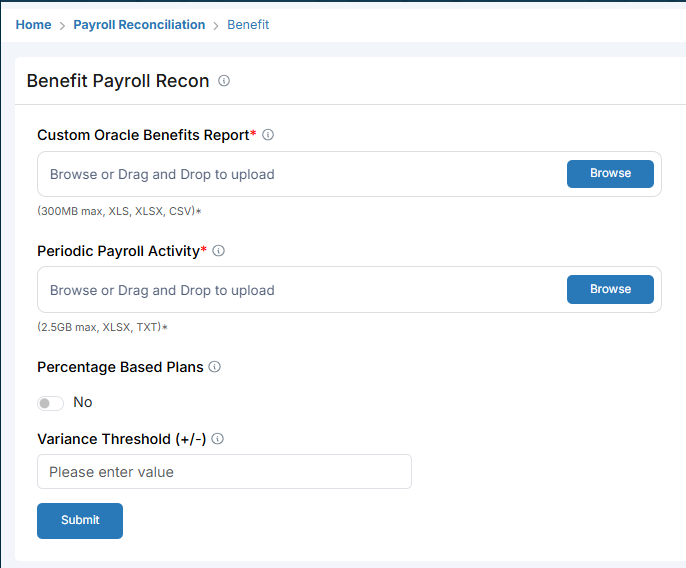
The tool is designed for ease of use with three simple inputs: the Custom Oracle Benefits Report (built specifically for this tool), the Periodic Payroll Activity report, and a Variance Threshold. Users can also toggle ‘Percentage Based Plans’ to ensure accurate mapping between systems.
Key Insight: Setting a Variance Threshold (+/-) helps filter out negligible rounding differences, allowing you to focus on significant discrepancies.
Identifying Unprocessed Payroll Cases
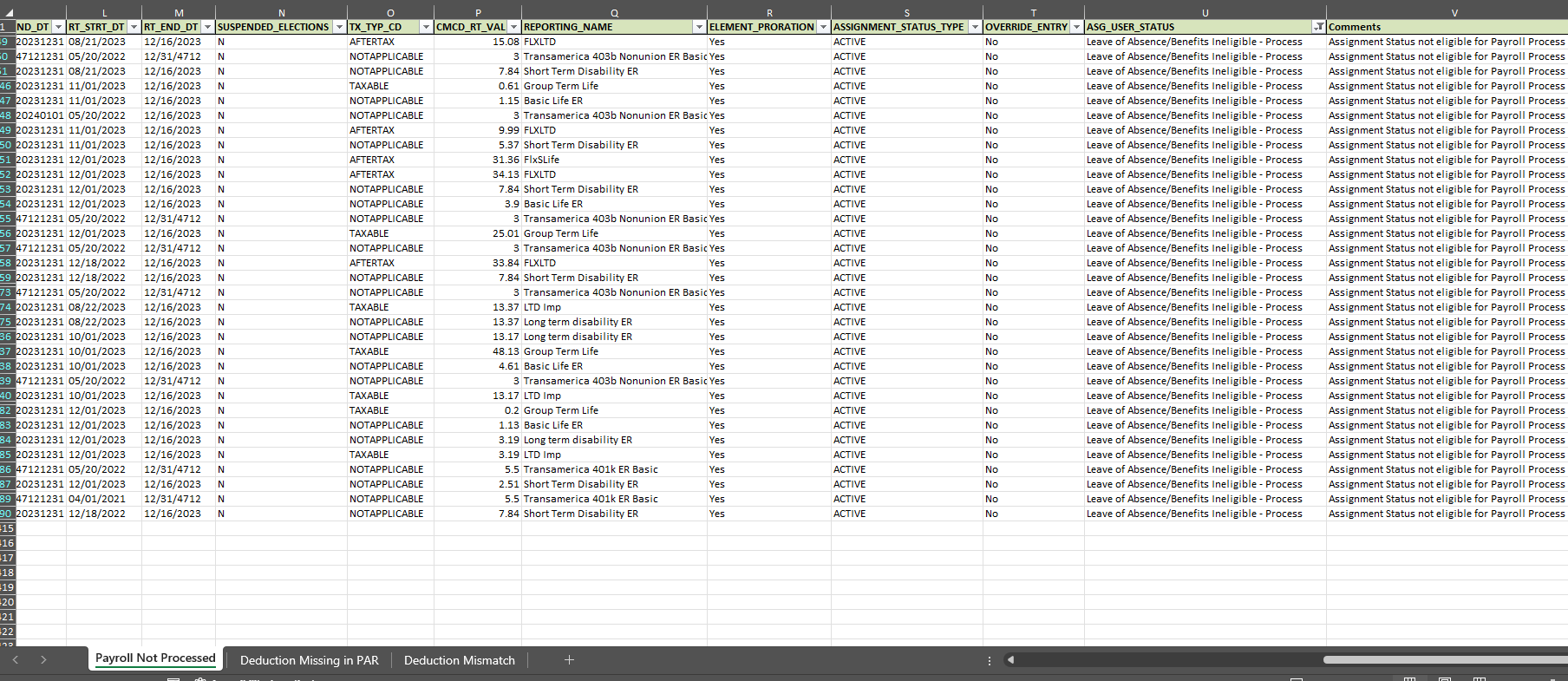
Within minutes of submitting the reports, the tool generates a detailed list of ‘Payroll Not Processed’ cases. This view explicitly states the reasons for the failure, such as assignment statuses that are ineligible for payroll processing, allowing for immediate corrective action.
Detecting Deduction Mismatches
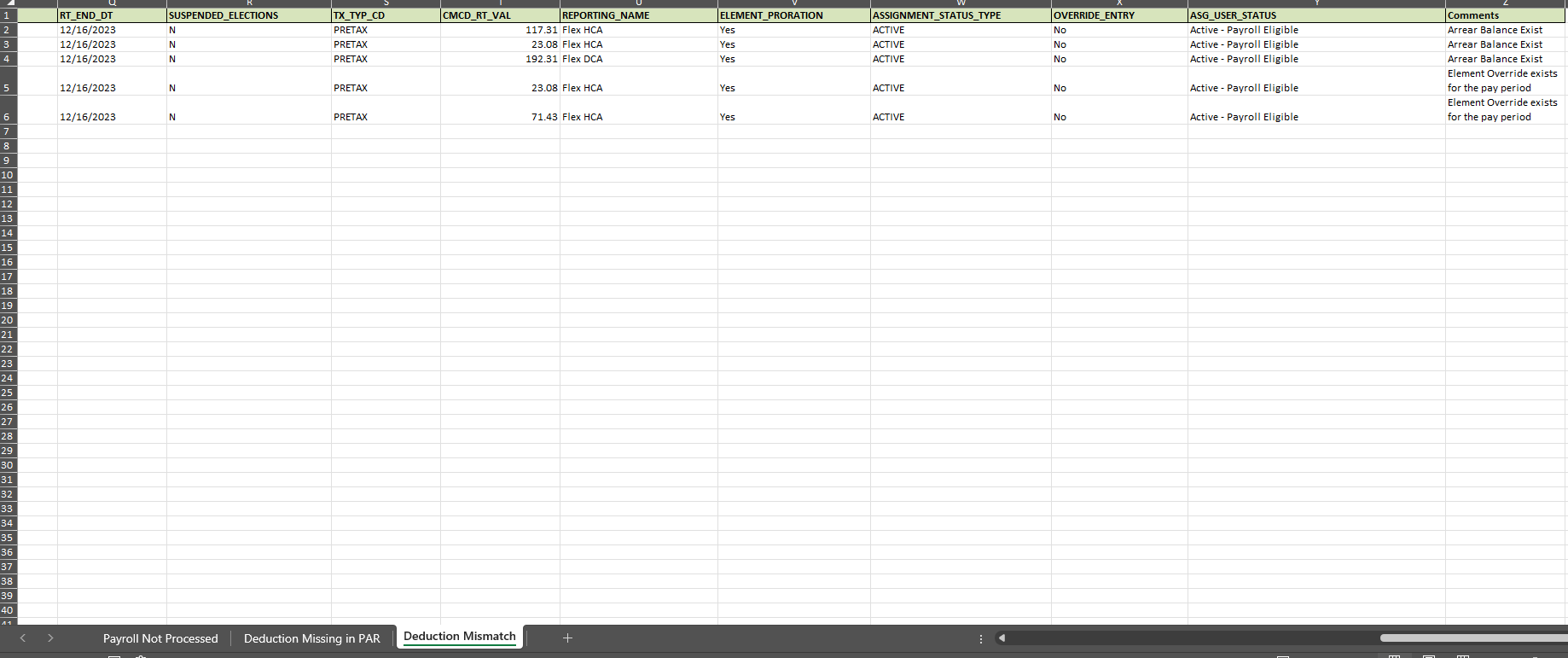
The tool identifies specific deduction mismatches by comparing the Payroll Amount against the Benefits Amount. It breaks these down by Balance Category (such as Pretax Deductions), PAR_Balance, and Person Number, ensuring that every dollar is accounted for across both systems.

Detailed Root Cause Analysis
Beyond just finding errors, the tool provides a Detailed Root Cause Analysis view. This identifies specific issues like existing Arrear Balances or Element Overrides that a team might have forgotten to end, ensuring long-term accuracy and peace of mind for both Benefits and Payroll teams.
Key Insight: Check the ‘Comments’ column in this view to quickly identify if an ‘Element Override exists for the pay period,’ which is a common cause of persistent mismatches.
Frequently Asked Questions
What are the primary benefits of using this reconciliation tool over the standard Payroll Activity Report?
Unlike the standard report, which is massive and complex, this tool provides automated reconciliation, mismatch identification with root-cause insights, and a centralized view that eliminates manual Excel work.
What specific files are required to run the reconciliation?
The tool requires a Custom Oracle Benefits Report (provided as part of the tool) and a Periodic Payroll Activity report in formats such as XLS, XLSX, CSV, or TXT.
How does the tool help identify why a deduction was not processed?
The tool identifies the specific root cause, such as ‘Assignment Status not eligible for Payroll Process’, ‘Arrear Balance Exist’, or ‘Element Overrides’ that were not properly ended.
