

The Unprocessed Payroll Results Report for Oracle Cloud Payroll, from Camptra, at no charge
Every payroll team runs QuickPays and ad hoc calculations that were never meant to be paid. Someone tests a bonus amount for one employee. Someone checks how a new earnings code calculates. Someone runs a QuickPay to answer an HR question and moves on to the next ticket. Each of those is a normal part of the job, and each of them is supposed to be rolled back once the question is answered.
Sometimes it is not. The QuickPay stays where it is, calculated but never sent through prepayments, and nobody notices until the main payroll run produces a result that does not look right. This article explains why a forgotten QuickPay causes that, and introduces a simple report Camptra is releasing for free so that payroll teams can find every one of them before the main run starts.
What a Forgotten QuickPay Does to the Main Payroll Run
Oracle Cloud Payroll processes each element entry once per period. When a QuickPay calculates an employee, the elements it picked up are marked as processed for that period. If that QuickPay is still sitting there when the main payroll flow runs, the main run sees those elements as already done and skips them.
The consequence depends on how much the QuickPay covered. A QuickPay that calculated the employee’s full set of elements means the employee is effectively excluded from the main payroll run altogether. The main run has nothing left to pick up. A QuickPay that was restricted to a single element, for example a test of a bonus or a specific earnings code, means that part of the employee’s earnings is missing from the main run while everything else is paid normally.
Neither situation produces an error. The main payroll flow completes, the totals look plausible, and the gap shows up later as a short paycheck, an employee escalation, or a manual off-cycle correction. The root cause is a test calculation that somebody meant to roll back and did not.
Why This Is Hard to Spot by Hand
Finding a forgotten QuickPay one employee at a time is easy. Finding all of them across a payroll is not. There is no standard page that lists every calculation in a period for which a prepayment has not yet been applied, and checking process results employee by employee is not realistic for a large population.
The problem grows with the size of the payroll team. In a large organization, several people process payroll, run QuickPays, and test changes in the same environment. The person who runs the main payroll flow usually has no way of knowing what a colleague calculated and left behind the week before. What is needed is a single check, run just before the main payroll flow, that answers one question: is anything sitting out there that should have been rolled back?
The Unprocessed Payroll Results Report
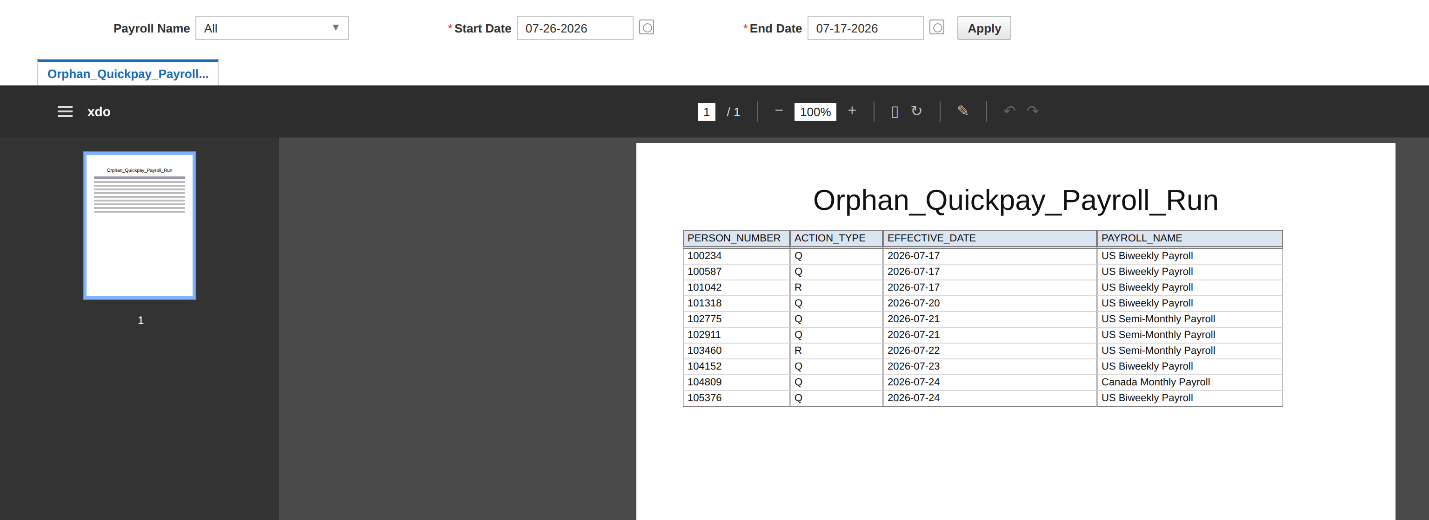
That is exactly what this report does. It takes a start date and an end date as parameters and returns all payroll calculations and QuickPay whose process date falls between them and that have not been carried forward into a subsequent process. In practical terms, if a calculation or QuickPay has been run and prepayments have not been run against it, the report lists it. If prepayments has already picked it up, it does not appear.
For each result, the report shows the employee, the payroll, the process date, and whether the result came from a regular payroll calculation or from a QuickPay, which is enough to tell at a glance whether a row is expected or needs a rollback.
How to Use It Before Every Payroll Run
Run the report with start and end dates that cover the current pay period, ideally as the last step before the main payroll flow begins. Review each row. If a QuickPay was run for a legitimate off-cycle payment that is meant to go through its own prepayments, leave it alone. If a row is a test, a forgotten experiment, or a calculation nobody can account for, roll it back before the main run so that the employee’s elements are picked up correctly.
The whole check takes a few minutes. Teams that build it into their payroll checklist stop discovering forgotten QuickPays through employee complaints and start catching them before it’s too late. Nothing in this report is complicated. Its value is that it runs across the entire payroll at once, at the moment it matters most, and turns a problem that used to surface after payday into one that is resolved before the main run starts.
Download the Report
The Unprocessed Payroll Results Report is free for Oracle Cloud Payroll customers and consultants. Provide your name and email address, and you will receive a .zip file containing the BI Publisher data model and the report layout, ready to upload to your environment. No product purchase is required.
Unprocessed Payroll Results Report (.zip)
Giving Back to the Payroll Community
If your team is looking for the same level of certainty across the full payroll cycle, Camptra’s Payroll Recon Toolset is available on Oracle Cloud Marketplace, and you can reach us at [email protected].
