

If you run Oracle Cloud Payroll, employee hours reach you from Oracle Time and Labor (OTL) or from a third-party timekeeping system. The hours load, payroll processes without errors, and it’s tempting to treat that as proof that everyone was paid exactly what they reported.
A successful time interface only tells you the transfer worked, though. It says nothing about what happened to those hours between loading and payment. The payroll control that matters more compares the originally reported time against the final payroll results and asks a simple question: did we pay for the hours that were reported?
Where Time and Payroll Drift Apart
Reported and paid hours can differ in plenty of ordinary situations — no system failure required.
Hours sometimes fail to load or arrive after the payroll cutoff. The payroll team receives the missing entries separately and keys them in by hand, so the employee still gets paid on time. That solves the immediate problem, but it also creates a manual transaction that never touched the time system, and someone should verify it against the original record.
Imported time also gets edited after the fact. The time system shows 10 hours; someone in Payroll updates the entry to 8 after a late correction comes in. The change may be perfectly legitimate. But if nobody can see it happening, nobody can confirm it was right.
QuickPay adds another wrinkle. A QuickPay run for review that isn’t rolled back as expected can change how that employee is handled in the regular payroll flow.
Employee changes create the messiest cases. Picture someone moving from salaried to hourly in the middle of a biweekly period. If the transition isn’t handled cleanly, they can receive default salaried pay on top of their reported hourly time — an overpayment that looks perfectly normal on the payslip.
In each of these cases, the payroll process completes successfully. Whether the result reflects what should have been paid is a separate question, and it deserves its own answer.
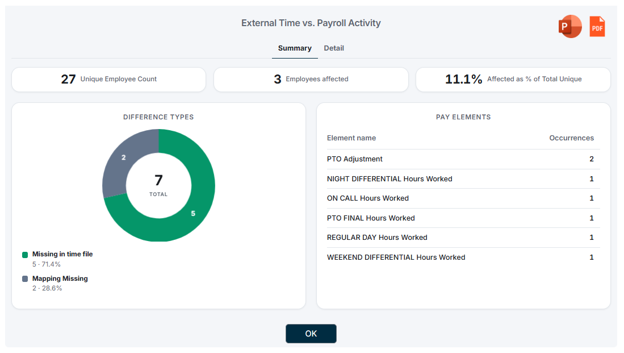
One pay period, one view: matched hours, mismatches, and missing transactions flagged automatically.
Three Kinds of Exceptions to Look For
A time-to-payroll reconciliation comes down to three exception types:
- Hours mismatch. Hours exist in both the time system and Payroll, but the amounts differ.
- Missing in Payroll. Hours exist in the source time system with no corresponding payroll result.
- Missing in Time. Hours were paid in Payroll with no matching record in the source time data.
Not every difference is an error. A manual adjustment, a retroactive transaction, or another authorized payroll action may explain the variance. The point of the reconciliation is to surface every difference so the payroll team can decide which ones are fine and which ones need action.
Start From Source Time, Not Loaded Time
If the goal is to verify that employees were paid according to what they reported, the comparison has to begin with the actual source time data and end with the final payroll result.
Comparing only the data already loaded into Oracle misses anything that changed after the load. In the earlier example — 10 hours reported, 8 hours paid — a load-based comparison would show a clean match, because both sides reflect the edited value. Only a comparison against the source file reveals the two missing hours.
Retro pay complicates this further. Current-period payroll results can include hours that belong to prior periods, so a naive period-to-period comparison will either double-count those hours or flag them as false exceptions. A workable reconciliation needs mappings between time-system pay codes and Oracle Payroll elements, along with clear rules for how retro entries are treated.
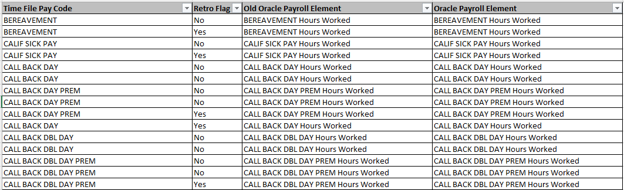
Configurable mapping aligns any time system’s pay codes with Oracle Payroll elements, including retro treatment.
Less Time Building, More Time Explaining
Payroll teams can absolutely do this comparison in Excel. Plenty do — exporting reports, matching rows, writing lookup formulas. The trouble is that the work grows with every additional employee, pay code, payroll element, retro transaction, and payroll cycle, and the team ends up spending most of its effort constructing the reconciliation before the actual review can even start.
That gap is what Camptra Tech’s Time-to-Pay comparison, part of the Payroll Recon Toolset, was built to close. It compares source time — from OTL or any third-party time system — against Oracle Payroll Activity results, applies the pay-code-to-element mappings, handles retro and mid-period changes, and reports mismatched and missing transactions at the employee level.
“Since we use a third-party time entry system and often face issues with late entries and corrections, this simple report has been a lifesaver.”
— Juby Nand, Payroll Manager, SRI International
Her team cut its manual review effort by 80%. Automation doesn’t replace the payroll professional’s judgment — the exceptions still need a person to decide which are valid. It just moves the team’s time from finding differences to explaining them.
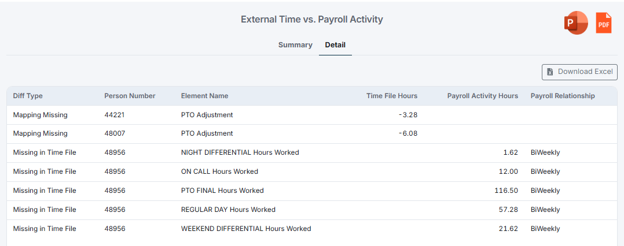
Drill from summary totals to the individual employee
A Control Worth Running Every Cycle
For one employee, checking reported time against paid hours takes a minute. Across hundreds or thousands of employees every pay period, it becomes a serious control activity — one that many organizations only attempt after something has already gone wrong.
Oracle Cloud Payroll handles the processing. A reconciliation layer on top gives the payroll team a fast, repeatable way to spot exceptions and validate the final result before employees see their pay. There will always be differences; what matters is that every meaningful one is identified, explained, and resolved before it becomes a payroll problem.
The Payroll Recon ToolSet is available on Oracle Cloud Marketplace. To see a sample Time-to-Pay exception report or request early access, contact the Camptra Tech team at [email protected].
