
What happens when a Friday pay date falls on New Year’s Day, and how to set up the early payment without affecting the benefit deductions
The Calendar Problem
Friday is the most common pay day in the US for both weekly and biweekly payrolls. In 2027, that convention runs into a snag. Jan 1, 2027 is a Friday, and the Federal Reserve observes New Year’s Day, so the ACH network doesn’t settle on that day. An employer with a January 1st pay date on their payroll calendar is therefore unable to make direct deposits on time.
Employers have two options. They can pay on the next banking day (Monday, January 4th) or on the previous banking day (Thursday, 31st December 2026). Most will opt for the earlier date. Paying late is something employees will not be happy about, and in many jurisdictions it would be a potential pay-frequency compliance issue best not to get into. Paying early creates no such issue.
Paying one day early has no impact on how any amount is calculated. What it does is change the year in which the payment is recognized. That affects pre-tax benefit deductions and a few year-end balances, and requires a bit of deliberate configuration in Oracle Cloud HCM.
Why One Day Changes the Tax Year
Federal employment tax is based on the date the wages are paid rather than the period in which they were earned. The Social Security regulations define payment as either actual payment or constructive payment. Constructive payment occurs when wages are credited to or set aside for the employee so they can be drawn on at any time. IRS Publication 15 applies the same principle to income tax withholding, Social Security and Medicare wages, and Form W-2 reporting. The deposit schedule rules are explicitly based on the dates on which wages are paid, not on the dates on which liabilities arise.
A payment dated 31st December 2026 is therefore 2026 income for every employee who receives it. It appears on the 2026 W-2, it’s included in the 2026 Social Security wage base, and the withholding is calculated on the 2026 tables and rates. The pay period itself is still a 2027 period, so you’ve got a situation that requires some attention, as the deductions were designed for one year and the payment comes due in the next.
The Effect on an Annualized Deduction Schedule
Consider a biweekly payroll which pays on alternate Fridays commencing on 2nd January 2026. The 26 pay dates in 2026 are therefore from 2nd January to 18th December, and the first pay date in 2027 is 1st January. If you move that date to 31st December, you end up with a 27th pay date in 2026. A weekly Friday payroll goes from 52 to 53 in the same way.
The vast majority of pre-tax benefit deductions are based on the assumed number of pay periods in the plan year. The employee’s annual share of a medical, dental, or vision premium is prorated across those pay periods, as is an annual election to the health or dependent care FSA. The full 2026 amount for each of these has already been collected by December 18th 2026. A 27th deduction at the same per-period amount would constitute overcollection of the premium, and for those who elected the maximum, would push their annual contribution over the IRS limit. The health FSA limit for 2026 is $3,400 (under Revenue Procedure 2025-32) and the dependent care FSA limit is $7,500 (following the 2025 change).
Health savings accounts raise the same issue in an even more acute form. HSA contributions are capped by the calendar year in which they are made, not by the plan year. An employee whose payroll contributions had already reached the 2026 limit of $4,400 for self-only or $8,750 for family would be in breach with a deduction on a December 31 paycheck, and any excess would have to be corrected or would become taxable wages.
The call on which deductions to take off the December 31 payroll is with the benefits team, finance, and, in some instances, the carriers and plan administrators. The configuration outlined below will support whatever decision is ultimately made. In reality, most organizations will opt not to take the annualized benefit deductions off this payroll and will start the 2027 schedule on the 15th of January. That’s irrespective of whether the deduction amounts are calculated in Oracle Benefits or are coming in from an external benefits system. The objective in either case is the same: to ensure those elements don’t go through in this payroll.
Retirement Deferrals Continue as Usual
Retirement deferrals (401(k)s and 403(b)s) are frequently discussed alongside benefit deductions, yet they are not included in the exclusion. They are not annualized across pay periods; they are a percentage or a fixed amount of each pay, subject to the annual limit under IRC section 402(g) for the calendar year in which the deferral is made. The December 31st payment is a 2026 payment, so the deferrals from that payment are 2026 deferrals and subject to the 2026 limits. Employees who have already hit their limit will have no further deferral taken (as they would on any other late December pay), and employees who have not will make one further 2026 deferral. Nothing special is required.
The same is true of the Social Security tax. Employees whose 2026 wages exceed the $184,500 wage base will have no Social Security tax deducted from that payment; Medicare tax will still be applied.
A Note on 2027
As Dec 31, 2027 is also a Friday, a biweekly payroll with a January 1, 2027 anchor would otherwise have 27 pay dates in 2027. Moving the Jan 1 payment into 2026 brings 2027 back down to 26. The extra pay date doesn’t just go away; it gets absorbed into 2026 where the annual deduction schedules are already complete. For salaried staff, that means 27 regular payments in 2026 and 26 in 2027. That’s a sentence that should be included in the finance year-end cash planning and in the employee communications.
Configuring the Early Payment in Oracle Cloud HCM
The approach has three components: update the payroll calendar for the impacted period so that its dates and period names reflect 31st December 2026, create an element group that excludes the deductions you don’t want to be taken, and submit the payroll with that element group selected.
Update the payroll calendar
In Oracle Cloud Payroll, the Process Date, the Payroll Run Date, and the Date Paid are effectively a single date for a period. The Process Date is the one that appears on most payroll screens, and the statutory balances, the year-to-date figures, and the tax year of the payment all follow it. Date Earned is typically set to the end of the pay period and remains so. Only the dates that govern when the payment is made and when it is recognized need to move, and they are changed in one place: the payroll calendar.
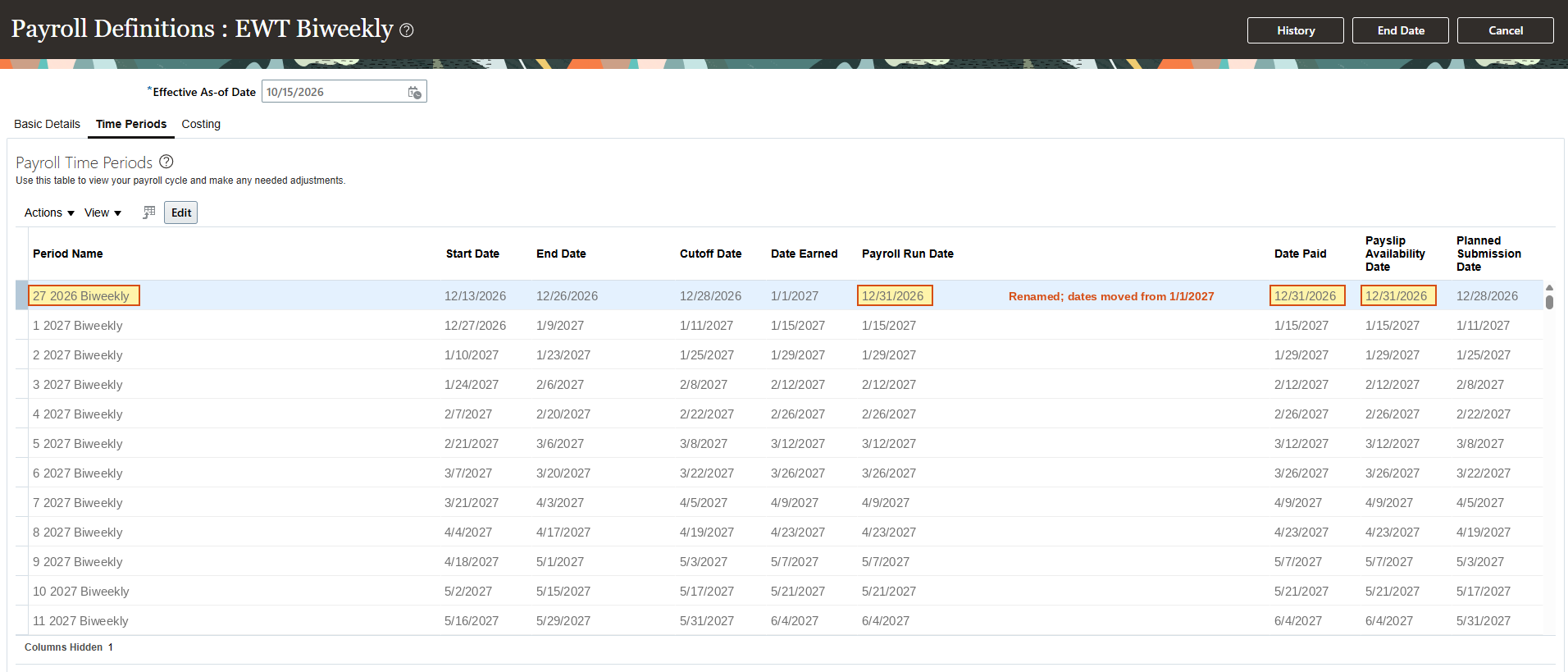
Go to Payroll Definitions, select the relevant payroll, and on the Time Periods tab find the period with a Date Paid of 1st January 2027. Change both its Payroll Run Date and Date Paid to 31st December 2026, and check the Cutoff Date, Planned Submission Date, and Payslip Availability Date for the same period to ensure the internal dates align with the new pay date. Oracle’s documentation refers to this exact type of manual adjustment when a bank holiday falls on a payment date.
Rename the period at the same time. Once the payment is moved to 31st December 2026, the period is no longer the first period of 2027; it is the twenty-seventh period of 2026, and its name should reflect that. Change it from 1 2027 Biweekly to 27 2026 Biweekly, then renumber every remaining 2027 period down by one: 2 2027 Biweekly becomes 1 2027 Biweekly, 3 becomes 2, and so on through the end of the year, so that 2027 finishes with 26 numbered periods. Period names appear on payslips, in payroll reports, and in the period-based balances that payroll and finance reconcile against, and a 2027 that begins with period 2 will raise questions every time someone looks at it.
Making the change on the calendar means the new dates and names are already in place when the payroll flow is submitted. No one has to remember to enter anything at run time, and every downstream process reads the same period.
Build the element group
An element group defines which elements a payroll run will process.
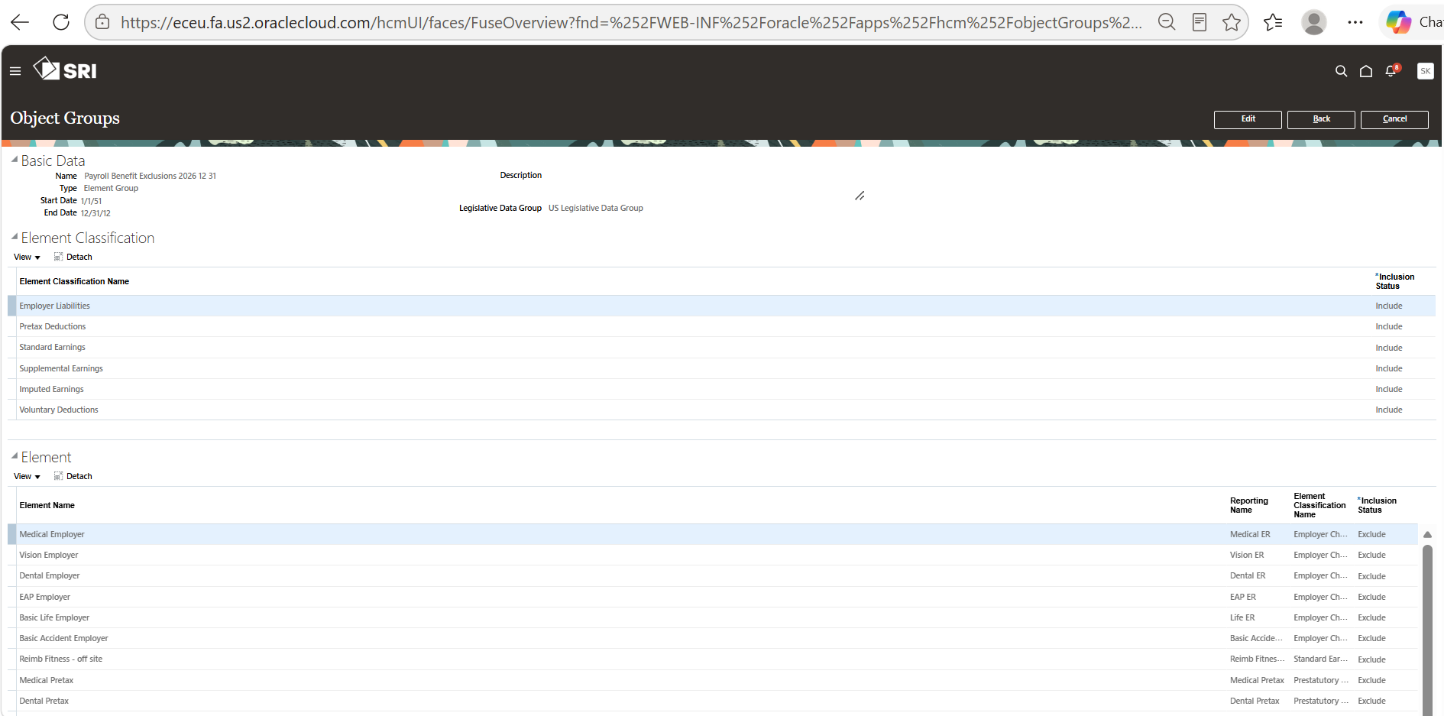
Go to My Client Groups > Payroll > Object Groups, create a new object group for your legislative data group with Type = Element Group and Usage Type parameter = Run Group. Add in the element classifications that you normally process in your payroll. For any elements you wish to exclude from your payroll run, set their Inclusion Status to Exclude. Oracle points out that an element can be excluded only if its classification has been included in the group, so you will first need to include the classification, then exclude the individual elements within it.
The exclusion list must cover the employee medical, dental, vision, FSA, and HSA deduction elements, as well as the matching employer contribution elements for those plans, so that the run doesn’t record an employer amount for a deduction that has been deliberately excluded. Give the group a clear name (e.g. Payroll Benefit Exclusions 2026 12 31) so that it doesn’t get selected by accident in a future period.
Submit the payroll
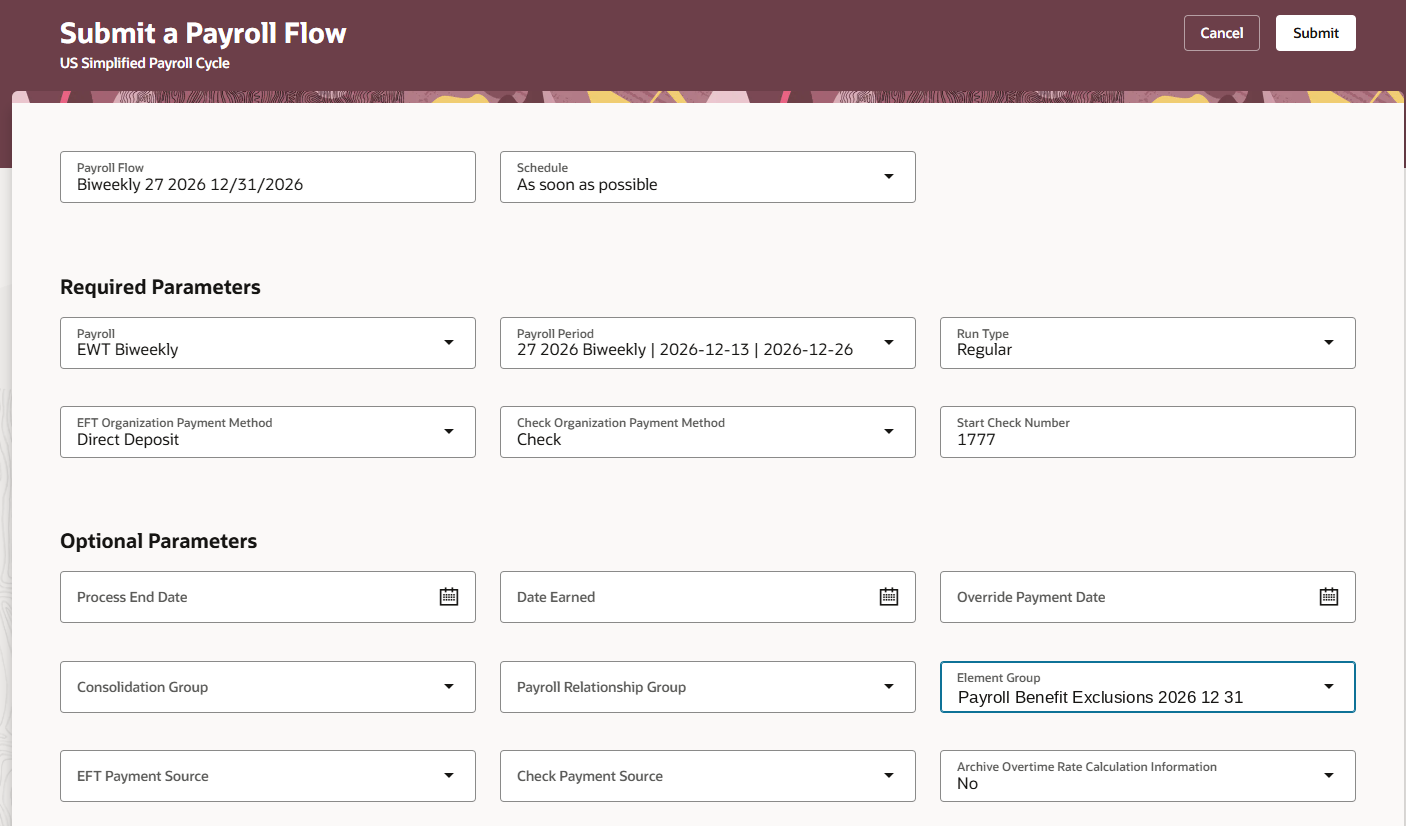
Just submit the Calculate Payroll flow for the period as normal. Confirm the period and process date are 31st December 2026, select the new group in the Element Group parameter, and carry through prepayments, the payment file, costing, and payslips.
Before you release the payments, you must check that the results have the 2026 dates, that the 2026 year-to-date balances have been updated, that the excluded deductions are not there and nothing else has been dropped, that the employees at their retirement or Social Security limits have been dealt with correctly, and that the payment file has a December 31, 2026 settlement date. The ACH file should be sent at least two banking days in advance, and with the holiday at the end of the week, it makes sense to send it earlier than normal.
Rehearsing the Payroll Before Year-End
One Camptra customer (a not-for-profit with operations in over 20 states) decided not to wait until December to see how this payroll would work. They applied the revised process date and the new element group in a non-production environment, ran the full December 31st payroll, and then compared each employee’s results against the prior period’s run using the Multi-Use module in the Camptra Payroll Recon Toolset.
With the full population rather than a sample, the differences that were expected were all there immediately: the skipped medical, dental, vision, FSA and HSA deductions on both the employee and employer side, the very small number of employees who had hit a retirement or Social Security cap, and 2026 dates on every result. Anything outside that expected set would have been flagged. The team went into year-end knowing precisely what the December 31 payroll would produce, and there was nothing left to find out on payday.
Preparing Now
- Identify every payroll definition with a Date Paid of 1st January 2027.
- Agree with Benefits and Finance on which deductions are made and which are not, and document the decision.
- Tell the carriers, the FSA and HSA administrators, and the retirement plan recordkeeper that the first payment for the 2027 period will be dated in 2026.
- Build the element group and apply the 31st December process date in a non-production environment.
- Run the December 31 payroll over there and compare each employee’s results against the prior period.
- Tell employees early: their pay arrives on December 31, it is reported as 2026 income, retirement deferrals continue, and some benefit deductions will not appear on that check.
Closing
January 1, 2027 does not change any payroll calculations, but it moves a full payment into a different tax year. Organizations that decide on their deductions early, configure the exclusion once, rehearse the run, and communicate clearly will handle it as a routine year-end payroll rather than a scramble.
References:
IRS Publication 15, Employer’s Tax Guide (2026);
20 CFR § 404.1042, Wages when paid and received;
Internal Revenue Code § 402(g);
Revenue Procedure 2025-32 (2026 health FSA limit);
Federal Reserve Financial Services holiday schedule;
Oracle Cloud HCM documentation on payroll definitions, time periods, and element object groups.
