

An audit-ready Oracle Cloud payroll environment requires eight controls working in concert: role separation and segregation of duties (SoD), master-data controls, a standardized change-management evidence pack, pre-payroll reconciliations, calculation and version controls, GL and cost-allocation validation, ongoing monitoring with KPIs, and automation tooling. Miss any one of these, and you are not managing payroll risk — you are hoping nothing surfaces during an audit. The single most effective risk mitigator is the combination of a complete evidence pack and enforced SoD: together, they eliminate the two most common audit findings before an auditor ever opens a request. Your immediate next step is to run a spot check on evidence packs for your last three payroll-impacting changes and confirm that a suspense account is defined at the payroll level in Oracle Cloud HCM.
Key stat: Camptra Technologies customers have reported reconciliation time reductions of up to 80% after replacing spreadsheet-heavy reviews with automated reconciliation workflows.
Table of Contents
- Who owns what in enterprise payroll controls?
- How do master data controls protect your GL and costing?
- What must your change-management evidence pack contain?
- Pre-payroll reconciliation: what to check and when
- How do you control payroll calculations and prevent override drift?
- Post-payroll: reconciling to the GL and validating cost allocations
- What KPIs and monitoring practices keep you audit-ready?
- How do you operationalize these controls at scale?
- Key Takeaways
- What enterprise payroll teams get wrong about controls
- Camptra Technologies: built for enterprise Oracle Cloud payroll teams
- FAQ
Who owns what in enterprise payroll controls?
Effective payroll governance is cross-functional. Payroll, HRIS, Finance, and Audit each carry distinct responsibilities, and no single team can own the full control set without creating the SoD gaps auditors flag most often.
RACI summary by function:
- Payroll: Requests changes, executes payroll runs, owns pre-payroll reconciliation sign-off, and retains run-level evidence.
- HRIS: Manages employee master data, element eligibility, and assignment attributes; approves data changes before payroll cutoff.
- Finance: Reviews GL postings, validates cost-allocation results, and signs off on period close.
- Audit/Compliance: Reviews evidence packs, certifies access quarterly, and escalates SoD violations.
Three SoD rules are non-negotiable in Oracle Cloud Payroll. First, the person who configures payroll elements must not be the same person who authorizes the payroll run. Second, the individual who releases the payment file must not be the one who reviewed the payroll calculation evidence. Third, system administration access must not carry transaction authorization rights. Enforce these through scheduled access reviews, privileged-role certification cycles, and a locked emergency-change path that requires post-facto approval within 24 hours.
Pro Tip: Document the approver role, not a person’s name, in every change evidence record. When that person leaves or changes roles, your evidence chain stays intact and auditors do not have to reconstruct who had authority.
For deeper guidance on cross-functional payroll collaboration, the Camptra blog covers HRIS and Finance alignment in detail.
How do master data controls protect your GL and costing?
Master data is where payroll errors originate and where auditors look first. Every employee record, pay element, and costing assignment carries downstream GL risk if it is wrong at the source.

| Master Data Item | Required Verification Artifact |
|---|---|
| Employee identifier (person number, assignment) | HR system confirmation + payroll eligibility check |
| Bank account | Dual-authorization approval record + pre-note confirmation |
| Tax status (W-4 / state withholding) | Employee-submitted form + effective-date stamp |
| Element eligibility | Element entry audit log + first-impacted-payroll snapshot |
| Costing assignment (Cost Allocation Key Flexfield) | Segment value confirmation + suspense-account test result |
| Assignment attributes (department, job, position) | HRIS change record + payroll costing hierarchy validation |
Oracle Cloud HCM uses the Cost Allocation Key Flexfield to build GL account numbers sequentially from segment values mapped to your legislative data group. The costing hierarchy runs from element eligibility (highest priority) through department, job, position, person, and payroll (lowest priority). Define override rules explicitly at each level, and always set a suspense account at the payroll level to catch invalid combinations before they cause run errors.
Configuration note: If a required segment has no suspense account defined and receives an invalid combination, the payroll run errors out entirely. With a suspense account in place, the invalid cost routes to suspense for reconciliation rather than halting the run.
Your audit log must capture who changed which segment, the effective date of the change, and a snapshot of the first payroll run affected.
What must your change-management evidence pack contain?
Payroll change management is not a project. It is an operating cycle: assess, design, build, deploy, sustain. Each phase produces artifacts that belong in a standardized evidence pack, linked to a master change log by a unique change ID.
Every payroll-impacting change requires these seven items:
- Source instruction — the formal request (employee form, HR directive, or regulatory notice) that initiated the change.
- Approval record — documented sign-off from the designated approver role, not an informal email.
- Effective date — the date the change takes effect in the system, confirmed against the payroll calendar.
- Execution evidence — a screenshot, system log, or export confirming the change was applied as approved.
- First-run validation note — a comparison of the first payroll run after the change against the expected result, signed by the reviewer.
- Correction or override record — if a correction was required, the corrected value, reason, and secondary approval.
- Master change log ID — the unique identifier linking this pack to the central log so auditors can retrieve the full trail without reconstruction.
Classify changes as material (pay rate, bank account, tax status, element eligibility, costing segment) or non-material (address update, contact information). Material changes require all seven artifacts. Non-material changes require items 1, 2, 3, and 4 at minimum.
For emergency changes, lock the change window, apply the fix, and attach a mandatory post-facto approval within 24 hours. Log the emergency path in the master change log with a distinct status flag so it surfaces in the next access review.
Pre-payroll reconciliation: what to check and when
Pre-payroll reconciliation is your last defensible checkpoint before payroll releases. Run it in sequence, not in parallel, so a blocker in step 2 does not mask a separate issue in step 5.
| Data Source | Owner | Typical SLA Before Cutoff |
|---|---|---|
| Time and attendance feed | Payroll Operations | T-3 business days |
| Benefits deduction feed | Benefits/HRIS | T-3 business days |
| Tax table updates | Payroll Tax | T-5 business days |
| Costing data (Key Flexfield changes) | Finance/HRIS | T-2 business days |
| Element eligibility changes | HRIS | T-2 business days |
Ordered pre-payroll checklist:
- Headcount delta check — compare active employee count in the payroll run to the HRIS headcount report. Investigate any discrepancy before proceeding.
- Gross Pay reasonableness — compare current-period Gross Pay to prior period. Flag variances above your defined threshold (a common benchmark is 5%) for investigation.
- Tax and deduction alignment — confirm federal withholding, FICA, and state/local deductions match the current tax tables and employee W-4 elections.
- Costing validation for high-risk elements — verify that elements with department or position-level overrides are resolving to the correct GL segments, not suspense.
- First-impacted-payroll checkpoint — for any material change deployed this cycle, confirm the expected result matches the payroll run output before archive.
Classify exceptions as blocker (must resolve before cutover) or informational (document and route to owner for next cycle). Route blockers to the responsible owner with a defined resolution SLA. Do not release payroll with an open blocker.
For a deeper look at how Oracle’s native tools and automated reconciliation work together, the Oracle Payroll Activity Center guide covers complementary approaches.
How do you control payroll calculations and prevent override drift?
Configuration drift is one of the quietest sources of payroll error in Oracle Cloud environments. A tax table loaded without a timestamp, an element formula updated without a version ID, or a manual override applied without secondary approval can compound across multiple pay periods before anyone notices.
- Freeze configuration before each cycle — record the element version ID, formula version, and tax table effective date in the run evidence. Require pre-run signoff from the Payroll Manager before any configuration change applies to a live run.
- Override policy — define which overrides are permitted (balance adjustments, retro-pay corrections), require dual approval for each, and mandate a post-payroll reconciliation note comparing the override result to the expected value.
- Parallel/test run — for material configuration changes, run a shadow payroll against the prior period baseline. Document the variance analysis and attach it to the change evidence pack before deploying to production.
- Tax table source validation — import statutory rates only from primary sources (IRS, state revenue agencies), timestamp the import, and retain the source document as an audit artifact.
Pro Tip: Never apply a balance adjustment in production without first running it in a test environment and capturing the before-and-after balance report. Auditors treat unexplained balance adjustments as a red flag, and a documented test run eliminates the question before it is asked.
Post-payroll: reconciling to the GL and validating cost allocations
Post-payroll reconciliation closes the loop between what payroll calculated and what Finance recorded. It also surfaces any costing misallocations before they compound into the next period.
Timing benchmark: Most enterprise Oracle Cloud teams target GL posting reconciliation within one business day of payroll archive, with cost-allocation validation completed before the period-close journal entry deadline.
Reconciliation sequence:
- Tie payroll run totals (Gross Pay, Net Pay, deductions) to the payment file total and the GL posting summary. Any gap between the payroll register and the GL entry requires a documented explanation before close sign-off.
- Validate costing hierarchy behavior by reviewing the costing results report: confirm that overrides at the element or department level resolved correctly and that no unexpected suspense-account hits occurred.
- Check that clearing accounts and offset accounts are balanced to zero after the GL transfer. An unbalanced clearing account is a blocker for period close.
- When corrections are required, reference the original change ID from the master change log in the correction record. This preserves the audit trail without requiring forensic reconstruction.
For a technical walkthrough of Oracle Cloud costing reconciliation, Camptra’s implementation blog covers the costing-to-GL tie-out in detail.
What KPIs and monitoring practices keep you audit-ready?
Audit readiness is not a point-in-time event. It is the output of consistent monitoring between payroll cycles.
Core KPIs to track:
- Pre-payroll exception rate — number of exceptions surfaced per run, trended over time. A rising rate signals process drift.
- First-run variance — percentage difference between current and prior period Gross Pay, tracked against your defined threshold.
- Time-to-close exceptions — average hours from exception identification to resolution sign-off.
- Evidence-pack completeness rate — percentage of material changes with all seven required artifacts present before the next payroll run.
- Access-review compliance — percentage of privileged roles certified on schedule (target: 100% quarterly).
Reporting cadence:
- Weekly: Exception digest distributed to Payroll and HRIS leads.
- Monthly: Close sign-off package reviewed by Finance and Payroll Management, including GL reconciliation and costing validation results.
- Quarterly: Access certification report reviewed by Audit/Compliance, with SoD violation findings escalated to leadership.
Retention policy:
- Active evidence packs: retain for the current fiscal year plus two prior years in an accessible repository.
- Archived evidence packs: retain per your organization’s records retention schedule, at minimum seven years for federal compliance purposes.
- Access logs and SoD certification records: retain for a minimum of three years or per your audit committee’s requirements.
How do you operationalize these controls at scale?
Manual checklists break down at enterprise scale. When you are processing tens of thousands of payroll records per cycle, the gap between a spreadsheet-based review and an automated reconciliation workflow is measured in hours of exposure time, not minutes.
Automation requirements for an enterprise-grade payroll control system include: data normalization across feeds (time and attendance, benefits, costing, tax, GL), ID-based reconciliation that ties every exception to a specific employee or element, exception routing with owner assignment and SLA tracking, evidence-pack linking that attaches reconciliation outputs to the master change log, and run-versus-run diffing that surfaces new variances without manual comparison.
Camptra’s Payroll Recon Toolset addresses each of these requirements directly. The tool connects payroll, benefits, costing, and GL feeds within Oracle Cloud HCM, reconciles millions of records before payroll release, and surfaces exceptions with enough context for the responsible owner to act without chasing raw data. A 105,000-employee healthcare network used the toolset to reduce reconciliation overhead and achieve its earliest financial close on record.
When evaluating any reconciliation tool for Oracle Cloud Payroll, verify: accuracy at scale (can it handle your record volume without sampling?), audit-evidence linkage (does it produce artifacts that satisfy an external auditor?), Oracle Cloud HCM compatibility (is it listed on the Oracle Marketplace?), and reconciliation throughput SLA (how long does a full run take?).
Pro Tip: Start your automation pilot with the pre-payroll headcount delta and Gross Pay reasonableness checks. These two reconciliations surface the highest-impact exceptions and are the easiest to validate against a manual baseline, giving you a clean proof point before expanding scope.
Camptra customers have reported reconciliation time reductions of up to 80%, which translate directly into more time for exception resolution and less exposure between payroll archive and cutoff.
Key Takeaways
An audit-ready Oracle Cloud payroll environment requires enforced SoD, a complete evidence pack for every material change, and automated reconciliation that surfaces exceptions before payroll release.
| Point | Details |
|---|---|
| SoD is the foundation | Separate configuration, transaction authorization, and payment release across distinct roles — no exceptions. |
| Evidence packs prevent reconstruction | Every material change needs all seven artifacts linked to the master change log before the next payroll run. |
| Suspense accounts are mandatory | Define a suspense account at the payroll level in Oracle Cloud HCM to prevent run errors from invalid cost combinations. |
| KPIs signal drift early | Track pre-payroll exception rate, first-run variance, and evidence-pack completeness rate every cycle. |
| Camptra Technologies accelerates close | Camptra’s Payroll Recon Toolset automates pre-payroll reconciliation across payroll, benefits, costing, and GL feeds, with customers reporting up to 80% reductions in reconciliation time. |
What enterprise payroll teams get wrong about controls
The most common failure pattern is not a missing control. It is a control that exists on paper but has no owner, no artifact, and no enforcement cadence. Teams build a checklist, run it once during an audit prep sprint, and then let it drift until the next audit cycle. That is not a control program. It is a documentation exercise.
What actually works is treating the evidence pack as a living operating artifact, not a retrospective reconstruction. The teams that pass audits cleanly are the ones that close each payroll cycle with a complete evidence pack already assembled, not the ones that spend two weeks before an audit pulling records from email threads and shared drives.
The other underestimated risk is conflating project management with payroll governance. A system implementation project has a go-live date and a close-out report. Payroll governance has no end date. The assess-design-build-deploy-sustain cycle repeats with every material change, every statutory update, and every organizational restructuring. Teams that treat it as a project eventually find themselves with a governance gap that compounds quietly until it surfaces as an audit finding or a payroll error that affects employee pay.
Start with evidence packs for material changes only. Get those right, get the master change log current, and then expand. Trying to govern everything at once is how teams end up governing nothing well.
Camptra Technologies: built for enterprise Oracle Cloud payroll teams
If your team is spending more time preparing reconciliation data than resolving exceptions, the checklist above describes the problem. Camptra’s Payroll Recon Toolset is built to close that gap for large Oracle Cloud payroll environments.
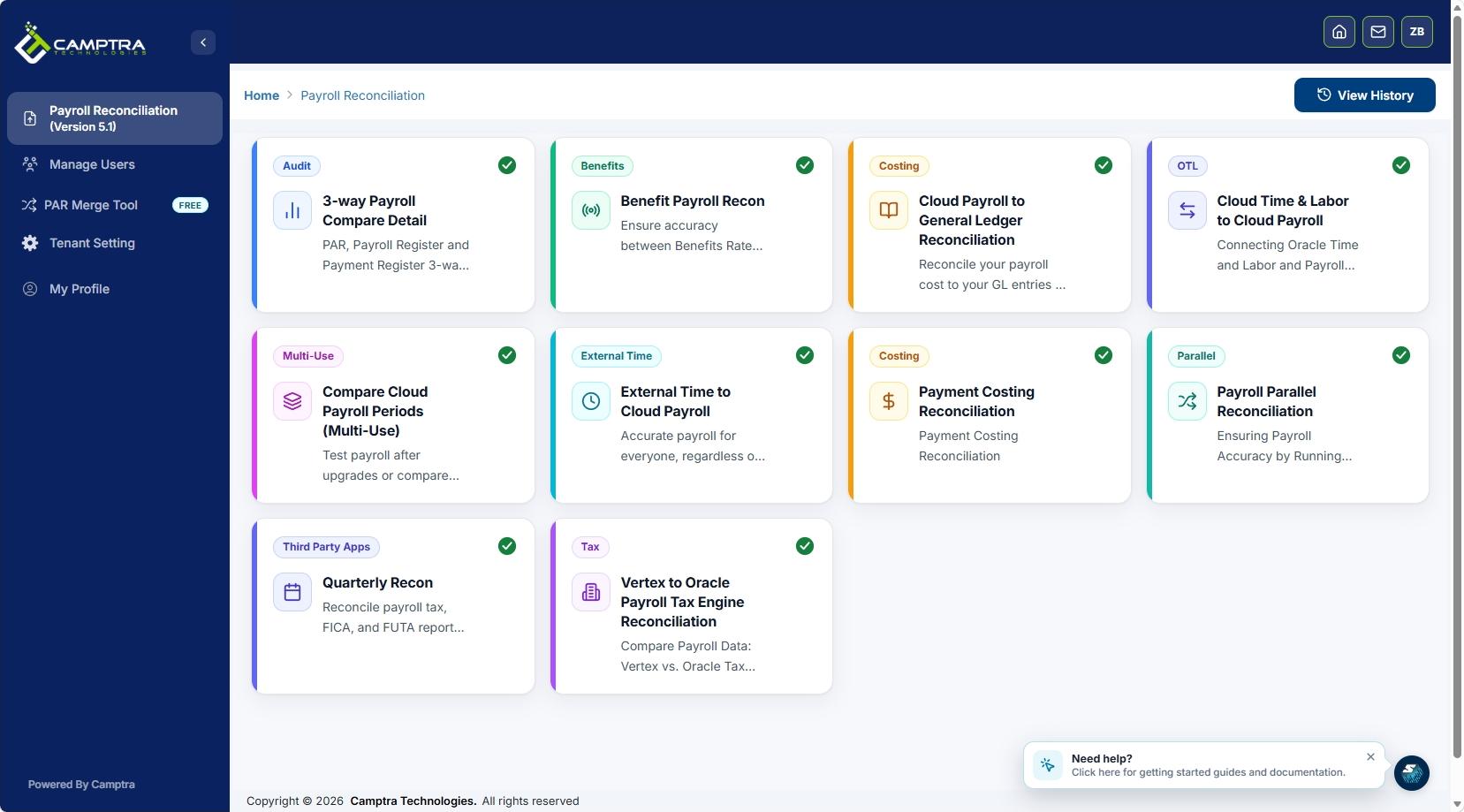
The toolset connects time and attendance, payroll, benefits, costing, tax, and GL feeds, reconciles millions of records before payroll release, and links exceptions directly to the evidence pack and master change log. Finance teams get a cleaner GL tie-out. Audit teams get artifacts they can retrieve without reconstruction. Payroll teams get their time back.
Camptra’s enterprise reconciliation case studies include a 105,000-employee healthcare network that achieved its earliest financial close on record and a nonprofit that cut reconciliation overhead significantly after automating pre-payroll checks. Both implementations ran on Oracle Cloud HCM.
Request sandbox access to see how the toolset performs against your payroll volume, or review the Oracle Marketplace listing to confirm compatibility with your current HCM configuration.
Authoritative sources and further reading
The controls and configuration guidance in this article draw from the following primary sources. Use them to drill into implementation details and evidence-pack templates.
- Payroll Change Audit Trail Checklist — HR Decision Guide: evidence-pack structure and retention requirements.
- Payroll Change Control Playbook — HR Decision Guide: four-part toolkit including change request form, approval matrix, and master change log.
- Payroll setup for costing accounts — Oracle Cloud HCM documentation: Cost Allocation Key Flexfield and suspense account configuration.
- Overview of loading payroll costing — Oracle Cloud HCM documentation: HCM Data Loader, priority accounts, and override hierarchy.
- Payroll Cost Allocation Key Flexfield Setup — Oracle Cloud HCM documentation: segment design, value sets, and related value sets.
- Camptra case studies — enterprise-scale reconciliation implementations including healthcare and migration scenarios.
- Vertex-to-OPTE migration case study — detailed example of reconciliation controls during a complex payroll migration.
Note: Oracle documentation covers the technical configuration of costing flexfields and suspense accounts. The HR Decision Guide playbooks cover evidence-pack templates and change-log structure. Camptra case studies provide proof points for automation scale and close acceleration.
FAQ
What are the eight essential enterprise payroll controls?
The eight controls are: role separation and SoD, master-data controls, a standardized change-management evidence pack, pre-payroll reconciliations, calculation and version controls, GL and cost-allocation validation, ongoing KPI monitoring, and automation tooling.
What must an evidence pack include for a payroll-impacting change?
A complete evidence pack contains seven items: the source instruction, approval record, effective date, execution evidence, first-run validation note, any correction or override record, and the master change log ID linking the pack to the central audit trail.
How does Oracle Cloud HCM handle invalid cost combinations?
If a required Cost Allocation Key Flexfield segment receives an invalid combination and a suspense account is defined at the payroll level, Oracle routes the cost to suspense rather than erroring the run. Without a suspense account, the run fails entirely.
How can Camptra Technologies help with pre-payroll reconciliation?
Camptra’s Payroll Recon Toolset connects payroll, benefits, costing, and GL feeds in Oracle Cloud HCM, reconciles records before payroll release, and surfaces exceptions with owner-level routing. Customers have reported reconciliation time reductions of up to 80%.
How long should payroll evidence packs be retained?
Active evidence packs should be accessible for the current fiscal year plus two prior years. Archived packs should be retained for a minimum of seven years for federal compliance, or longer per your audit committee’s requirements.
Recommended
- Blog | Camptra Technologies | Camptra Technologies
- Bridging the Gap Between Payroll and Finance: The Oracle Cloud Payroll Costing Reconciliation Tool | Camptra Technologies
- Oracle Payroll Activity Center and Multiuse Reconciliation: A Complementary Approach for Modern Payroll Teams | Camptra Technologies
