

If you run Oracle Cloud Payroll, reconciliation is not a single task you check off at month-end. It is a defined, sequenced workflow where skipping or misordering a step can lock records, corrupt balances, or leave discrepancies sitting in your General Ledger until an auditor finds them first.
The core payroll reconciliation steps Oracle teams must follow in 2026 are:
- Run the Payroll Data Validation Report before processing to catch missing or noncompliant statutory data
- Submit payroll payments and transfer payment information to Oracle Cash Management
- Load bank statement files into Cash Management for the reconciliation period
- Apply automated matching rules with date, amount, and tolerance configurations to reconcile payments against bank records
- Review reconciliation statuses, investigate exceptions, and resolve discrepancies allocated to the General Ledger differences account
- Submit Calculate Costing of Payments to update accounting entries for reconciled payments
- Verify employee payroll balances using the Employee Active Payroll Balance report at period, quarter, and year-end close
- Follow interlock and sequence rules strictly before attempting any rollback to avoid integrity failures
Each step depends on the one before it. Oracle’s interlock rules exist precisely because a prepayments process that has already run will lock the underlying payroll calculation, and no amount of manual effort will undo that without a structured rollback sequence.
Payroll reconciliation steps Oracle teams should follow in sequence
Getting the order right is everything. Oracle Cloud Payroll enforces strict process sequencing, and understanding why each step sits where it does will save your team hours of corrective work.

Step 1: Run the Payroll Data Validation Report
Before you calculate a single payment, run the Payroll Data Validation Report to surface missing or noncompliant statutory data at the worker and organization level. This report is part of the US Simplified Payroll Cycle Flow and pauses the flow automatically when it finds issues, giving you a clean window to correct data before downstream processes lock results. You can also run it manually after any mass HCM Data Loader upload.
Step 2: Submit payroll payments and transfer to Cash Management
Once payroll calculations are confirmed, submit tasks to generate payments for employees and third-party payees, such as Generate Check Payments or EFT files. Then submit the Transfer Payments Information to Cash Management task. Oracle documentation recommends submitting this process after sending payment files to the banks, so Cash Management has a complete picture of what was issued.
Step 3: Load the bank statement file
Load the bank statement that covers the payroll period you want to reconcile. Oracle’s reconciliation process matches these bank statement lines against the payment transactions transferred in Step 2. Payment types eligible for reconciliation include checks, EFT, and external payments.

Step 4: Run automated payment matching
With the bank statement loaded, Oracle Cash Management applies your configured Bank Statement Reconciliation Matching Rules and Tolerance Rules. Tolerance rules are set by date, amount, or percentage. When a discrepancy falls within the allowable tolerance, the payment is marked reconciled and the difference posts to the reconciliation differences account in General Ledger. When it exceeds tolerance, the system warns or blocks reconciliation, requiring manual review.
Step 5: Review statuses and resolve exceptions
Monitor reconciliation status across your payment portfolio. Payments show as Cleared when reconciled or not requiring reconciliation, and Not Cleared when awaiting reconciliation or when the process failed. Discrepancies beyond tolerance require the payroll manager and cash manager to collaborate on resolution. Timely review of the Payment Register and Payroll Register reports helps catch timing differences, manual entry errors, and unprocessed payment statuses before they compound.
Step 6: Submit Calculate Costing of Payments for reconciled payments
After payments clear, submit Calculate Costing of Payments again. This second submission debits the cash clearing account and credits the cash account, completing the accounting cycle. The first submission, run earlier for new payments, debited payroll liability accounts and credited cash clearing. Running it post-reconciliation closes the loop between payroll and your General Ledger.
Step 7: Verify employee payroll balances
Run the Employee Active Payroll Balance report to reconcile employee-level balances at pay period, quarter-end, and year-end. You can filter by Tax Reporting Unit or Payroll Relationship Group to target specific employee populations. Variances surfaced here may indicate underpayments, overpayments, or balance adjustments that need correction before statutory reporting.
Pro Tip: Run the Balance Exception Report immediately after each payroll run or QuickPay calculation. Catching anomalies at this stage, before prepayments are processed, keeps your options open. Once prepayments run, the payroll calculation locks and rollback becomes a multi-step operation.
Understanding interlock and sequence rules before any rollback
Oracle’s payroll process validation rules enforce two distinct controls. Sequence rules lock all prior payroll results once a later-dated run is submitted, preventing out-of-order corrections. Interlock rules lock a process once a subsequent process has consumed its results, so a completed prepayments run locks the payroll calculation beneath it. Rollbacks must proceed from the latest process back to the earliest. If ten employees already received immediate payments, their records are locked and will not roll back with the remaining population. The application generates messages identifying those locked records, which you can view in the Summary UI Results Listing or the Checklist.
Best practices and tools to improve Oracle payroll reconciliation accuracy
Accurate reconciliation at scale requires more than following the steps. It requires a repeatable framework, the right reports running at the right time, and enough automation to keep human review focused on exceptions rather than data preparation.
Build a structured reconciliation checklist
A payroll reconciliation checklist aligned to Oracle Cloud Payroll’s process flow prevents teams from skipping validation steps under deadline pressure. The checklist should map each task to its required predecessor, the responsible role (payroll manager vs. cash manager), and the report that confirms completion.
Use Oracle’s activity centers and multiuse reconciliation modules
Oracle’s Payroll Activity Center consolidates payroll process status and exception data in one view, reducing the need to navigate across multiple screens. The Multiuse Reconciliation module supports cross-period and cross-payroll reconciliation scenarios, particularly useful for organizations running multiple payrolls or processing retroactive changes. Pairing these native tools with structured reporting gives teams a real-time picture of where reconciliation stands.
Run the right reports at the right time
Three reports do the heaviest lifting in a well-run Oracle payroll validation workflow:
- Payroll Data Validation Report: Run before payroll calculation to catch statutory gaps
- Balance Exception Report: Run after each payroll or QuickPay run to flag anomalies before prepayments lock results
- Employee Active Payroll Balance Report: Run at period, quarter, and year-end to verify Gross Pay, Net Pay, and balance adjustments at the employee level
The Periodic Payroll Activity Report and Payment Register serve as cross-checks for total payment amounts by category, type, status, and method.
Align payroll, HR, and finance teams on data ownership
Misalignments between payments and bank statement reconciliations often trace back to timing differences or unprocessed payment statuses that cross team boundaries. Payroll owns the payment generation; cash management owns the bank statement load; finance owns the General Ledger posting. When these teams operate in silos, exceptions sit unresolved. A shared escalation path and defined SLAs for exception resolution close that gap.
Automate to reduce manual exposure
Oracle’s AI-driven anomaly detection continuously audits payroll data in real time, supporting more than 16 million employees processed globally each month. Exception-based automation applies complex rules with speed and accuracy, reducing the need to monitor every step of the payroll cycle manually. For teams managing high-volume US payrolls, this means human review concentrates on the exceptions that genuinely require judgment.
Camptra Technologies clients using the Payroll Recon Toolset have reported reconciliation time reductions of up to 80%, replacing spreadsheet-heavy reviews with automated aggregation across payroll, HRIS, costing, tax, and General Ledger data. The result is standardized workflows, faster exception identification, and audit-ready reporting that does not require last-minute assembly.
Camptra Technologies cuts Oracle reconciliation time by up to 80%
For Oracle payroll teams that have outgrown spreadsheet-based reconciliation, Camptra Technologies offers a faster path to accuracy and audit confidence.
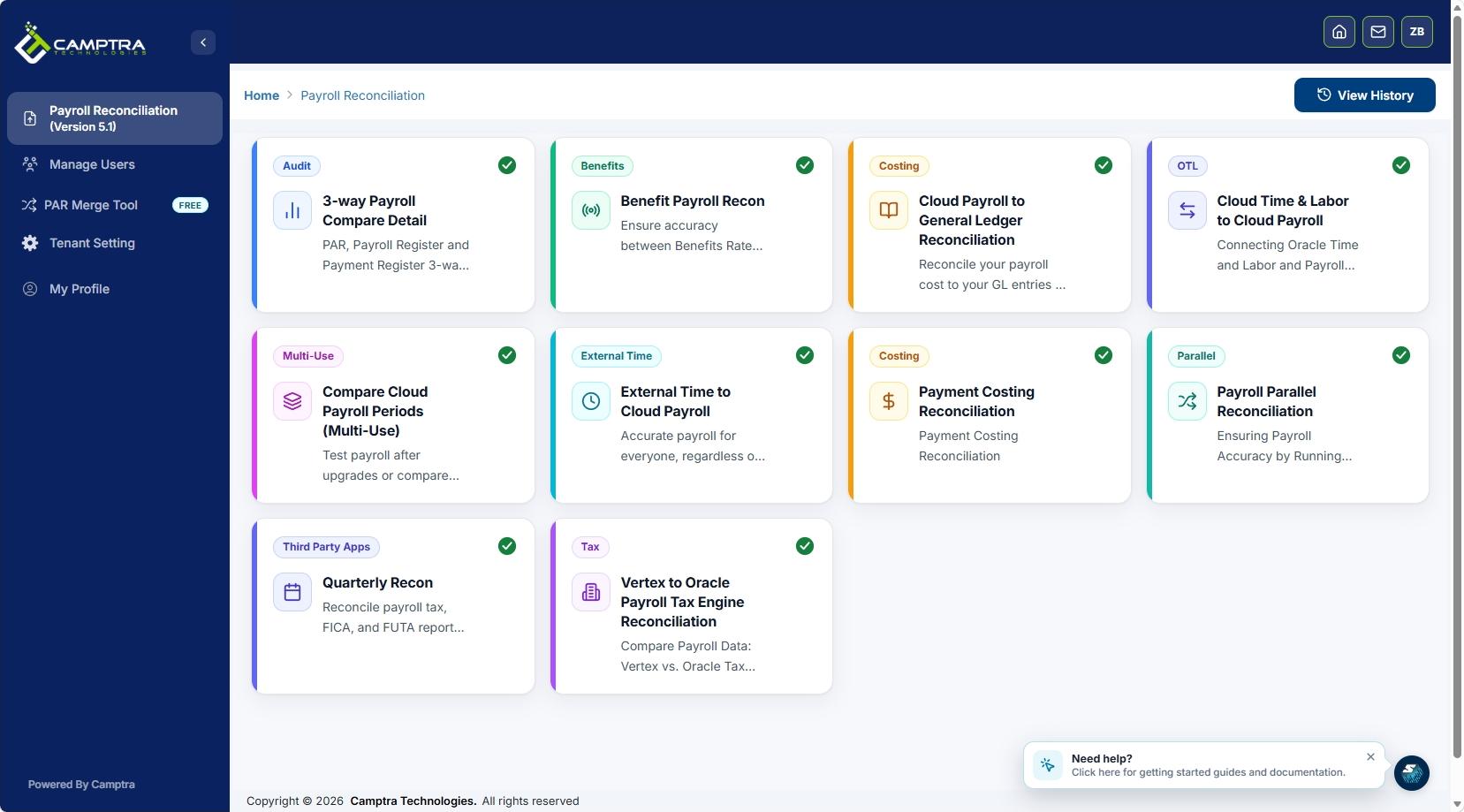
The Camptra Payroll Recon Toolset connects and analyzes payroll-impacting data across time and attendance, payroll, benefits, costing, tax, and General Ledger processes within Oracle Cloud environments. Instead of manually pulling and cross-referencing reports, your team reconciles millions of records in minutes and surfaces variances automatically. Payroll, HRIS, finance, and audit teams all work from the same standardized view, which means fewer handoffs and fewer surprises at period close. Customers have reported substantial reconciliation time reductions. You can request sandbox access to see the toolset’s capabilities against your own Oracle payroll data before committing.
Key Takeaways
Accurate Oracle payroll reconciliation requires running validation reports before processing, following strict process sequencing, and resolving exceptions before they reach the General Ledger or an auditor.
| Point | Details |
|---|---|
| Validate before you calculate | Run the Payroll Data Validation Report before every payroll run to catch statutory gaps early. |
| Sequence controls everything | Oracle’s interlock and sequence rules lock prior results once later processes run; rollbacks must go latest-to-earliest. |
| Three reports drive reconciliation | The Balance Exception, Employee Active Payroll Balance, and Payment Register reports cover the full verification cycle. |
| Discrepancies post to General Ledger | Amounts within tolerance are marked reconciled; amounts beyond tolerance require payroll and cash manager resolution. |
| Camptra Technologies automates at scale | The Payroll Recon Toolset reduces reconciliation cycle time by up to 80% for Oracle Cloud Payroll teams. |
FAQ
What is the payroll reconciliation process in Oracle Cloud?
Payroll reconciliation in Oracle Cloud is a sequenced workflow that matches payroll payment transactions against bank statement records in Cash Management, verifies employee balances using designated reports, and resolves discrepancies before posting final results to the General Ledger.
How do interlock rules affect payroll rollbacks in Oracle?
Interlock rules lock a payroll process once a subsequent process has used its results, so rolling back a prepayments run is required before you can roll back the underlying payroll calculation. Rollbacks must proceed from the latest process to the earliest to maintain data integrity.
Which Oracle reports are most critical for payroll reconciliation?
The Payroll Data Validation Report, Balance Exception Report, and Employee Active Payroll Balance Report are the three reports Oracle documentation identifies as central to pre-processing validation, anomaly detection, and period-end balance reconciliation respectively.
How can Oracle payroll teams reduce manual reconciliation effort?
Oracle’s built-in AI-driven anomaly detection reduces manual monitoring by flagging exceptions automatically. Teams managing high-volume payrolls can further reduce manual effort with tools like Camptra Technologies’s Payroll Recon Toolset, which automates data aggregation across Oracle payroll, HRIS, and finance systems and has delivered reconciliation time reductions of up to 80% for customers.
What happens when a bank statement discrepancy exceeds the tolerance threshold?
When a discrepancy exceeds the configured tolerance, Oracle Cash Management warns or blocks reconciliation and requires the payroll manager and cash manager to investigate and resolve the difference before the payment can be marked reconciled.
