

For Oracle Cloud Payroll teams, payroll clearing account reconciliation means automated matching and exception identification across payroll, time and attendance, benefits, tax, costing, and the general ledger — not the bookkeeping exercise of clearing a temporary bank account. The recommended approach: implement an automated, exception-first validation layer that checks upstream feeds before calculation, runs Oracle’s standard balance and exception reports at each stage, and routes discrepancies to the right owner before payment runs finalize.
The business case is direct:
- Faster financial close: automated matching compresses reconciliation from hours to minutes, giving finance teams earlier GL visibility
- Audit-ready outputs: immutable exception logs and standardized workflows replace spreadsheet trails that auditors routinely reject
- Fewer retro adjustments: catching gross-to-net variances, deduction mismatches, and costing errors before payment prevents costly after-the-fact corrections
Customers using automated reconciliation tools have reported time reductions of up to 80% compared to manual processes.
Table of Contents
- Why manual reconciliation breaks at enterprise scale
- What data sources does a complete payroll validation cover?
- What Oracle Cloud Payroll reports should you run and when?
- How do you design an automated reconciliation workflow?
- What KPIs prove your reconciliation process is working?
- Phased implementation checklist for large enterprises
- Common pitfalls and how to avoid them
- Key Takeaways
- The case for treating reconciliation as continuous validation
- Camptra’s Payroll Recon Toolset for Oracle Cloud teams
- Useful sources and next steps
- FAQ
Why manual reconciliation breaks at enterprise scale
If you run Oracle Cloud Payroll across multiple states or business units, a spreadsheet-based reconciliation process is not just slow — it is structurally unreliable. The volume of records, the number of upstream systems, and the jurisdictional complexity of US multi-state payroll combine to create failure modes that spreadsheets cannot handle.
Version control fatigue is the most common hidden risk. When three analysts are reconciling the same pay period in separate workbooks, there is no single source of truth. A formula error in one file, a stale export in another, and a missing row in a third can each produce a different variance number — and none of them will have an audit trail that shows how the figure was derived.
The downstream consequences are real. A late time-and-attendance feed for a multi-state payroll run can produce a GL mismatch that only surfaces during month-end posting. By then, the payroll has been paid, the tax withholdings have been remitted, and correcting the error requires amended filings and retro journal entries. Payroll reconciliation that spans HR, time and attendance, benefits, taxes, and the GL is the only way to catch these variances before they become finalized errors.
Pro Tip: Set a hard cut-off rule: no payroll run proceeds to pre-payment if the time-and-attendance feed has not been confirmed received and normalized. This single governance control eliminates the most common source of invisible variances.
What data sources does a complete payroll validation cover?
A defensible payroll clearing account validation must reconcile every system that touches a paycheck. Missing even one creates a gap that auditors will find.
Required data sources:
- Time and attendance: hours worked, overtime, shift differentials, and absence codes matched to payroll earning types
- Payroll run outputs: Gross Pay, Net Pay, earning and deduction registers from Oracle Cloud Payroll
- Benefits feeds: pre-tax deductions (401k, HSA, FSA, commuter benefits) matched to benefit carrier elections
- Tax withholdings and remittances: federal, state, and local withholdings matched to tax liability accounts and remittance records
- Costing and chargebacks: cost allocation entries matched to GL account segments and department codes
- GL and bank clearing transactions: payroll journal entries matched to bank clearing account postings and cleared payments
- Archived payroll register: post-archive balance snapshots used as the reconciliation baseline
Sample field-mapping reference:
| Source System | Key Field | Maps To | Validation Check |
|---|---|---|---|
| Time and attendance | Employee ID, hours | Payroll earning type | Hours × rate = Gross Pay |
| Payroll register | Gross Pay, Net Pay | GL payroll expense account | Register total = GL debit |
| Benefits feed | Deduction code, amount | Pre-tax liability account | Election amount = deduction taken |
| Tax engine | Withholding amount | Tax liability GL account | Withheld = remitted |
| Costing module | Cost segment, amount | GL cost center | Costing total = payroll expense |
| Bank clearing | Payment amount | Net Pay register | Cleared amount = Net Pay issued |

Cut-off timing matters as much as the mapping itself. Oracle Cloud Payroll archives payroll data at a specific point in the cycle; any upstream feed that arrives after archive eligibility has closed will not be reflected in the archived register. Document your cut-off windows explicitly and enforce them with system-level controls, not email reminders.
Pro Tip: Reconciling pre-tax deductions — including 401k, HSA, FSA, and commuter benefits — requires matching Oracle Cloud deduction codes to benefit carrier files period by period. Mismatches here are among the most common sources of employee complaints and IRS correction filings.
What Oracle Cloud Payroll reports should you run and when?
Oracle Cloud Payroll provides a set of standard reports that map directly to reconciliation stages. Running them in sequence, at the right point in the payroll cycle, is the foundation of a controlled process.
| Stage | Oracle Report | When to Run | Purpose |
|---|---|---|---|
| Pre-calculation validation | Payroll Data Validation Report | Before payroll calculation | Identifies missing or noncompliant worker and org data |
| Post-calculation balance check | Balance Exception Report | After payroll run or QuickPay | Flags values that vary for the same balance dimension |
| Periodic balance reconciliation | Periodic Payroll Activity Report | After archive, before GL posting | Reconciles relationship-level balances across PSUs and TRUs |
| Prepayment verification | Prepayment Results Report | Before payment processing | Confirms Net Pay calculations and payment method accuracy |
| Post-payment GL match | Payroll Costing Results Report | After GL transfer | Matches costing entries to GL account postings |
The Balance Exception Report deserves particular attention: Oracle recommends running it after every payroll run and at minimum quarterly for year-end balancing. Any exception it surfaces should be resolved before the payroll moves to prepayment. Automated checks should hook into this sequence at the pre-approval gate, immediately after the payroll run, and again during the GL transfer.
How do you design an automated reconciliation workflow?
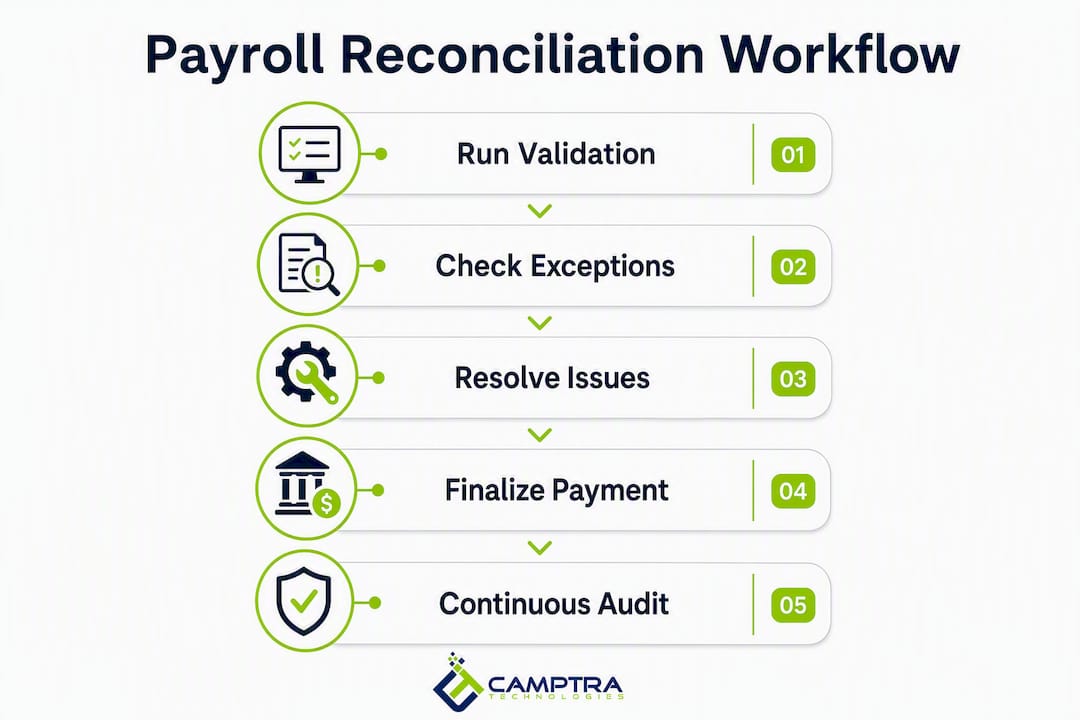
An effective automated workflow catches upstream data issues before payment and surfaces only exceptions for human review. The goal is to eliminate the preparation work entirely so your team spends its time resolving discrepancies, not finding them.
- Data ingest and normalization: Pull feeds from all source systems (time and attendance, benefits, tax, costing) into a normalized data model with consistent employee IDs, pay period keys, and earning/deduction codes.
- Auto-matching rules: Apply deterministic matching logic — Gross Pay register total to GL debit, deduction codes to benefit elections, tax withheld to tax remitted. Set tolerance thresholds (for example, a gross-to-net variance under $0.01 per employee auto-clears; anything above routes to exception).
- Exception classification: Tag each exception by type (timing difference, mapping error, missing feed, balance adjustment) and severity (informational, warning, critical).
- Owner routing: Assign exceptions to the correct function automatically. A missing time feed goes to the HRIS team; a GL account mismatch goes to finance; a deduction code error goes to benefits administration.
- Remediation and revalidation: Each owner resolves their exception within a defined SLA, and the system re-runs the affected matching rule to confirm resolution.
- Audit log: Every match, exception, routing action, and resolution is written to an immutable log with timestamp, user, and before/after values.
Pro Tip: Set SLAs by exception severity before go-live: critical exceptions (those that would block payment) resolved within 4 hours; warnings resolved within 24 hours. Without defined SLAs, exceptions age and payroll cutoff pressure forces teams to override rather than resolve.
Connected HRIS-to-GL integration removes the lag that creates variance between systems and applies consistent matching logic every period, which is what makes the process defensible at audit.
What KPIs prove your reconciliation process is working?
Finance and audit teams need measurable controls, not just a process description. These five KPIs give you a defensible picture of reconciliation health.
| KPI | Definition | Calculation | Target Threshold | Owner |
|---|---|---|---|---|
| Time-to-reconcile | Elapsed time from payroll run to cleared reconciliation | End timestamp minus start timestamp | Under 2 hours for standard runs | Payroll Manager |
| Exception rate | Percentage of records flagged as exceptions | Exceptions ÷ total records processed | Under 1% per pay period | Payroll Analyst |
| Mean time to remediate | Average time to resolve a flagged exception | Sum of resolution times ÷ exception count | Under 24 hours | Function owner |
| GL variance rate | Percentage of GL lines with unresolved variances | Unresolved GL variances ÷ total GL lines | 0% at period close | Finance Controller |
| Audit findings avoided | Count of issues caught pre-payment vs. post-payment | Tracked per pay period | Trend toward zero post-payment findings | Internal Audit |
Dashboard outputs should include a real-time exception queue, period-over-period exception trend, SLA compliance by function, and a read-only audit log exportable for external review. The audit log is non-negotiable: auditors need to see not just the final reconciled balance but every step that produced it.
Phased implementation checklist for large enterprises
The recommended approach for a large Oracle Cloud Payroll environment is a four-phase rollout that limits risk and builds confidence before full deployment.
- Phase 1: Scoping and mapping (Weeks 1–3). Document all upstream data sources, cut-off windows, and GL account mappings. Identify the Oracle reports currently in use and any gaps. Deliverable: a data model and integration map signed off by payroll, HRIS, finance, and IT.
- Phase 2: Pilot on one business unit (Weeks 4–7). Run automated reconciliation in parallel with your existing manual process for one payroll group. Compare outputs, tune matching thresholds, and validate exception routing. Deliverable: a reconciliation accuracy baseline and a tuned rule set.
- Phase 3: Parallel validation across all business units (Weeks 8–12). Extend the automated process to all payroll groups while keeping the manual process as a shadow check. Resolve any mapping drift or feed timing issues surfaced at scale. Deliverable: confirmed parity between automated and manual outputs.
- Phase 4: Full cutover and optimization (Weeks 13–16). Retire the manual process. Establish SLA governance, assign exception owners, and schedule recurring KPI reviews. Deliverable: a live reconciliation dashboard and an audit-ready process documentation package.
Technical prework required before Phase 1: API or file-based connectors to all upstream systems, a normalized employee identity key across systems, and Oracle Cloud Payroll report scheduling configured for each stage in the cycle.
Common pitfalls and how to avoid them
| Pitfall | Mitigation | Recurrence Control |
|---|---|---|
| Late upstream feeds | Enforce hard cut-off times with system alerts, not email reminders | Automated feed receipt confirmation before payroll run |
| Mapping drift | Version-control all field mappings; review after every system upgrade | Quarterly mapping audit against Oracle release notes |
| Insufficient audit logs | Require immutable, timestamped logs for every match and exception action | Audit log completeness check as a pre-close gate |
| Over-tolerant matching rules | Set tolerance thresholds based on actual variance history, not assumptions | Monthly threshold review against exception trends |
| No owner SLAs | Define SLAs by exception type before go-live | SLA breach alerts routed to function manager |
The most expensive reconciliation failures are not the ones you catch late — they are the ones you never catch at all because your matching rules were set too loosely. A 2% gross-pay tolerance on a 10,000-employee payroll can mask six-figure errors that only surface during a year-end audit or an IRS inquiry.
Pre-pilot readiness checklist: all upstream feed connections tested and confirmed; employee identity keys normalized across systems; Oracle report schedule configured; exception routing roles assigned; SLAs documented and approved; audit log storage confirmed.
Key Takeaways
Automated, exception-first payroll clearing account reconciliation for Oracle Cloud Payroll reduces reconciliation time, strengthens audit readiness, and prevents costly retro adjustments by catching variances before payment runs finalize.
| Point | Details |
|---|---|
| Run Oracle reports in sequence | Payroll Data Validation, Balance Exception, and Periodic Payroll Activity reports each serve a distinct stage — skip one and you have a gap. |
| Enforce upstream feed cut-offs | Most reconciliation failures originate in late time and attendance or benefits feeds, not the payroll engine itself. |
| Set SLAs before go-live | Critical exceptions should resolve within 4 hours; warnings within 24 hours — without SLAs, exceptions age and get overridden. |
| Measure five core KPIs | Time-to-reconcile, exception rate, mean time to remediate, GL variance rate, and audit findings avoided give a defensible picture of process health. |
| Camptra Technologies | Camptra’s Payroll Recon Toolset automates matching across all source systems, with customers reporting reconciliation time reductions of up to 80%. |
The case for treating reconciliation as continuous validation
Most enterprise payroll teams still treat reconciliation as a period-end activity — something you do after the run, before the GL posts, under time pressure. That framing is the root cause of most of the failures described in this article.
The teams I see operating with the most confidence treat reconciliation as continuous validation across the integration chain. They are not waiting for the payroll run to discover that a benefits feed arrived three days late or that a new cost center was added without a GL mapping. They know before the run because their validation layer is watching the integration chain in real time.
What changes when you make that shift is not just speed. It is the nature of the work. Your payroll analysts stop spending their time preparing data and start spending it resolving exceptions. Your finance team gets earlier, cleaner GL entries. Your audit team gets an immutable log that answers every question before they ask it. The reconciliation process stops being a source of anxiety before payroll cutoff and becomes a control you can point to with confidence.
The 80% time reduction that customers report is real, but the more durable benefit is what your team does with the time they get back.
Camptra’s Payroll Recon Toolset for Oracle Cloud teams
Enterprise payroll teams running Oracle Cloud Payroll at scale need more than a checklist. They need a tool that connects every upstream system, applies consistent matching logic across millions of records, and surfaces only the exceptions that require human judgment.
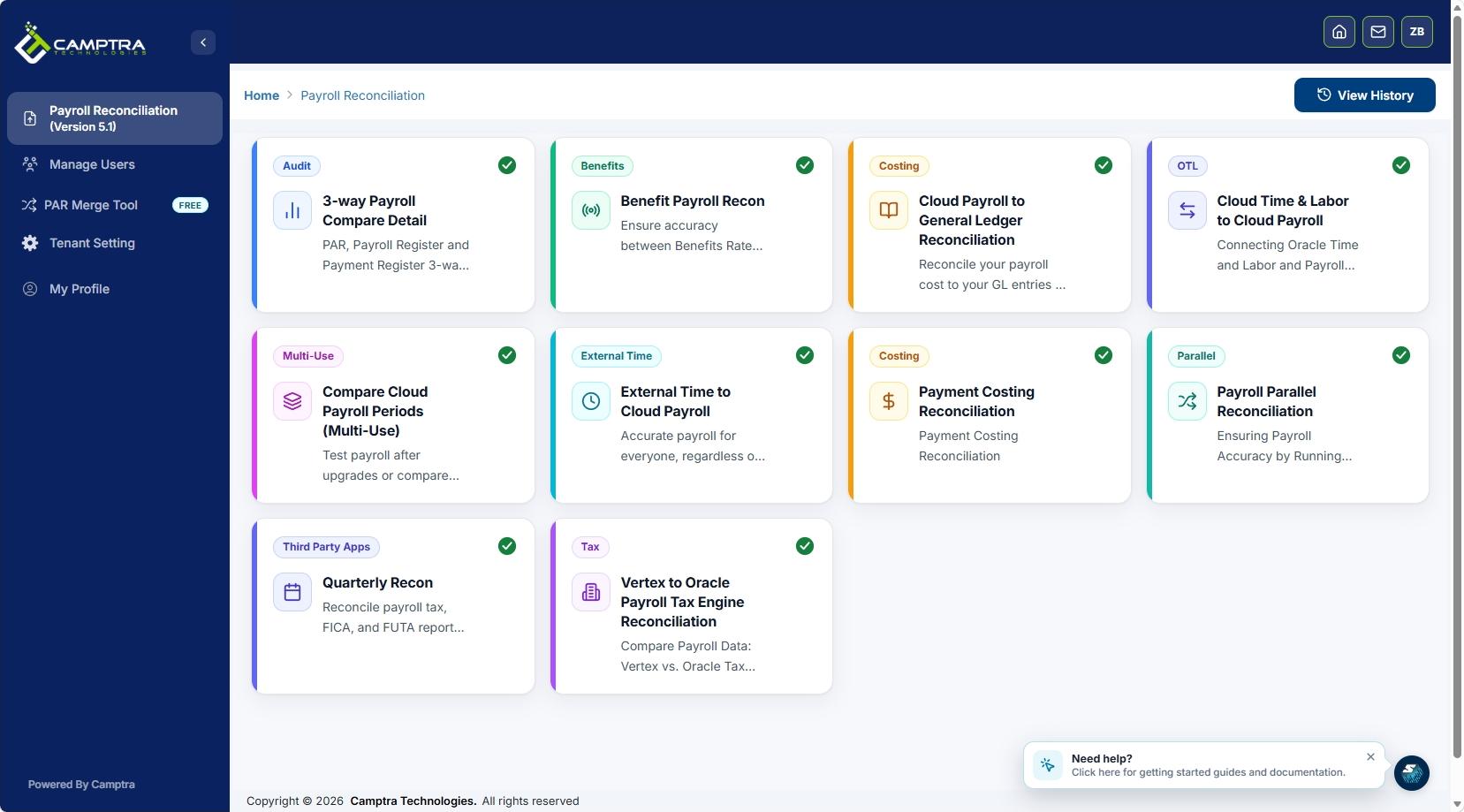
Camptra’s Payroll Recon Toolset automates reconciliation across time and attendance, payroll, benefits, tax, costing, and the GL — with native connectors to Oracle Cloud Payroll reports and optional ADP Workforce Now connectivity. Matching logic runs automatically each period. Exceptions are classified, routed to the right owner, and logged immutably for audit. For organizations running parallel validation during an Oracle upgrade or migration, the toolset supports side-by-side payroll comparison at full production scale. Customers have reported reconciliation time reductions of up to 80%, and the outputs are audit-ready from day one.
The next step is a scoped pilot on one business unit. Request a demo to see how the toolset maps to your Oracle environment and what your reconciliation baseline looks like before you commit to a full rollout.
Useful sources and next steps
- Periodic Payroll Activity Report for the US — Oracle documentation for running and interpreting the primary balance reconciliation report
- Overview of Payroll Data Validation Report — Oracle guidance on pre-calculation data validation and corrective action
- Summary of Data Validation and Audit Reports — Oracle’s full report catalog for payroll managers, including the Balance Exception Report
- What is Payroll Reconciliation? — ADP’s overview of reconciliation scope across HR, time, benefits, taxes, and GL
- Payroll Reconciliation Steps for Oracle Teams — step-by-step Oracle-specific reconciliation guidance from Camptra Technologies
- Oracle Cloud Payroll Costing Reconciliation — detailed guidance on GL mapping and costing controls in Oracle Cloud
Immediate next steps: enable the Payroll Data Validation Report and Balance Exception Report on your current Oracle Cloud Payroll schedule if they are not already running; scope a pilot business unit using the Phase 1 checklist above; and request a demo to see automated exception routing in your environment.
FAQ
What is payroll clearing account reconciliation in Oracle Cloud?
In an Oracle Cloud Payroll context, payroll clearing account reconciliation means validating payroll data across all source systems — time and attendance, benefits, tax, costing, and the GL — to confirm that every record matches before and after payment. It is not limited to the GL clearing account; it covers the full integration chain.
Which Oracle reports are required for payroll reconciliation?
The three core reports are the Payroll Data Validation Report (run before calculation), the Balance Exception Report (run after each payroll run), and the Periodic Payroll Activity Report (run after archive to reconcile relationship-level balances).
Why does manual reconciliation fail at enterprise scale?
Version control fatigue, hidden formula errors, and the absence of an immutable audit trail make spreadsheet-based reconciliation unreliable for large, multi-state payrolls. A single late upstream feed can produce a GL mismatch that only surfaces at audit.
How much time can automated reconciliation save?
Customers using Camptra’s Payroll Recon Toolset have reported reconciliation time reductions of up to 80% compared to manual processes.
What KPIs should finance leaders track for reconciliation health?
The five most important KPIs are time-to-reconcile, exception rate, mean time to remediate, GL variance rate, and audit findings avoided — each with a defined owner and target threshold reviewed at least monthly.
