

For Oracle Cloud Payroll teams managing high-volume, month-end reconciliation, the right tool is a purpose-built costing-validation platform that natively understands the Payroll Cost Allocation key flexfield (KFF) and maps run results directly to your General Ledger. The top pick to evaluate first is Camptra’s Payroll Recon Toolset.
Here is why it earns that position:
- KFF-to-GL mapping validation: Automatically validates Payroll Cost Allocation KFF combinations against your GL structure and cross-validation rules, catching mismatches before they post.
- Suspense/default-account detection: Flags entries routed to suspense or default accounts and traces root causes to the element, run result, or payment source.
- High-volume performance: Reconciles millions of records in minutes, not hours, with incremental and parallel processing.
- Audit-ready outputs: Standardized reconciliation worksheets and immutable exception logs that auditors can rely on without additional formatting.
Customers have reported reconciliation time reductions of up to 80% after deploying Camptra’s Payroll Recon Toolset in Oracle Cloud Payroll environments.
Table of Contents
- What do payroll costing reconciliation tools actually solve?
- Must-have features for enterprise payroll costing tools
- How do you evaluate vendors and budget for the right tool?
- When in your payroll cycle should you run costing validation?
- Pre-deployment checklist for Oracle Cloud Payroll mapping
- How Camptra’s Payroll Recon Toolset delivers on these requirements
- Key Takeaways
- The cost of waiting is higher than the cost of the tool
- Camptra Technologies: request your sandbox demo
- Useful sources and further reading
- FAQ
What do payroll costing reconciliation tools actually solve?
Payroll costing tracks salary, bonuses, paid leave, and employer-paid costs, using the Payroll Cost KFF as the basis for every accounting entry reported to the General Ledger. When that mapping breaks, run results land in suspense accounts, journals post with wrong accounting dates, and your close cycle stalls while staff chase phantom variances across spreadsheets.
Reconciliation and costing-validation tools in this category solve a specific problem: automated matching of payroll run results to time and attendance, benefits, costing, tax, and GL data, with exception identification before cutoff. They are not payroll processors, payroll service bureaus, or small-business payroll software. Their job is to validate what Oracle Cloud Payroll already calculated and confirm it maps correctly to your financial structure.
The operational payoff is real. When exceptions surface pre-cutoff, your team resolves them during the pay period rather than after journals have posted. That shortens audit cycles, accelerates month-end close, and frees highly paid staff from data preparation.
“Comparing Net Pay breakdowns by employee across periods and validating costing immediately after payroll calculation are foundational reconciliation practices for Oracle Cloud Payroll teams.” — Yum! Brands Oracle Cloud Payroll implementation
Pro Tip: Run a parallel validation in your nonproduction environment that mirrors your production KFF and Transfer-to-GL settings. This lets you verify mappings without risking live journals, and it doubles as a regression test before any Oracle Cloud upgrade.
Must-have features for enterprise payroll costing tools
Screening vendors quickly requires a concrete checklist. Every tool you evaluate should cover these eight capabilities:
- KFF-aware mapping: Automatic validation of Payroll Cost Allocation KFF combinations against GL structure and cross-validation rules, per Oracle’s KFF setup guidance.
- Suspense/default-account detection: Flagged entries with root-cause tracing to element, run result, or payment source.
- High-volume performance: Reconciliation with high performance designed to handle large payroll populations efficiently.
- Native Oracle connectors: Direct connectors for Oracle Cloud Payroll run results, balances, costing flows, time and attendance, benefits, tax feeds, and Subledger Accounting.
- Audit-ready outputs: Standardized reconciliation worksheets, journal exports to SLA/GL, and immutable exception logs.
- Flexible field mapping: Automated mapping with configurable rules or AI logic, plus a versioned testing framework for upgrades and migrations.
- Role-based access controls: Distinct user roles for payroll, finance, and audit teams, with enterprise-grade security and SLA-backed incident support.
- Subscription delivery model: Sandbox/demo access, professional services for initial mapping, and enterprise SLAs included in the contract.
Tools that check all eight give you a defensible audit trail and a repeatable close process. Missing even one, particularly suspense-account detection or KFF-aware mapping, means you are still doing the hardest part manually.
How do you evaluate vendors and budget for the right tool?
Start with three non-negotiable questions in every vendor conversation:
- Can your tool validate KFF-to-GL mapping automatically, including cross-validation rule failures?
- How do you detect and root-cause suspense or default-account flows at the element level?
- What native connectors exist for Oracle Cloud Payroll run results, balances, and Subledger Accounting?
Then request concrete proof: performance benchmarks against millions of records, sample audit-ready outputs, and customer case studies with measurable reconciliation-time reductions.
Require a sandbox loaded with your Oracle test data and an agreed set of reconciliation KPIs as acceptance criteria before signing any contract. A vendor who cannot demonstrate performance against your data in a POC is a vendor whose claims are unverified.
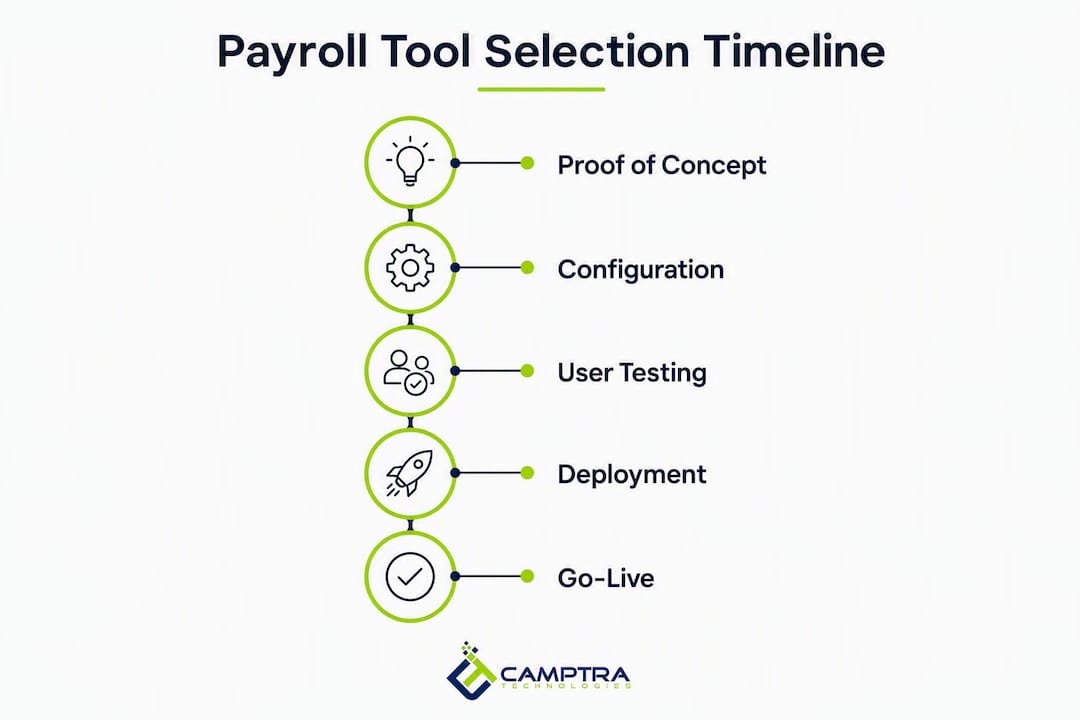
Evaluation timeline:
| Phase | Duration |
|---|---|
| Proof of concept | 2–4 weeks |
| Configuration and mapping | 4–8 weeks |
| UAT and parallel run | 2–4 weeks |
| Go-live support | 1–2 pay periods |

The main cost drivers are licensing model (per-tenant, per-seat, or usage-based), implementation services for initial mapping and custom reports, sandbox provisioning, and ongoing support and maintenance. Build all four into your budget from day one.
When in your payroll cycle should you run costing validation?
Validate costing immediately after the Calculate Payroll flow and again after Calculate Costing of Payments, but before you transfer journals to Subledger Accounting or GL.
Three checkpoints matter most:
- Pre-finalization: Run Net Pay breakdown comparisons by employee across periods to catch element-level anomalies before the pay period closes.
- Post-payment costing: Validate clearing versus reconciled payments and confirm Calculate Costing of Payments and Transfer to Subledger Accounting flows completed without suspense entries.
- Pre-transfer verification: Confirm journal accounting dates and encumbrance reconciliations before the final Transfer to GL.
Operational controls are strongest when costing validation runs both incrementally during pre-close and as a full validation immediately before journal transfer.
Pro Tip: Automate nightly incremental validation runs during the week leading up to cutoff. Schedule a final full validation 24–48 hours before Transfer to GL so your team has a clear window to resolve any remaining exceptions.
Pre-deployment checklist for Oracle Cloud Payroll mapping
Before switching on any reconciliation tool, complete these steps in order:
- Establish account parity: Mirror payroll accounts to your GL structure using the same natural account segments, and define reconciliation-differences accounts in General Ledger to capture bank-statement variances.
- Verify KFF setup: Confirm Payroll Cost Allocation KFF structure, value sets, and cross-validation rules against your GL account combinations.
- Configure payment-source accounts: Create liability, cash, and cash-clearing accounts per payment source and specify Transfer to General Ledger options for each.
- Provide a test data extract: Supply a sample of run results, payments, balances, and SLA journals to the vendor sandbox for mapping verification.
- Run a parallel costing cycle: Execute a parallel costing and reconciliation cycle in test and compare Net Pay breakdowns by employee against a production sample.
- Complete sign-off gates: Obtain mapping sign-off from payroll, then from finance/GL, then complete an audit readiness checklist before go-live.
Skipping account parity in step one is the single most common cause of post-go-live suspense entries. Fix the GL mirror before you configure any tool.
How Camptra’s Payroll Recon Toolset delivers on these requirements
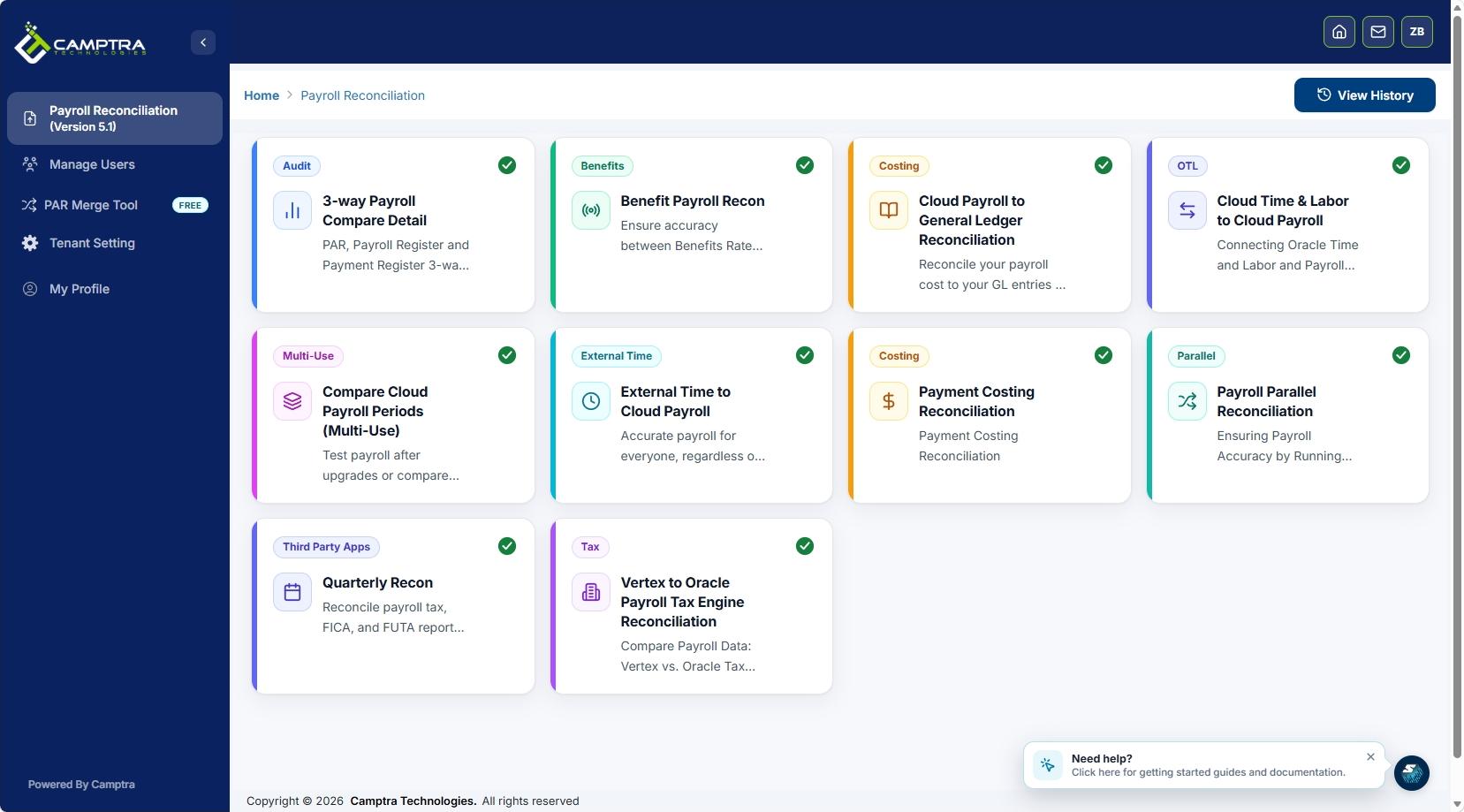
Camptra’s Payroll Recon Toolset automates KFF validation, maps payroll run results to the GL, and scales to millions of records, surfacing exceptions before cutoff rather than after journals post. The platform connects across time and attendance, payroll, benefits, costing, tax, and General Ledger data sources within Oracle Cloud Payroll environments, and supports ADP Workforce Now comparisons for organizations running parallel systems.
Customers have reported reconciliation time reductions of up to 80%, translating directly to faster month-end close and measurable reductions in manual remediation work. The tool’s standardized reconciliation workflows mean every pay period follows the same control structure, which auditors can verify without additional preparation.
Camptra’s Payroll Recon Toolset was built specifically for the Oracle Cloud Payroll environment, including support for parallel validation during upgrades and migrations, where mapping integrity is most at risk.
For teams managing a migration or an Oracle Cloud upgrade, the parallel validation capability is particularly valuable. It lets you run a shadow reconciliation against your production KFF and Transfer-to-GL settings, confirming that the new configuration produces identical costing results before you cut over. The Oracle Marketplace listing also provides a procurement pathway for organizations buying through Oracle channels.
Key Takeaways
For Oracle Cloud Payroll teams, the path from evaluation to go-live is faster when you validate KFF mapping in a POC, automate incremental pre-close validations, and require audit-ready outputs as a contract deliverable.
| Point | Details |
|---|---|
| KFF mapping is non-negotiable | Any tool must validate Payroll Cost Allocation KFF combinations against your GL structure automatically. |
| Validate before Transfer to GL | Run costing validation after Calculate Payroll and after Calculate Costing of Payments, before journal transfer. |
| Budget for four cost drivers | Licensing, implementation services, sandbox access, and ongoing support all belong in your initial budget. |
| Evaluation timeline: a period typically spanning several weeks for POC through go-live phases. | POC through go-live typically spans 2–4 weeks for POC, 4–8 weeks for configuration, 2–4 weeks for UAT, plus 1–2 pay periods of go-live support. |
| Camptra Technologies | Camptra’s Payroll Recon Toolset reconciles millions of records in minutes and customers report up to 80% reconciliation time reduction. |
The cost of waiting is higher than the cost of the tool
Most enterprise payroll teams underestimate one thing: invalid costing balances compound. A suspense entry that goes unresolved for one pay period becomes a reconciling item that auditors flag, finance investigates, and payroll re-explains every quarter. The longer it sits, the more it degrades confidence in your GL and the more time it consumes from people who should be doing higher-value work.
The argument for investing in a purpose-built reconciliation tool is not about convenience. It is about control. When you can validate KFF-to-GL mappings automatically, detect suspense entries at the element level, and produce audit-ready outputs before cutoff, you are not just saving time. You are building a payroll control environment that holds up under scrutiny.
The 80% reconciliation time reduction that Camptra customers report matters less as a headline and more as a signal: that is the difference between a team spending most of a pre-close week preparing data and a team spending that same week resolving the three exceptions that actually need attention. That shift, from data preparation to exception resolution, is what a well-implemented reconciliation tool actually delivers.
Camptra Technologies: request your sandbox demo
If you run Oracle Cloud Payroll at scale, the fastest way to validate whether a reconciliation tool fits your environment is to test it against your own data. Camptra Technologies offers sandbox access loaded with your Oracle test data so you can verify KFF-to-GL mappings, run a parallel costing validation, and confirm performance against your actual record volumes before any purchase decision.
The healthcare system case study shows what that looks like in practice: measurable audit time reduction and the organization’s earliest financial close on record. Request sandbox access today and set your own reconciliation KPIs as the acceptance criteria.
Useful sources and further reading
These primary sources support the Oracle Cloud Payroll costing concepts covered above and serve as the basis for POC acceptance criteria and test cases:
- Overview of payroll costing — Oracle Cloud HCM documentation defining the scope of payroll costing and the Payroll Cost KFF.
- Payroll setup tasks to transfer costs to General Ledger — Transfer-to-GL setup and accounting-date validation.
- Administering global payroll costing (PDF) — Full reference for costing flows, reversals, encumbrance reconciliation, and Subledger Accounting transfers.
- Payroll setup for costing accounts — Liability, cash, and cash-clearing account configuration per payment source.
- Payroll Costing Results Report — Oracle’s delivered report for verifying costing entries after a payroll run.
- Camptra Payroll Recon Toolset features — Module capabilities, connectors, and scaling details for enterprise Oracle Cloud Payroll environments.
- Camptra case studies — Customer outcomes including reconciliation time reduction and faster financial close.
FAQ
What makes a payroll costing tool “enterprise-grade” for Oracle Cloud?
An enterprise-grade tool validates Payroll Cost Allocation KFF combinations automatically, detects suspense entries at the element level, and reconciles millions of records in a single run. It must also produce audit-ready outputs and carry SLA-backed support.
How does KFF mapping affect payroll costing reconciliation?
The Payroll Cost Allocation KFF determines which GL accounts receive each payroll run result. Misconfigured KFF combinations route entries to suspense or default accounts, creating reconciling items that delay close and trigger audit findings.
What is a realistic timeline from vendor selection to go-live?
Most Oracle Cloud Payroll implementations follow a multi-week path: 2–4 weeks for POC, 4–8 weeks for configuration and mapping, 2–4 weeks for UAT and parallel run, and 1–2 pay periods of go-live support.
Can Camptra’s Payroll Recon Toolset handle parallel validation during an Oracle upgrade?
Yes. Camptra’s Payroll Recon Toolset supports parallel costing validation during upgrades and migrations, letting teams confirm that new KFF configurations produce identical costing results before cutover.
How much reconciliation time can a purpose-built tool realistically save?
Camptra customers have reported reductions of up to 80% in reconciliation time, shifting team effort from data preparation to exception resolution in the days before payroll cutoff.
Recommended
- Bridging the Gap Between Payroll and Finance: The Oracle Cloud Payroll Costing Reconciliation Tool | Camptra Technologies
- Top Alternatives to Manual Spreadsheet Reconciliation for Oracle Cloud to ADP Payroll Validation | Camptra Technologies
- Payroll Reconciliation Steps for Oracle Teams: 2026 Guide | Camptra Technologies
- From Uncertainty to Confidence: Why We Built the Oracle Cloud Benefits Payroll Reconciliation Tool | Camptra Technologies
