

Effective timekeeping payroll integration is defined as a controlled, auditable workflow that moves approved time data through four mandatory stages: approve, lock, validate, and prove. Without this structure, payroll teams face silent miscalculations, late corrections, and audit exposure that compound with every pay period. Integration failures are rarely caused by broken connections. They stem from missing freeze points, uncontrolled late edits, and configuration drift that no one catches until paychecks are wrong. Camptra Technologies built its Payroll Recon Toolset specifically to close these gaps for Oracle Cloud Payroll teams operating at enterprise scale.
1. Timekeeping payroll integration best practices start with a freeze point
The single most important control in any time and attendance payroll sync is the freeze point. A freeze point locks time data after manager approval so that no further edits can enter the payroll calculation without a formal re-import and re-approval process. Without it, you are calculating pay against a moving target.
Payroll teams that skip this step frequently discover variances they cannot explain. The hours that fed the payroll run do not match the hours managers approved, because someone edited a timecard after the export. That is not a technology failure. It is a process failure.

The freeze point also creates the audit trail your finance and compliance teams need. Every approved record becomes a timestamped artifact. If an auditor asks why an employee received overtime pay in a specific period, you can point to the locked record, the approving manager, and the exact import file.
Pro Tip: Set your freeze deadline at least 24 hours before the payroll import runs. This gives your team time to catch any last-minute approval exceptions without reopening the locked dataset.
2. Validate every import before payroll calculates
Import validation is the checkpoint between your time and attendance system and your payroll engine. A well-executed validation confirms that total hours imported match total hours approved, that no records arrived with missing employee IDs, and that no late edits slipped through after the freeze.
The validation step should check at minimum:
- Employee count match: The number of active employees in the time system equals the number of records in the import file.
- Hours reconciliation: Total regular hours and total overtime hours in the import match the approved timecard totals.
- Pay code mapping: Every time code in the export file maps to a recognized earnings element in payroll.
- Null and error flags: Any record with a missing cost center, blank rate, or unresolved exception is held for review before the run proceeds.
Automation does not mean unsupervised. Active exception review remains critical even when your integration runs on a scheduled job. A clean import file is not proof of a correct payroll. It is proof that the file transferred. Validation proves the data is right.
3. Run parallel payroll testing for at least two pay periods
Parallel payroll testing is the practice of running your legacy system and your new integration simultaneously, then comparing results record by record. The gold standard is running both systems in parallel across at least two full pay periods before cutting over to the new integration.
Two periods matter because a single period rarely surfaces edge cases. The second period catches overtime thresholds that reset mid-month, shift differentials that apply only on weekends, and leave overlaps that affect regular hour totals.
Effective parallel testing compresses complex edge cases into targeted synthetic pay periods. Include employees with split shifts, cost center changes, leave overlap, and benefits variations. If your test population does not include these profiles, your parallel run will not catch the errors that matter most.
When discrepancies appear, classify them before you fix them:
- Rate mismatches: The time system exported hours at one rate; payroll applied a different rate. Check the employee’s rate table and the pay code mapping.
- Overtime calculation errors: State-mandated overtime rules were not configured correctly in the payroll engine. Review the rule set against the applicable labor law.
- Missing records: An employee appears in the time system but not in the payroll import. Investigate the employee ID mapping and eligibility filter.
- Rounding differences: The time system rounds to the nearest quarter hour; payroll rounds to the nearest minute. Align rounding rules before go-live.
Resolve every discrepancy before cutover. A parallel run that surfaces ten errors and closes nine is not ready for production.
4. Choose the right integration method and build a canonical time record
Connecting timekeeping and payroll systems guide decisions about architecture as much as they guide process. Four integration methods are in common use, each with different trade-offs:
| Method | How it works | Best for | Key risk |
|---|---|---|---|
| Native connector | Built-in link between two platforms from the same vendor | Single-vendor environments | Locked to that vendor |
| API integration | Real-time data exchange via published endpoints | High-volume, real-time needs | Requires IT maintenance |
| Middleware | Third-party platform routes and transforms data | Multi-system environments | Added cost and complexity |
| Flat file (CSV/XML) | Scheduled export and import of structured files | Legacy or budget-constrained setups | Manual error risk |
The method you choose matters less than the data standard you enforce. A canonical time record is a vendor-neutral schema that captures time, approvals, pay codes, and exceptions in a standardized format. When you build your integration against a canonical record, switching payroll platforms does not require rebuilding your time data structure from scratch.
Treat the export file between your time and attendance system and your payroll engine as a product. Give it a version number, document its field specifications, and run regression tests every time a pay-impacting configuration changes. This discipline prevents the silent miscalculations that appear months after a system update.
Pro Tip: Document every pay code mapping in a living register. Include the time system code, the payroll earnings element, the applicable overtime rule, and the last date the mapping was reviewed. Review this register at every major system update.
Most payroll providers charge between $2 and $8 per employee per month for timekeeping integration, depending on feature complexity. That cost range reflects the difference between a basic flat file transfer and a fully validated, API-driven connection with real-time exception alerts.
5. Avoid the most common integration pitfalls
Payroll integration failures stem from configuration drift and workforce changes, not broken API connections. The technology rarely fails. The process around it does.
The most frequent pitfalls payroll teams encounter include:
- Mismatched employee IDs: The time system uses a different identifier than the payroll system. Records fail to match, and hours go unprocessed.
- Improper overtime rule configuration: State or local overtime rules are not mapped correctly. Employees receive straight-time pay for hours that legally require a premium rate.
- Manual overrides without documentation: A manager manually adjusts hours in the payroll system after the import. The time system record no longer matches the payroll record, and the audit trail breaks.
- Late edits without re-approval: An employee submits a timecard correction after the freeze. The edit enters the next import without manager re-approval, creating an uncontrolled data change.
- “Set and forget” mindset: The integration runs correctly at go-live, and no one reviews it again for six months. Configuration drift accumulates silently until a payroll error surfaces.
Each of these failures has a process fix. Mismatched IDs require a master employee ID governance policy. Overtime errors require a configuration review against current labor law. Manual overrides require a documented exception workflow. Late edits require a re-approval gate. Configuration drift requires a governance forum that reviews every pay-impacting system change.
6. Build ongoing audit and reconciliation protocols into every pay cycle
A successful integration at go-live does not stay successful without active maintenance. Monthly reconciliations reduce integration drift and prevent costly payroll corrections from compounding across periods.
A practical reconciliation protocol runs in this sequence each pay period:
- Reconcile employee counts: Compare active headcount in the time system against active headcount in payroll. Any gap signals a missing record or a terminated employee still receiving pay.
- Validate total hours by bucket: Confirm that regular hours, overtime hours, and leave hours in the payroll register match the approved totals from the time system.
- Check rate mappings: Verify that each pay code applied the correct rate. Focus on employees who changed roles, locations, or cost centers during the period.
- Cross-check payroll register to GL export: Total gross pay in the payroll register must equal the total posted to the general ledger. Any gap is a costing error, not just a payroll error.
- Escalate and document exceptions: Any variance above your defined threshold goes to a named owner with a resolution deadline. Document the root cause and the fix.
The table below shows a simple reconciliation scorecard format that payroll teams can run each cycle:
| Reconciliation check | Data source A | Data source B | Acceptable variance |
|---|---|---|---|
| Active employee count | Time system | Payroll system | Zero |
| Total regular hours | Approved timecards | Payroll register | Zero |
| Total overtime hours | Approved timecards | Payroll register | Zero |
| Gross pay total | Payroll register | GL export | Zero |
| Deductions vs. eligibility | Benefits system | Payroll deductions | Zero |
A payroll integration governance forum should own this scorecard. That forum brings together HR, payroll, and finance representatives to review every pay-impacting change and maintain a living inventory of system mappings. Without that cross-functional ownership, reconciliation becomes a payroll-only task, and the root causes of variances stay hidden in HR or IT.
For teams managing HR payroll collaboration across multiple departments, formalizing this governance structure is the difference between catching errors before cutoff and correcting them after paychecks are issued.
A well-executed integration reduces reconciliation time by up to 80%. That figure reflects the difference between a team spending two days preparing data for review and a team spending two hours resolving the exceptions that actually need attention.
Key Takeaways
Effective timekeeping payroll integration requires a freeze point, validated imports, parallel testing, canonical data standards, and active reconciliation every pay cycle to prevent errors from compounding.
| Point | Details |
|---|---|
| Freeze point is non-negotiable | Lock approved time data before import; require formal re-approval for any late edits. |
| Validate imports before calculation | Confirm employee counts, hours totals, and pay code mappings before payroll runs. |
| Parallel test for two or more periods | Run legacy and new systems simultaneously to catch overtime, rate, and rounding errors. |
| Use a canonical time record | A vendor-neutral data schema protects your integration when you switch payroll platforms. |
| Reconcile every pay cycle | Monthly cross-checks of hours, rates, and GL exports prevent silent integration drift. |
Why discipline beats technology in payroll integration
I have worked with payroll teams that spent months selecting the right integration architecture, only to go live with no freeze point and no re-approval workflow. Within two pay periods, they were chasing variances they could not explain because the data feeding their payroll run was never actually locked.
The uncomfortable truth about timekeeping payroll integration is that the technology is the easy part. API connections work. Flat file transfers work. What breaks is the process discipline around them. Teams that treat integration as a controlled data flow, with clear ownership at every stage, consistently outperform teams that rely on the technology to self-correct.
Parallel testing is where I see the most shortcuts taken. Teams run one pay period, find no major errors, and declare the integration ready. One period is not enough. The second period is where split-shift overtime, mid-period cost center changes, and leave-overlap calculations surface. Skipping it is a risk that always costs more to fix than it saved in time.
The other lesson I keep returning to is data ownership. Someone must own the pay code mapping register. Someone must own the freeze deadline. Someone must own the escalation path when a variance appears. When everyone assumes someone else owns it, nothing gets resolved before cutoff.
If you run Oracle Cloud Payroll at scale, the payroll costing reconciliation layer adds another dimension to this discipline. Time data does not just feed gross pay. It feeds costing, tax, and the general ledger. A single misconfigured pay code can create variances across all four downstream systems simultaneously.
— Zach
How Camptra Technologies supports payroll teams at every integration stage
Payroll teams managing high-volume Oracle Cloud environments need more than a checklist. They need a tool that connects time and attendance data, payroll results, benefits, costing, and GL exports in one reconciliation view.
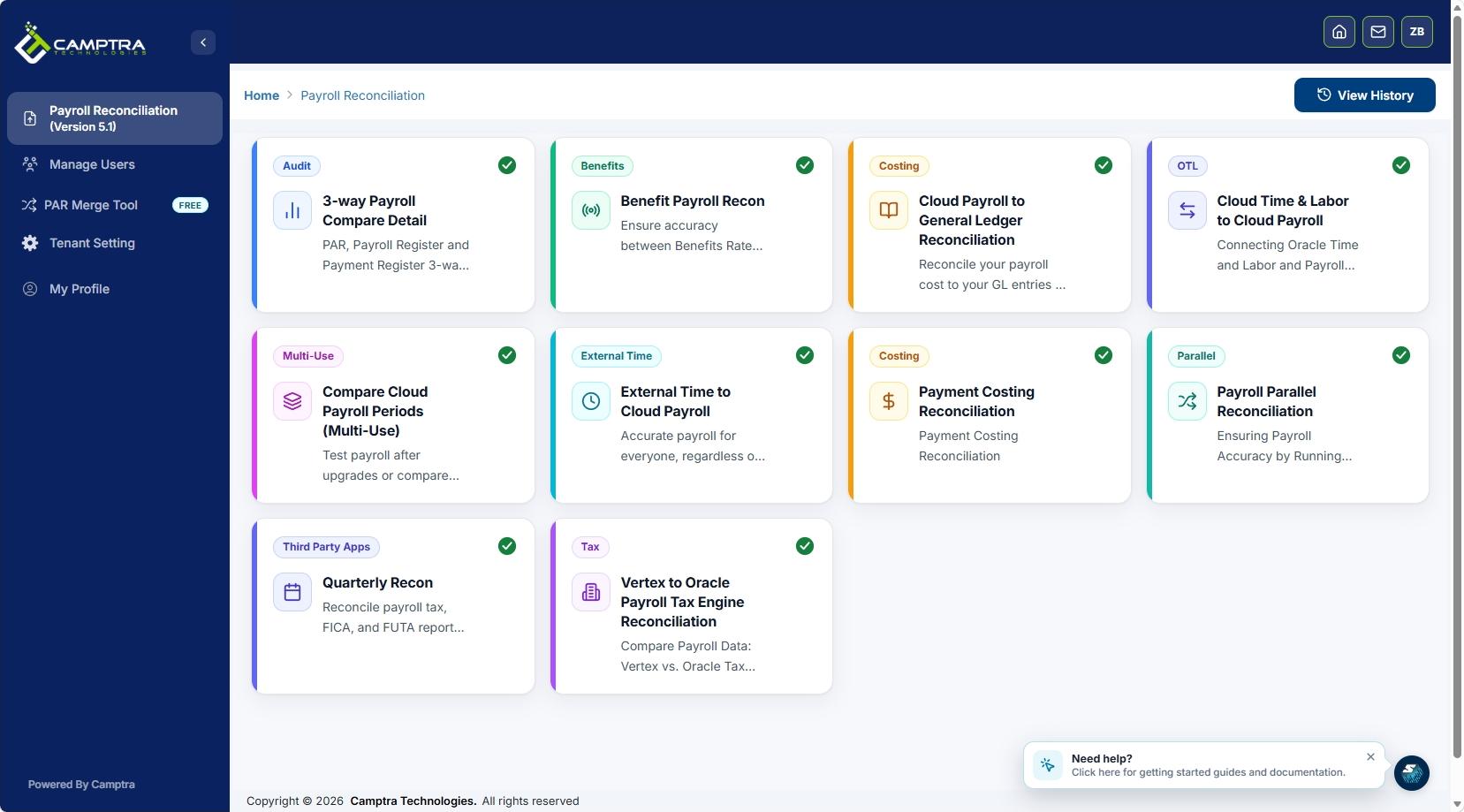
Camptra Technologies’ Payroll Recon Toolset automates the reconciliation checks described throughout this article. Teams using the toolset have reported reconciliation time reductions of up to 80%, moving from spreadsheet-heavy manual reviews to exception-focused workflows that surface variances in minutes. The toolset also supports audit readiness by maintaining a defensible, timestamped record of every reconciliation run. For teams navigating complex integration environments, the Vertex-to-OPTE migration case study shows how Camptra’s approach resolves enterprise-scale reconciliation challenges before they reach the general ledger.
FAQ
What is a freeze point in payroll integration?
A freeze point is a defined cutoff after which approved time data is locked and cannot be edited without a formal re-approval process. It prevents late timecard changes from entering payroll calculations without authorization.
How long should parallel payroll testing run?
Parallel testing should run for at least two full pay periods. A single period rarely surfaces edge cases like split-shift overtime, mid-period cost center changes, or leave overlaps that affect regular hour totals.
What causes most timekeeping payroll integration failures?
Integration failures most often stem from configuration drift and workforce changes, not broken technical connections. Mismatched employee IDs, improperly mapped overtime rules, and uncontrolled manual overrides are the leading root causes.
What is a canonical time record?
A canonical time record is a vendor-neutral data schema that captures time, approvals, pay codes, and exceptions in a standardized format. It protects your integration architecture when you switch payroll platforms by decoupling your time data structure from any single vendor.
How often should payroll integration audits run?
Monthly or quarterly audits of hours-to-earnings totals and payroll register-to-GL exports are the minimum standard. High-volume environments benefit from running the core reconciliation checks every pay cycle.
