

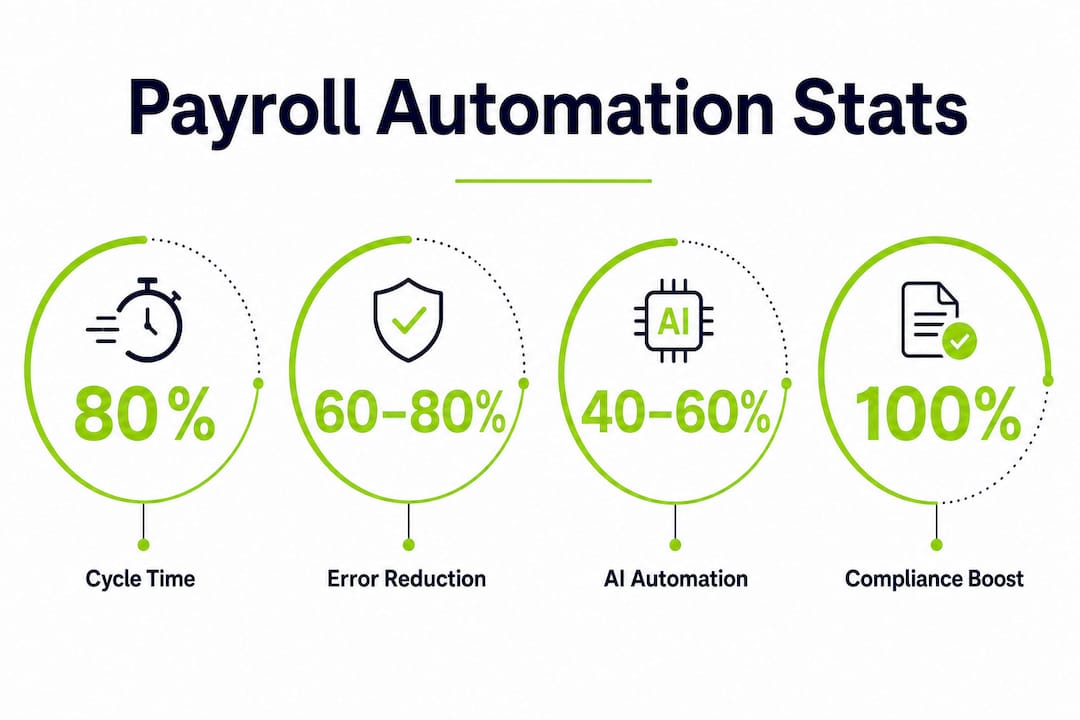
Payroll automation is defined as the use of rule-based software and integrated workflows to calculate pay, apply tax tables, enforce compliance rules, and validate results without manual intervention at each step. For payroll teams managing thousands of employees across multiple entities, the case for automation is not theoretical. Processing cycle times drop by 60–80% when organizations move from spreadsheet-heavy processes to automated orchestration. That kind of reduction changes what your team can accomplish before every payroll cutoff. Camptra Technologies built its Payroll Recon Toolset specifically for Oracle Cloud Payroll environments where that scale and complexity are the daily reality.
Why payroll teams need automation: the accuracy and error case
Manual payroll fails at scale for a predictable reason. Every step that requires a human to copy, calculate, or confirm a value is a point where errors enter the process. Typos in employee records, broken formulas in reconciliation spreadsheets, and deduction rates that were never updated after a statutory change are not edge cases. They are the routine causes of compliance penalties and employee pay disputes.

Automated payroll engines eliminate these failure points by applying deterministic logic. Built-in tax tables update automatically when statutory limits change. Deduction formulas execute the same way every pay period. Modern platforms adjust to new statutory limits without requiring a payroll analyst to manually update every affected record. The result is a consistent, auditable calculation chain from Gross Pay to Net Pay.
Artificial intelligence adds a second layer of protection on top of rule-based accuracy. AI-powered anomaly detection scans output for patterns that fall outside expected ranges, such as a Net Pay figure that is 40% higher than the prior period for the same employee. It flags those records for human review before the payroll run is finalized. AI automates 40–60% of routine payroll tasks while shifting your team’s focus toward governance and exception resolution.
- Data entry errors: Eliminated by direct HRIS-to-payroll API feeds that remove manual keying.
- Formula drift: Prevented by centralized calculation engines that apply a single version of every rule.
- Stale deduction rates: Corrected automatically when tax tables and benefit rates are maintained inside the platform.
- Missed retroactive adjustments: Caught by balance adjustment validation before the archive runs.
Pro Tip: Run a pre-archive variance report comparing current-period Gross Pay to the prior period at the employee level. Any variance above a defined threshold should require a documented exception before the run proceeds. Automation makes this check a standard step, not an afterthought.
How does automated reconciliation improve the payroll close?
Manual reconciliation across multi-source data is where payroll close cycles break down. When time and attendance data, benefits deductions, costing allocations, tax withholdings, and general ledger entries all live in separate systems, reconciling them requires your team to pull files, align columns, and manually compare figures that were never designed to match directly. That process takes days and produces results that are difficult to audit.
Automated reconciliation replaces that process with a structured, repeatable workflow. The steps below reflect how enterprise payroll teams redesign the close when they move to automation:
- Consolidate data sources. Pull time and attendance, benefits, costing, and tax data into a single reconciliation environment through validated API connections.
- Run automated variance analysis. Compare current-period results against prior-period baselines and expected ranges at the employee, department, and cost-center level.
- Surface exceptions only. Present your team with a prioritized list of records that fall outside tolerance thresholds, not a full data dump to review manually.
- Apply maker-checker controls. Automated maker-checker workflows prevent a single user from both creating and approving payroll entries, enforcing segregation of duties for every reconciliation cycle.
- Archive with a documented audit trail. Every variance, resolution, and approval is logged with a timestamp and user record, making audit preparation a byproduct of the normal close process.
| Reconciliation approach | Typical cycle time | Audit readiness |
|---|---|---|
| Manual spreadsheet review | 3–5 days per pay period | Inconsistent, difficult to reproduce |
| Partially automated with manual sign-off | 1–2 days per pay period | Improved but dependent on individual steps |
| Fully automated with exception workflow | Hours per pay period | Standardized, documented, and repeatable |
Global payroll aggregators reduce reconciliation complexity for multi-entity organizations by consolidating inputs into unified reporting. That matters when your organization runs payroll across multiple legal entities with different pay frequencies and cost structures.
How does payroll automation support enterprise growth?
Enterprise payroll complexity grows faster than headcount. Adding a new legal entity, entering a new tax jurisdiction, or acquiring a company with a different pay structure multiplies the number of rules your payroll engine must apply correctly every cycle. Manual processes do not scale to that complexity. They require more analysts, more spreadsheets, and more time, and they still produce more errors as volume increases.
Automation handles complexity by encoding rules rather than relying on individual knowledge. Multi-jurisdictional tax logic, union contract rules, and benefit eligibility conditions are configured once and applied consistently. The role of payroll automation in enterprise growth is not just operational efficiency. Regulators increasingly expect employers to have automated anomaly detection and compliance engines in place. Running manual payroll at enterprise scale is now a compliance liability, not just an operational inefficiency.
- Multi-entity consolidation: Automated platforms aggregate payroll results across entities into a single reporting layer, eliminating manual file merges.
- Tax jurisdiction management: Rule-based engines apply the correct withholding rates for each employee’s work location without manual lookups.
- API-driven data hygiene: Clean API integrations from HRIS and time tracking systems prevent upstream data errors from propagating into payroll calculations.
- Audit-ready costing: Automated costing allocation validates that labor costs post to the correct general ledger accounts before the financial close.
Pro Tip: Before expanding automation to a new entity or jurisdiction, audit the upstream data feeds first. Automation amplifies whatever data quality exists in your HRIS and time systems. Clean data produces accurate payroll. Dirty data produces accurate errors.
Payroll automation is viewed increasingly as a workforce planning tool, not just an operational function. When your reconciliation data is clean and your close is fast, finance teams get reliable labor cost data earlier. That data feeds headcount planning, budgeting, and compensation modeling with a level of accuracy that manual processes cannot support consistently.
What is the role of AI in payroll automation, and where does human oversight still matter?
AI and rule-based automation are not the same thing, and conflating them creates real governance risk. Deterministic automation applies fixed rules to produce predictable outputs. If an employee works 80 hours at a defined rate, the gross pay calculation is the same every time. There is no probability involved. AI, by contrast, uses probabilistic models to identify patterns, flag anomalies, and predict outcomes. Its outputs require interpretation and validation.
58% of finance and HR teams are currently using or testing AI-based payroll technologies, with 21% planning full-scale integration by the end of 2026. That adoption rate reflects genuine value. AI tracks regulatory changes, scans configuration accuracy, and validates output at a speed no manual review can match.
Where AI falls short is final accountability. Payroll sign-off is a legal and financial responsibility. An AI model that flags a variance is doing its job. The payroll professional who reviews that flag, investigates the root cause, and approves or rejects the run is doing theirs.
“Despite the promise of ‘touchless’ payroll, human oversight on reconciliation and payroll sign-off remains essential. AI helps highlight anomalies, but payroll teams are ultimately responsible for final payroll legitimacy.”
The practical division of labor looks like this:
- AI handles: Regulatory update detection, anomaly scanning, employee self-service queries, and configuration validation.
- Rule-based automation handles: Tax calculations, deduction processing, costing allocation, and compliance rule enforcement.
- Your team handles: Exception review, variance investigation, final sign-off, and audit documentation.
Understanding that distinction is the foundation of responsible AI deployment in payroll. Teams that treat AI output as a final answer rather than a starting point for review take on compliance risk they may not recognize until an audit surfaces it. For teams exploring how AI fits into their HR payroll collaboration model, the governance structure matters as much as the technology itself.
Key Takeaways
Payroll automation reduces processing cycle times by up to 80%, eliminates the most common sources of manual error, and gives enterprise payroll teams the audit-ready reconciliation workflows that regulators now expect.
| Point | Details |
|---|---|
| Automation cuts cycle time | Processing cycles drop by 60–80% when manual handoffs and spreadsheet transfers are replaced with automated workflows. |
| Rule-based logic prevents errors | Built-in tax tables, deduction formulas, and compliance rules eliminate typos, formula drift, and stale rates. |
| Maker-checker controls strengthen audits | Segregation of duties enforced by automation produces a documented, reproducible audit trail every pay period. |
| AI augments but does not replace oversight | AI flags anomalies and tracks regulatory changes, but payroll teams retain final sign-off accountability. |
| Data hygiene determines automation quality | Clean API feeds from HRIS and time systems are the prerequisite for accurate automated payroll output. |
The part most teams learn too late
The payroll teams I have seen struggle most with automation are not the ones who chose the wrong platform. They are the ones who automated a broken process. They moved their manual reconciliation steps into a tool, kept the same data quality problems, and then wondered why the outputs were still unreliable.
Automation does not fix a process. It accelerates it. If your upstream data is inconsistent, your costing rules are undocumented, or your reconciliation workflow depends on one person’s institutional knowledge, automation will surface those problems faster and more visibly than before. That is actually useful, but only if you treat it as a signal to fix the root cause rather than a reason to distrust the tool.
The teams that get the most out of payroll automation invest in data governance before they invest in software. They document their reconciliation logic, clean their HRIS feeds, and define what a valid payroll result looks like before they automate the check. When they do automate, the tool confirms what they already know should be true. Exceptions become genuinely exceptional rather than routine noise.
The other thing I would push back on is the idea that automation is primarily about speed. Speed is a byproduct. The real value is consistency. A payroll close that takes four hours and produces the same result every time is worth more than a close that takes two hours and requires three rounds of manual correction. Payroll automation, done well, is a quality system first and a time-saving system second.
— Zach
How Camptra Technologies supports payroll teams at scale
Payroll teams running Oracle Cloud Payroll face a specific version of the reconciliation problem. The data spans time and attendance, benefits, costing, tax, and general ledger systems, and validating it manually before cutoff is not realistic at enterprise volume.
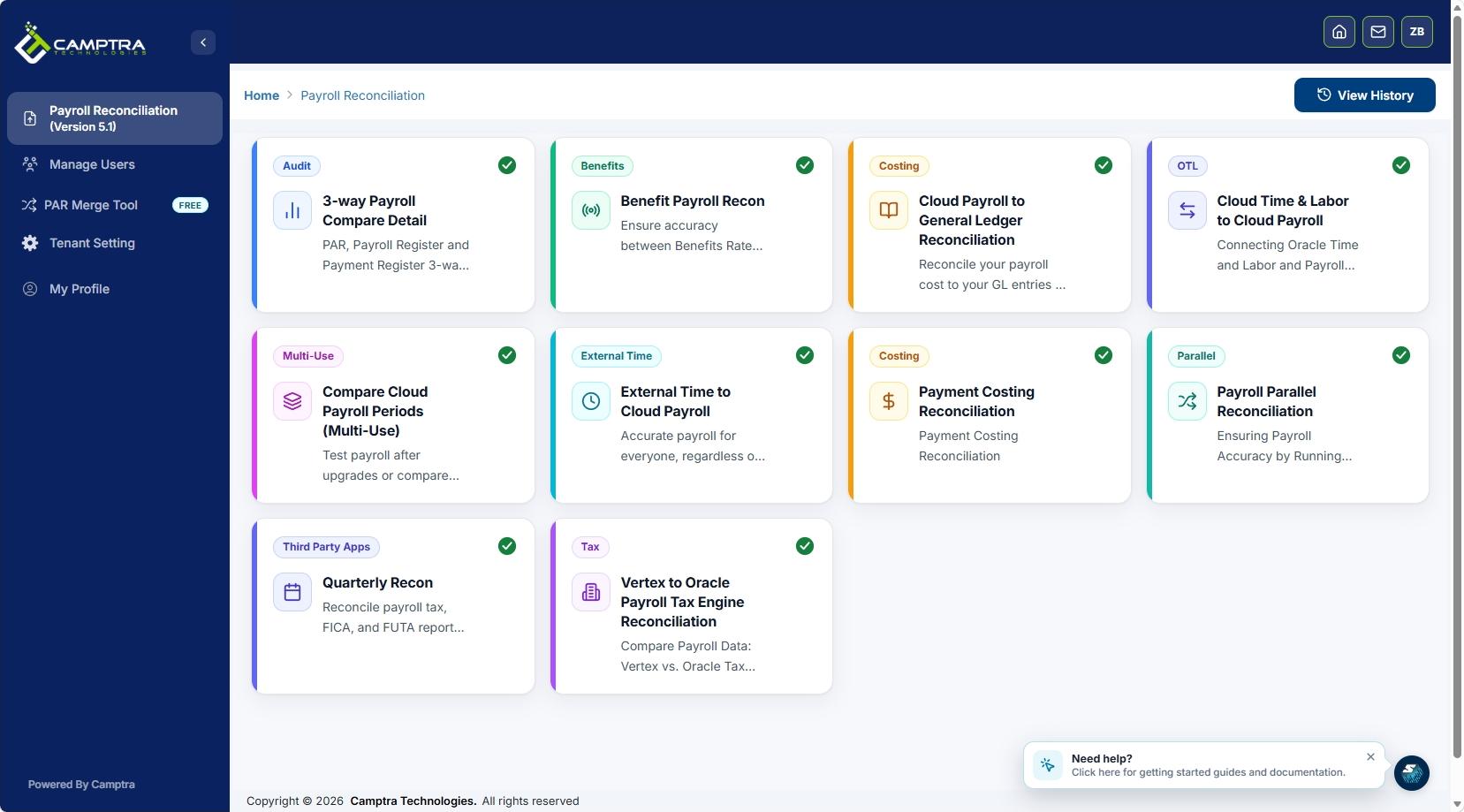
Camptra Technologies’ Payroll Recon Toolset connects and analyzes payroll-impacting data across all of those sources, reconciling millions of records in minutes and surfacing only the exceptions that need your attention. Customers have reported reconciliation time reductions of up to 80%, with one healthcare system achieving its earliest financial close on record after implementing the tool. For teams managing high-volume Oracle Cloud Payroll operations, the Camptra case studies show what that kind of improvement looks like in practice across healthcare, nonprofit, and enterprise environments.
FAQ
What is payroll automation?
Payroll automation is the use of rule-based software to calculate pay, apply tax tables, enforce compliance rules, and validate results without manual input at each step. It replaces spreadsheet-heavy processes with integrated, auditable workflows.
What are the main signs your payroll process needs automation?
The clearest signs are a multi-day reconciliation close, recurring manual errors in tax or deduction calculations, and a reconciliation process that depends on one person’s knowledge rather than a documented workflow.
How does payroll automation work in enterprise environments?
Enterprise payroll automation connects HRIS, time and attendance, benefits, costing, and general ledger systems through API integrations, then applies configured rules to calculate and validate payroll results across multiple entities and jurisdictions in a single run.
Does AI replace payroll professionals?
AI automates 40–60% of routine payroll tasks but does not replace payroll professionals. Human oversight remains mandatory for final sign-off, exception resolution, and compliance accountability.
How does payroll automation improve audit readiness?
Automated maker-checker workflows enforce segregation of duties and log every variance, resolution, and approval with a timestamp. That documentation is produced as a byproduct of the normal close process, not as a separate audit preparation task.
