

To identify payroll discrepancies during an audit, run these six steps in order: intercept exceptions pre-run, cross-reconcile all source systems; perform substantive sample recalculations; trace every variance to the GL; triage exceptions by severity; and assign remediation owners before payroll closes. Pull three data sources immediately: the current payroll register, the active employee master, and the most recent ACH/EFT disbursement file. Those three together surface the majority of high-risk discrepancies before funds leave the account.
Your six-step audit checklist:
- Pre-run intercept: Compare incoming payroll inputs against historical baselines and flag deviations before the calculation run executes.
- Cross-system reconcile: Tie employee master records, time and attendance data, benefits enrollment, and tax tables to the payroll register.
- Substantive sample recalculation: Manually recompute Gross Pay, Net Pay, and deductions for a risk-scaled sample of employees.
- GL trace: Confirm payroll journal entries match register totals and that all liabilities clear to the correct accounts.
- Exception triage: Classify each variance by type, dollar impact, and root cause before the pay period closes.
- Remediation assignment: Log every finding with an owner, due date, and corrective action, then verify resolution before the next run.
Table of Contents
- When should you reconcile versus run a full payroll audit?
- Which Oracle Cloud data sources should you cross-check?
- How do you detect anomalies and size your substantive test sample?
- What are the most common payroll discrepancy types and their data fingerprints?
- How do you run a reproducible Oracle Cloud payroll reconciliation?
- How should you report audit findings and prioritize remediation?
- What preventive controls stop discrepancies from repeating?
- Key Takeaways
- What enterprise payroll audits keep teaching us
- Camptra’s Payroll Recon Toolset cuts Oracle Cloud audit time by up to 80%
- Useful sources and references
- FAQ
When should you reconcile versus run a full payroll audit?
Reconcile every pay period as a baseline control; schedule a comprehensive audit at least annually. Frequent per-period reconciliation catches configuration drift and data-entry errors before they compound, which materially reduces the effort required for year-end filings.
Certain events should trigger an immediate focused audit regardless of schedule: system migrations, controller or payroll administrator turnover, unexplained GL variances, employee complaints about pay accuracy, or a notice from the IRS or a state agency. Multi-jurisdiction payrolls add another trigger — any change to a state or local tax table warrants a targeted review of affected employees before the next run.
| Timing | Scope |
|---|---|
| Pre-run (every period) | Anomaly detection, duplicate check, rate-change review |
| Immediate post-run | Register-to-GL tie-out, bank file trace, exception log |
| Quarterly | Deduction reconciliation, benefits enrollment match, tax deposit verification |
| Annual | Full substantive test, segregation-of-duties review, compliance sign-off |
Pro Tip: In multi-jurisdiction payrolls, tag each employee record with its primary tax jurisdiction code and run a jurisdiction-level variance report after every tax table update. A single misconfigured locality code can silently underpay or overpay dozens of employees across multiple periods.
Which Oracle Cloud data sources should you cross-check?
The minimum reconciliation set covers seven systems: employee master/HRIS, time and attendance, payroll register, payroll journal/GL, benefits enrollment, tax tables, and bank/ACH disbursement files. Skipping any one of these creates a blind spot that automated checks cannot compensate for.
For reconciling benefit deductions in Oracle Cloud, the Element Entries table is the authoritative source for what the system intends to deduct; the Payroll Register confirms what it actually deducted. Mismatches between those two are the most common source of 401(k), HSA, and FSA discrepancies.
| System / Report | Key Oracle Cloud Object | Fields to Verify |
|---|---|---|
| Employee master | HR Person and Assignment | Employee ID, pay rate, job classification, status |
| Time & attendance | Time Card entries / HCM Extracts | Hours worked, overtime flag, period start/end |
| Payroll register | Payroll Register Report | Gross Pay, Net Pay, element amounts, deduction totals |
| GL / payroll journal | Payroll Journal Import / Fusion GL | Account code, debit/credit amounts, posting date |
| Benefits enrollment | Element Entries / Benefits Extract | Deduction type, elected amount, effective date |
| Tax tables | Tax Withholding Card / Calculation Cards | Jurisdiction code, filing status, additional withholding |
| Bank / ACH file | Payment Output File / EFT Extract | Bank account last four, routing number, net pay amount |
How do you detect anomalies and size your substantive test sample?

Automated pre-run anomaly detection combined with risk-scaled substantive sampling gives the highest discrepancy detection rate. AI-powered detection scans payroll runs before funds leave the account, flagging ghost employees, duplicate payments, incorrect tax tables, and overtime spikes without waiting for a post-run reconciliation.
Run these automated checks before each payroll calculation:
- Compare each employee’s current gross pay against their trailing three-period average; flag deviations exceeding a defined threshold.
- Run a duplicate match on bank account numbers and Social Security Numbers across the active employee master.
- Identify off-cycle element-entry changes made within 48 hours of the payroll run cutoff.
- Verify that tax calculation card jurisdiction codes match the employee’s current work location.
- Check for terminated employees whose assignment status was not end-dated before the period close.
For substantive testing, scale sample size to control strength. Where internal controls test weak — missing approvals, single-person payroll processing, no independent reconciliation — expand the sample to cover at least 20–25% of the population across all pay frequencies. Where controls are strong and consistently operating, a representative sample of 5–10% stratified by pay frequency, employee type (hourly, salaried, contractor), and geography is defensible.
Pro Tip: Run a peer-cohort comparison by department: calculate average Gross Pay per FTE for each cost center and flag any department where the current period average deviates more than two standard deviations from the prior six-period mean. Department-level outliers often reveal supervisor-level override patterns that individual-employee checks miss.
What are the most common payroll discrepancy types and their data fingerprints?
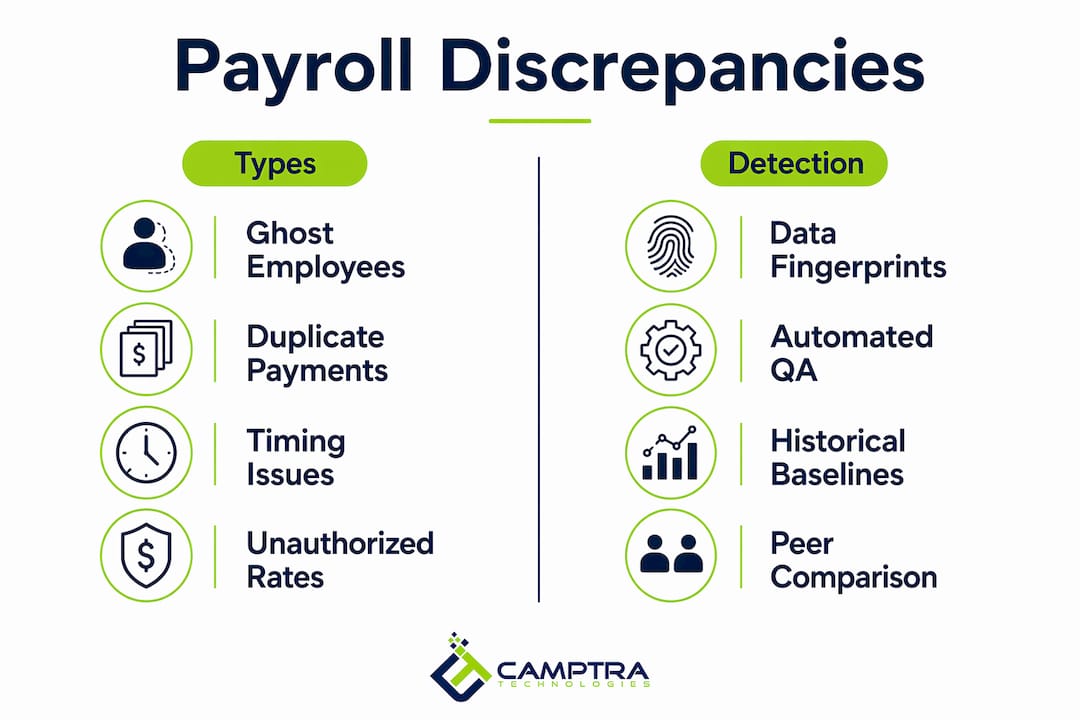
Enterprise Oracle Cloud payroll runs most commonly surface four discrepancy types: ghost employees, duplicate payments, timing mismatches, and unauthorized rate changes.
Industry practitioners report an average of 3–7 payroll errors per run that pass unchallenged without independent validation checks.
| Discrepancy Type | Data Fingerprint | Immediate Triage |
|---|---|---|
| Ghost employee | Payment to a terminated Assignment ID; duplicate bank account; blank or mismatched SSN | Freeze payment, pull access log, verify HR termination record |
| Duplicate payment | Same Employee ID + same Net Pay amount in same period; matching ACH trace numbers | Void duplicate, confirm single disbursement, review approval chain |
| Timing mismatch | Element entry effective date falls outside the pay period; retroactive adjustment with no approval record | Confirm period boundaries, verify retroactive approval, recalculate affected elements |
| Unauthorized rate change | Pay rate in Payroll Register differs from HR Assignment; change log shows no approval workflow completion | Pull change audit trail, compare to signed compensation approval, escalate to HR |
Automated QA catches most of these fingerprints by comparing incoming data against historical per-employee baselines, cross-system records, and peer-cohort norms — before the calculation run closes.
How do you run a reproducible Oracle Cloud payroll reconciliation?
Follow this numbered procedure from time capture through bank disbursement:
- Data ingestion validation: Extract the Time Card report and compare total hours to the prior period; flag employees with zero hours or hours exceeding your overtime policy threshold.
- Pre-run anomaly checks: Execute the automated checks listed in the previous section; resolve or document all flags before advancing the run.
- Payroll calculation run: Process the payroll run in Oracle Cloud; extract the Payroll Results report immediately post-calculation.
- Register-to-GL tie-out: Run the Payroll Journal Import report and confirm that total Gross Pay, tax withholdings, and net deductions in the Payroll Register match the GL journal entry amounts. For payroll costing reconciliation, verify that cost allocation segments map to the correct GL account codes.
- Bank file trace: Compare the Payment Output File net pay totals to the Payroll Register Net Pay column; confirm no additional or missing records exist in the ACH/EFT extract.
- Exception closure: Log every unresolved variance in the exception workpaper before archiving the run.
Each workpaper entry should capture: report name, extraction timestamp, user who ran the report, sampling method and population size, discrepancy ID, calculation detail, and dollar impact. That level of documentation allows a third-party reviewer to follow the workpapers cold without needing to re-pull data.
How should you report audit findings and prioritize remediation?
Structure every finding using four elements: Condition (what you found), Criteria (what the standard or policy requires), Effect (the financial or compliance impact), and Recommendation (the specific corrective action with a named owner and due date).
Prioritize findings using a likelihood-by-impact matrix:
| Priority | Likelihood | Impact | Example |
|---|---|---|---|
| Critical / material weakness | High | High | One person creates employees and authorizes payments |
| High | High | Medium | Terminated employees active in payroll for 2+ periods |
| Medium | Medium | Medium | Deduction amounts not matching benefits enrollment elections |
| Low | Low | Low | Missing documentation on a single approved retroactive adjustment |
Segregation of duties failures — where one person can create an employee record and authorize payment — must be classified as material weaknesses and escalated immediately. Process gaps (missing approval documentation, inconsistent naming conventions) carry lower priority but still require a remediation owner, a due date, and evidence of completion before the finding closes.
What preventive controls stop discrepancies from repeating?
Strong preventive controls rest on four pillars: segregation of duties, pre-run validation gates, independent reconciliation, and automated anomaly detection. Configure Oracle Cloud so that no single user holds both the “Manage Payroll” and “Approve Payroll” roles simultaneously.
Operational control checklist:
- Restrict element-entry write access to a dedicated payroll configuration team; require a second approver for any rate or deduction change.
- Configure a bank-account change verification window (minimum 48 hours) that triggers an email confirmation to the employee’s HR-record address before the change takes effect.
- Set up a termination processing SLA: HR must end-date the Assignment record within one business day of the employee’s last day.
- Run an independent reconciliation off-platform — a separate team or tool that traces data from timekeeping through the payroll register, GL posting, and bank payment without relying on the same system that processed the run.
- Export a full audit trail from Oracle Cloud after each run and store it in a read-only archive accessible to finance and internal audit.
Pro Tip: Never allow automated anomaly detection to auto-correct a discrepancy without a named reviewer and an explicit approval step. Auto-corrections that bypass human review create a new class of untraceable error and eliminate the audit trail you need for downstream compliance.
Key Takeaways
A per-period reconciliation discipline, combined with risk-scaled substantive testing and pre-run anomaly detection, is the most reliable path to payroll accuracy in Oracle Cloud environments.
| Point | Details |
|---|---|
| Reconcile every pay period | Per-period reconciliation reduces long-tail compliance risk and cuts year-end audit effort. |
| Scale sample size to control strength | Weak controls require a 20–25% sample; strong controls support a 5–10% stratified sample. |
| Prioritize material weaknesses first | Segregation-of-duties failures must be escalated immediately as material weaknesses. |
| Document to third-party standard | Every workpaper must include report name, timestamp, sampling method, discrepancy ID, and dollar impact. |
| Camptra Technologies automates the process | Camptra’s Payroll Recon Toolset connects Oracle Cloud data sources. Camptra case studies report reconciliation time reductions of up to 80% after implementing the Payroll Recon Toolset for Oracle Cloud payroll reconciliation and audit automation. |
What enterprise payroll audits keep teaching us
The most consistent lesson from enterprise payroll audits is that the data almost always contains the answer — the challenge is pulling the right sources together fast enough to act before the run closes. Teams that rely on spreadsheet-heavy reconciliation processes spend the majority of their time preparing data rather than analyzing it, which means exceptions surface after funds have already moved.
Two practices make the biggest practical difference. First, treat the pre-run validation gate as non-negotiable: no payroll run should advance to calculation without a documented anomaly check against historical baselines. Second, keep the reconciliation function independent from the processing function. When the same team that runs payroll also validates it, the structural conflict of interest is real — not theoretical. Independent validation, whether through a separate internal team or a dedicated tool, is what gives audit findings credibility with external reviewers and regulators.
The teams that close audits fastest are not the ones with the most sophisticated analytics. They are the ones with the clearest documentation standards and the discipline to apply them every single period.
Camptra’s Payroll Recon Toolset cuts Oracle Cloud audit time by up to 80%
If your team is still reconciling Oracle Cloud payroll in spreadsheets, the six-step process above is exactly what Camptra’s Payroll Recon Toolset automates. The tool connects directly to Oracle Cloud and pulls data across time and attendance, payroll, benefits, costing, tax, and GL — then surfaces variances before the run closes, so your team spends time resolving exceptions rather than hunting for them.
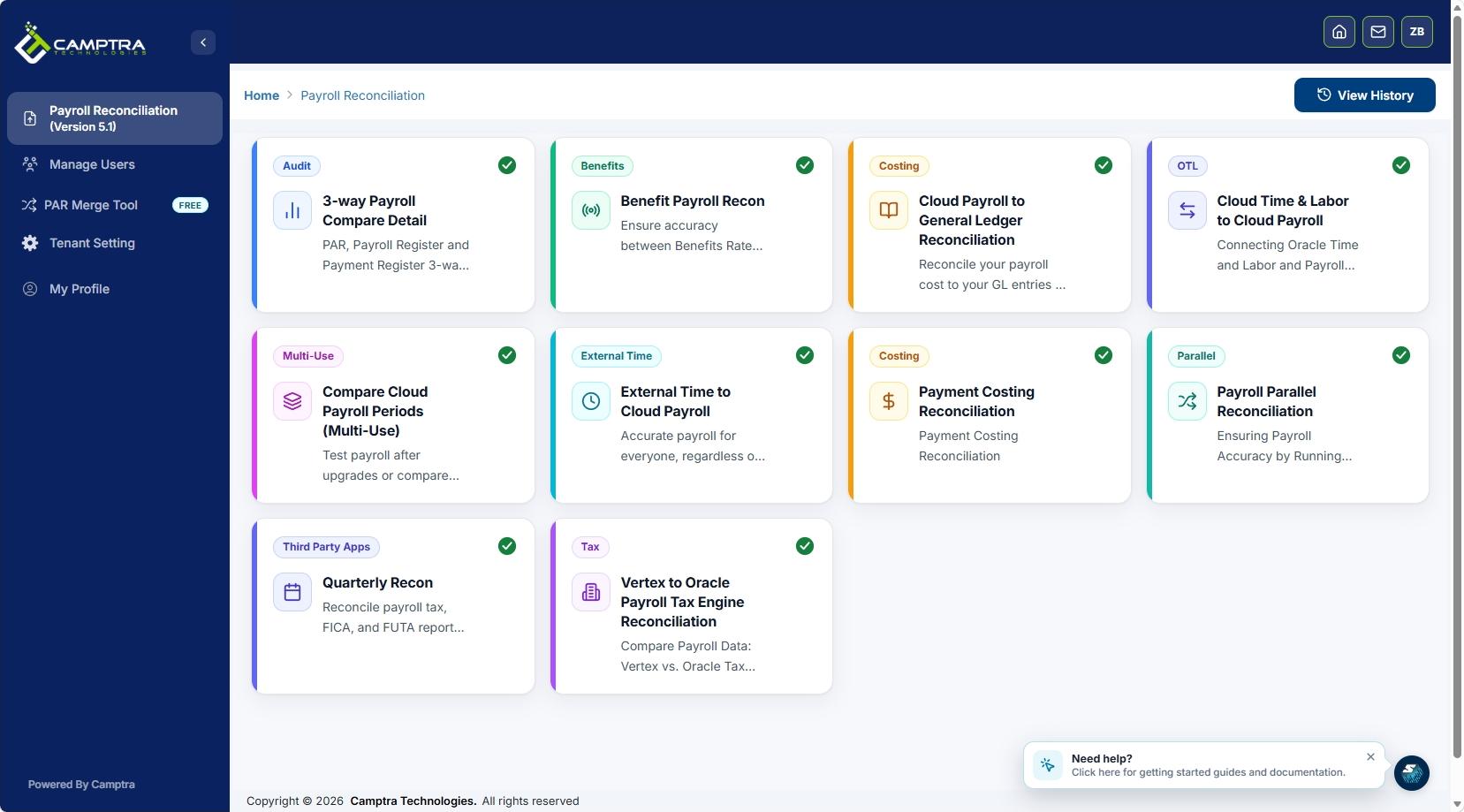
Core capabilities include pre-run validation gates, cross-system exception routing, and exportable audit trail reports formatted for third-party reviewers. Customers have reported reconciliation time reductions of up to 80% after implementation. For teams managing high-volume payroll across multiple jurisdictions, that efficiency gain translates directly into earlier financial close and stronger audit readiness. You can review real results on the Camptra case studies page, or request a sandbox to test the tool against your own Oracle Cloud environment.
Useful sources and references
- ADP — Payroll Audit Checklist: Independent guidance on reconciliation cadence and per-period audit best practices; use for frequency and compliance benchmarking.
- LegalClarity — How to Audit Payroll for Accuracy and Compliance: Covers segregation-of-duties requirements and material weakness classification; authoritative for controls and reporting sections.
- Deel — How AI Catches Payroll Errors Before Payday: Explains automated anomaly detection methodology using historical baselines and peer-cohort norms; vendor perspective on pre-run detection.
- SpaceHR — Payroll Anomaly Detection Software: Vendor claim source for AI-powered pre-run scanning capabilities; use alongside independent sources to evaluate detection scope.
- Camptra Technologies — Oracle Cloud Benefits Payroll Reconciliation Tool: Brand case study supporting the 80% reconciliation time reduction KPI; vendor source.
FAQ
What is the first step to identify payroll discrepancies in an audit?
Pull three data sources immediately: the current payroll register, the active employee master, and the most recent ACH/EFT disbursement file. Comparing these three surfaces the majority of high-risk discrepancies before funds leave the account.
How often should enterprise teams run a payroll audit?
Reconcile every pay period as a baseline control and conduct a comprehensive audit at least annually. Ad hoc audits should be triggered by system migrations, controller turnover, or unexplained GL variances.
What are the most common payroll discrepancy types in Oracle Cloud?
The four most common types are ghost employees, duplicate payments, timing mismatches, and unauthorized rate changes. Each leaves a distinct data fingerprint in the Payroll Register, Element Entries, and GL journal that automated checks can flag pre-run.
How large should a substantive test sample be?
Scale sample size to control strength: 20–25% of the population where controls test weak, and a stratified 5–10% sample where controls are strong and consistently operating.
How does Camptra’s Payroll Recon Toolset support the audit process?
Camptra’s Payroll Recon Toolset connects Oracle Cloud data sources across payroll, time, benefits, costing, and GL, then automates cross-system validation and exception routing. Camptra case studies report reconciliation time reductions of up to 80% after implementing the Payroll Recon Toolset for Oracle Cloud payroll reconciliation and audit automation.
