

High-volume payroll reconciliation is the systematic process of matching payroll output — gross-to-net calculations, bank disbursements, tax withholdings, and deductions — against HRIS records, bank files, and the general ledger across thousands or millions of employee records per cycle. At enterprise scale, the only defensible approach is automated per-cycle reconciliation with defined variance thresholds and an exception queue tied to resolution SLAs.
Three actions to start this month:
- Configure per-cycle matching between your payroll register, bank disbursement file, and GL journal entries so variances surface before the next run, not at year-end.
- Set materiality thresholds — a common starting point is flagging variances above 0.05% of gross pay by department or jurisdiction for mandatory sign-off.
- Pilot an automated reconciliation tool on one representative payroll population (mix of states, pay types, and deduction structures) and measure match rate, exception volume, and time-to-reconcile before expanding.
Key Takeaways
Automated per-cycle reconciliation with defined variance thresholds and role-based exception workflows is the primary control for enterprise payroll accuracy and audit defensibility.
| Point | Details |
|---|---|
| Automate per-cycle matching | Run gross-to-net, bank, tax, and headcount reconciliation every payroll cycle, not just at month-end. |
| Set materiality thresholds | A 0.05% of gross variance threshold is a common starting point; agree on the number with finance and tax before configuring. |
| Integrate all data sources | Connect HRIS, time and attendance, benefits, bank files, tax systems, and GL to eliminate manual sync failures. |
| Track the right KPIs | Monitor Payroll Accuracy Rate, Manual Adjustment Ratio, automated match rate, and time-to-resolution by severity. |
| Camptra Technologies | Camptra’s Payroll Recon Toolset automates Oracle Cloud Payroll reconciliation end-to-end, with customers reporting up to 80% reduction in reconciliation time. |
Table of Contents
- Why high-volume payroll reconciliation matters for enterprise finance
- What does a step-by-step high-volume reconciliation process look like?
- Key reconciliation methods and the accounts you must cover
- What are the most common high-volume reconciliation challenges?
- What must automation do for enterprise-scale reconciliation?
- How often should you reconcile, and which KPIs matter?
- An enterprise payroll reconciliation playbook: who does what and when
- How do you test and validate reconciliation automation before full deployment?
- Why an Oracle-focused toolset fits high-volume reconciliation
- How to pilot reconciliation automation with minimal risk
- Why enterprise teams move to automation: an editorial perspective
- Camptra Technologies: built for Oracle Cloud Payroll reconciliation at scale
- Sources
- FAQ
Why high-volume payroll reconciliation matters for enterprise finance
Payroll reconciliation, at its core, is the cross-analysis of source data and payroll records to find variances that could cause incorrect pay, inaccurate tax filings, or general ledger misstatements. For a 500-person company, a spreadsheet review each pay period is inconvenient. For a 50,000-person enterprise running biweekly payroll across 30 states, the same approach is a liability.
The business risks at enterprise scale compound quickly:
- Amended tax returns and IRS notices when Form 941 or W-2 totals don’t reconcile to payroll register data before filing deadlines.
- Audit exposure and SOX control failures when reconciliation evidence is missing, inconsistent, or locked in version-controlled spreadsheets no auditor can trace.
- Month-end close delays when finance teams are waiting on payroll to resolve GL variances that should have been caught at the run level.
- Restatements and penalty risk from multi-state tax rate misapplication, especially when reciprocity agreements or local tax codes change mid-year.
The case for automation isn’t just efficiency. Spreadsheet-based reconciliation processes create version-control, formula, and audit-trail risks that grow directly with transaction volume. When your payroll team is manually reconciling 200 exception rows per cycle, they’re managing data preparation, not resolving actual payroll problems.
Stat to know: Camptra customers running Oracle Cloud Payroll have reported up to 80% reduction in reconciliation time after moving from manual to automated per-cycle workflows.
The benefits of an automated, per-cycle approach are concrete: fewer amended returns, a faster month-end close, reduced manual adjustment volume, and reconciliation evidence that holds up under SOX 404 scrutiny. Those aren’t aspirational outcomes — they’re the direct result of catching errors cycle-by-cycle rather than letting them accumulate into year-end investigations.
What does a step-by-step high-volume reconciliation process look like?
A practical reconciliation sequence moves from data intake through exception closure and GL verification. At enterprise scale, each step needs an owner, a timing gate, and an automated check where possible.
Pre-run validation
Before payroll calculates, confirm that source data is complete and accurate:
- HRIS sync verification — confirm employee records (new hires, terminations, status changes, pay rate updates) have transferred from your HRIS to the payroll system with no truncation or mapping errors.
- Time and attendance data handoff — validate that timesheet totals by cost center match what payroll received; flag missing or zero-hour records for active employees.
- Benefits and deduction configuration — confirm open enrollment changes, mid-year benefit elections, and garnishment updates are reflected in the current period’s deduction setup.
- Tax table and configuration check — verify state and local tax rates, reciprocity rules, and pay code mappings are current, particularly after any system updates or jurisdiction changes.
Per-cycle automated matching
Once payroll runs, the reconciliation engine executes these matches in sequence:
- Gross-to-net match — compare payroll register gross pay, deductions, and net pay totals to expected values by department, cost center, and jurisdiction.
- Bank disbursement match — reconcile the ACH/bank file total to net pay on the payroll register; flag any employee-level discrepancies between the two.
- Tax withholding summary — match federal, state, and local withholding totals to the payroll register and to the running 941 liability balance.
- Benefit and deduction match — confirm employee and employer deduction amounts reconcile to benefits platform data and carrier invoices.
- Headcount sync — verify the active headcount in payroll matches HRIS for the pay period; investigate any delta before the run is finalized.
Exception triage
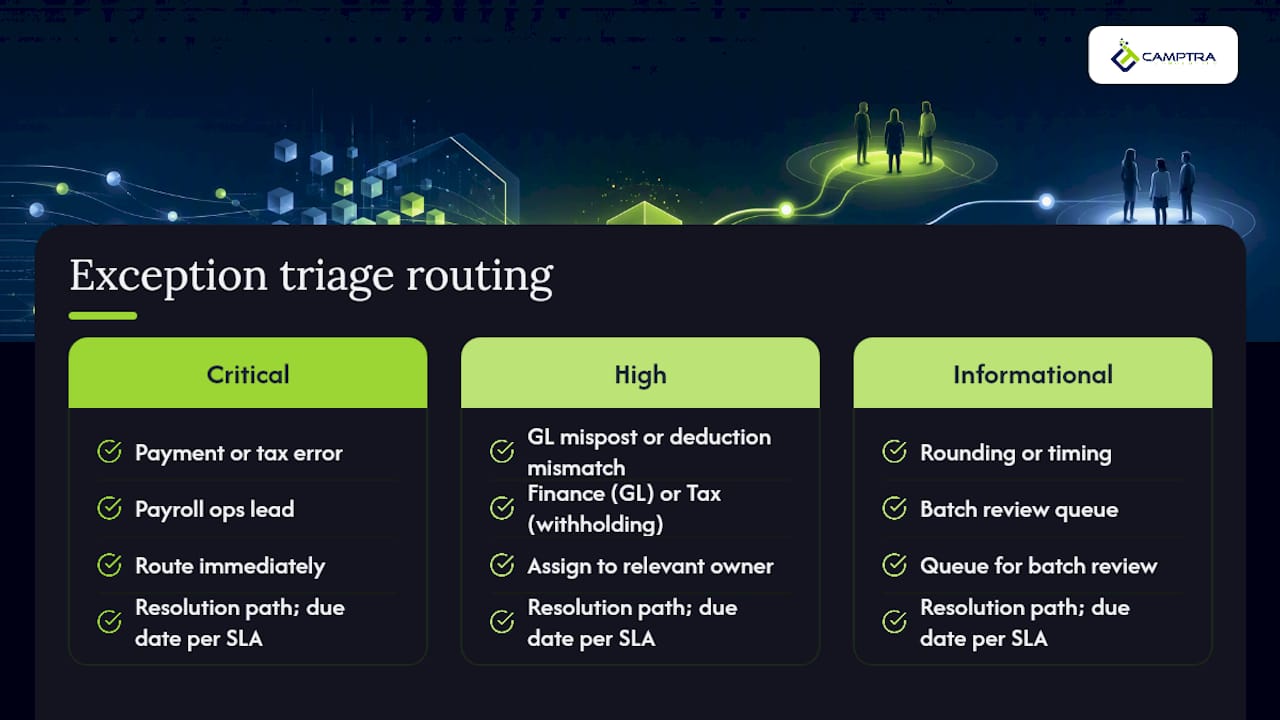
Automated classification assigns each variance a severity label — critical (payment or tax error), high (GL mispost or deduction mismatch above threshold), or informational (rounding, timing). Critical exceptions route immediately to the payroll ops lead; high-severity items go to the relevant owner (finance for GL, tax for withholding); informational items queue for batch review. Every exception gets a resolution path and a due date tied to the SLA.
Post-run GL posting verification
After payroll posts, confirm that journal entries in the ERP match the payroll register by account, cost center, and period. Investigate any GL variance before the period closes. Document the sign-off for audit evidence.
Pro Tip: Define materiality thresholds before the first automated run, not after. Automating the pre-payroll variance check against the prior cycle’s actuals catches configuration drift — changed pay codes, new deduction types, rate updates — before it becomes a filed liability.
Key reconciliation methods and the accounts you must cover
Different reconciliation techniques target different artifacts. Enterprise payroll teams typically run several in parallel, with distinct owners and frequencies.
A few points on ownership and handoffs that teams often underestimate:
- GL reconciliation is a shared responsibility. Payroll produces the journal entry; finance confirms it posts to the correct account and period. Without a defined handoff protocol, variances sit unresolved at month-end.
- Tax and filing reconciliation runs on a different cadence than the others. Monthly 941 deposits must reconcile to the payroll register before remittance. Year-end W-2 totals must reconcile to the cumulative payroll register before filing. Both require their own sign-off trail.
- Headcount reconciliation is the most underrated control. A headcount delta between HRIS and payroll is often the first signal of a ghost employee, a missed termination, or a system sync failure.
For teams managing payroll general ledger reconciliation, the GL mapping layer deserves its own documentation: which payroll elements map to which GL accounts, who maintains that mapping, and how changes are tested before going live.
What are the most common high-volume reconciliation challenges?
Enterprise reconciliation breaks down in predictable ways. Knowing the failure modes in advance lets you build controls before they become filed liabilities.
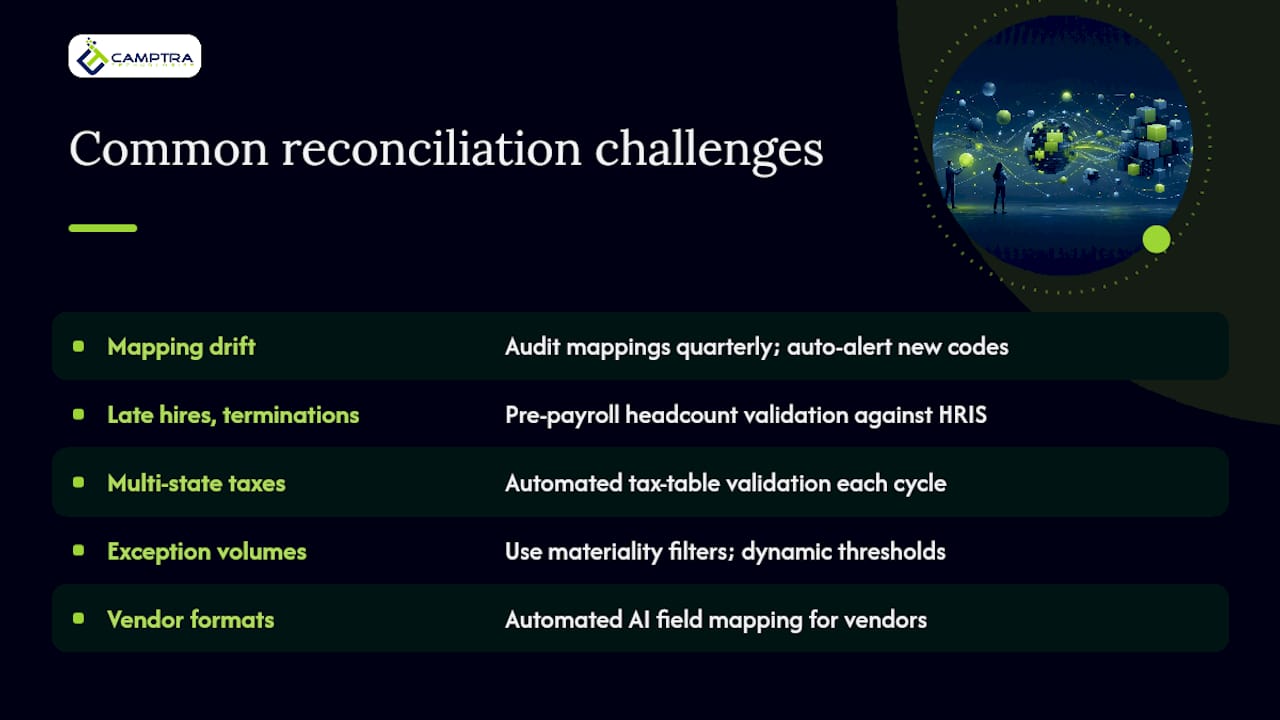
Data quality and mapping drift — Pay code mappings, cost center assignments, and deduction codes drift over time as the business changes. A connected payroll ecosystem where HRIS feeds directly into payroll and then into the GL structurally reduces this risk, because a single dataset eliminates many of the manual sync failures that create discrepancies. Audit your mapping tables quarterly and automate alerts when a new pay code appears without a GL assignment.
Late hires and terminations — A termination processed after payroll calculates but before the bank file transmits creates an overpayment that’s expensive to recover. Pre-payroll headcount validation, run automatically against HRIS, catches most of these before they disburse.
Multi-state and local tax complexity — Multi-state payroll reconciliation is particularly prone to rate misapplication when employees work across jurisdictions with reciprocity agreements. Automated tax table validation, run before each cycle, is the only scalable control for teams with employees in 10 or more states.
Large exception volumes — When every small rounding difference generates an exception ticket, investigators stop reading them. Automated matching and pre-payroll validation catch many issues before they become filed liabilities, but the exception queue still needs a materiality filter. Dynamic thresholds — where the flag threshold adjusts based on department size or pay type — reduce alert fatigue without hiding real problems.
Vendor format differences — Benefits carriers, time and attendance platforms, and banking partners all deliver data in different formats. Automated field mapping with AI logic, rather than manual transformation scripts, handles format variation without requiring a configuration change every time a vendor updates their file layout.
Pro Tip: *To cut alert fatigue without raising your risk threshold, segment exceptions by type before routing them. Tax variances and bank mismatches always go to a human reviewer. Rounding differences below your materiality floor get auto-closed with a log entry.
What must automation do for enterprise-scale reconciliation?
The functional bar for a reconciliation tool at enterprise scale is higher than most teams expect when they start evaluating options. Speed matters, but so does the ability to handle complexity without manual intervention.
Core automation capabilities your toolset must include:
- High-speed transaction matching across millions of records per cycle, with configurable match rules by pay type, jurisdiction, and deduction category.
- Fuzzy matching logic for records where identifiers don’t align perfectly — employee ID format differences, name variations, or rounding in currency conversion.
- Exception queues with role-based routing so critical items reach the right owner automatically, with escalation triggers when SLAs are missed.
- Full audit trail on every match, exception, and resolution action, with timestamps and user attribution for SOX evidence.
- Parallel reconciliation support for payroll migrations and upgrades, where you need to run the old and new environments simultaneously and compare outputs.
- Scheduled pre-payroll checks that run automatically before each cycle closes, not just after.
Essential integrations for a connected reconciliation environment:
- HRIS platforms (Oracle Cloud HCM, Workday, SAP SuccessFactors) for headcount and employee data.
- Time and attendance systems for hours and cost center data.
- Bank and ACH file feeds for disbursement matching.
- Tax filing systems for 941, W-2, FUTA, and SUTA reconciliation.
- Benefits platforms for deduction and carrier invoice matching.
- GL and ERP systems for journal entry verification and period-close confirmation.
For Oracle Cloud Payroll teams specifically, the Oracle Cloud Payroll costing reconciliation layer adds another integration dimension: costing results must reconcile to both the payroll register and the GL, and that reconciliation needs to survive a payroll upgrade without manual remapping.
Security and compliance requirements are non-negotiable at enterprise scale. Data encryption in transit and at rest, role-based access controls, change history logging, and SOX-ready evidence packages are baseline requirements, not differentiators.
Pro Tip: Before evaluating any reconciliation tool, build your integration checklist first. Map every data source that feeds your payroll process — HRIS, time systems, benefits platforms, bank files, tax systems, GL — and confirm the tool has a native or certified connector for each. A tool that requires a custom ETL for three of your six integrations will cost more to maintain than it saves in reconciliation time.
How often should you reconcile, and which KPIs matter?
Reconciliation frequency isn’t a single answer — it’s a layered discipline with distinct scope at each horizon.
Per-cycle reconciliation covers every payroll run: gross-to-net match, bank disbursement match, tax withholding summary, benefit deduction match, and headcount sync. This is the primary control layer. Catching errors here prevents them from compounding into monthly or quarterly variances that require amended filings.
Month-end reconciliation extends the per-cycle work to include GL account balances, accrual postings, and period-close confirmation. Finance and payroll sign off together before the books close.
Year-end reconciliation covers cumulative W-2 totals, annual 940/941 reconciliation, and benefits ACA reporting alignment. This is where per-cycle discipline pays off: teams that reconcile every run arrive at year-end with a clean audit trail rather than a backlog of unresolved variances.
KPIs enterprise teams should track:
- Payroll Accuracy Rate — percentage of payroll records processed without error or post-run correction.
- Total Payroll Variance Rate — total variance as a percentage of gross payroll; a common automated threshold is 0.05% of gross to trigger mandatory investigation.
- Manual Adjustment Ratio — number of manual corrections per 1,000 payroll records; a rising ratio signals upstream data quality problems.
- Time-to-Resolution for Exceptions — average hours from exception creation to closure, by severity tier.
- Automated Match Rate — percentage of records matched without human intervention; target above 95% for a mature process.
- Month-End Close Time — calendar days from payroll run to GL sign-off; automation typically compresses this significantly.
Sample operational SLAs for enterprise teams:
- Critical exceptions (payment or tax error): initial triage within 2 hours, resolution before next bank transmission.
- High-severity exceptions (GL mispost, deduction mismatch above threshold): triage within 4 hours, resolution within 24 hours.
- Informational exceptions (rounding, timing): batch review within 48 hours, auto-close with log if below materiality floor.
- Month-end GL variances: resolved and signed off within 3 business days of period close.
An enterprise payroll reconciliation playbook: who does what and when
A reconciliation process without defined ownership fails at the first exception. The playbook below assigns responsibility at each checkpoint so nothing falls through the gap between payroll ops, finance, tax, and HRIS.
Pre-run owner checks
- HRIS owner confirms all employee record changes (new hires, terminations, pay rate updates, status changes) are finalized and synced to payroll at least 24 hours before the calculation run.
- Timekeeper / time and attendance lead validates that all timesheets are approved and submitted; flags any missing records for active employees to the payroll ops lead.
- Payroll ops lead runs the pre-payroll configuration check: tax tables, pay code mappings, deduction setups, and cost center assignments. Any open items are resolved before the calculation run starts.
- Benefits administrator confirms mid-period benefit changes and garnishment updates are loaded and reflected in the deduction configuration.
Per-run reconciliation responsibilities
- Payroll ops owns the gross-to-net match, bank disbursement match, and headcount sync. They review the automated exception queue and route items to the appropriate owner.
- Finance owns GL posting verification and period-close confirmation. They sign off on journal entries and investigate any account-level variance.
- Tax owns withholding reconciliation and confirms 941 deposit liability balances before remittance.
- HRIS supports headcount discrepancy investigation and resolves any employee record sync failures.
Escalation triggers: any critical exception unresolved within 2 hours of creation escalates to the payroll director. Any month-end GL variance unresolved 48 hours before close escalates to the CFO’s office.
Acceptance criteria for a clean payroll run:
- Automated match rate at or above 95%.
- Zero unresolved critical exceptions at bank transmission time.
- GL posting confirmed and signed off by finance before period close.
- All exception resolutions documented with root cause and corrective action for audit evidence.
For a detailed payroll reconciliation process reference, including SOP templates and escalation matrices, the Camptra blog provides Oracle-specific operational guidance.
How do you test and validate reconciliation automation before full deployment?
Deploying reconciliation automation without a structured validation phase is how teams discover edge cases in production. A disciplined testing approach catches configuration gaps before they affect live payroll.
Testing steps for automation validation
- Sample-based validation — select a representative sample of 500–1,000 employee records covering multiple states, pay types, deduction structures, and employment statuses. Run the automated reconciliation against this sample and compare outputs to a manually verified baseline.
- Parallel run — run the automated tool alongside your existing process for at least two full payroll cycles. Compare exception lists, match rates, and GL outputs. Investigate every discrepancy between the two.
- Backtesting historical periods — run the tool against 3–6 months of historical payroll data where the correct outcome is already known. Measure false positive and false negative rates for exception detection.
- Edge-case simulations — test scenarios that stress the matching logic: large bonus payments, FX-denominated records (for multi-country payroll), retroactive pay adjustments, mid-period terminations, and garnishment changes. Confirm the tool handles each correctly.
- Integration validation — confirm that data flows from every connected system (HRIS, time and attendance, benefits, bank, GL) arrive complete, on schedule, and in the expected format. Simulate a late or malformed feed and verify the tool’s error handling.
Audit evidence your reconciliation process must produce:
- Exception logs with timestamps, severity labels, assigned owner, resolution action, and sign-off.
- Variance reports by cycle, department, and jurisdiction, retained for the audit period.
- Configuration change history showing who changed what, when, and with what approval.
- Reconciliation summaries for each payroll run, signed off by the responsible owner.
- SOX control evidence packages that map each reconciliation step to the relevant control objective.
Automated reconciliation tools can reconcile payroll register totals to IRS filings (Form 941, W-2) and GL entries and flag discrepancies before filing deadlines, reducing the risk of IRS notices and amended returns. That capability needs to be validated in testing, not assumed.
Why an Oracle-focused toolset fits high-volume reconciliation
If you run Oracle Cloud Payroll, you live in a world where the reconciliation challenge isn’t just volume — it’s the depth of the data model. Costing results, balance adjustments, archive eligibility flags, and pre-archive vs. post-archive states all affect what your reconciliation needs to check. A generic reconciliation tool that doesn’t understand Oracle’s payroll architecture will miss variances that an Oracle-native tool catches automatically.
Camptra’s Payroll Recon Toolset is built specifically for Oracle Cloud Payroll environments. Its capabilities map directly to the requirements enterprise teams face:
- Automation and scalability — reconciles millions of records per cycle in minutes, with configurable match rules across pay types, jurisdictions, and deduction categories.
- Integrations supported — connects Oracle Cloud Payroll, Oracle Cloud HCM, time and attendance systems, benefits platforms, tax filing systems, and the GL/ERP in a single reconciliation workflow.
- Exception detection and workflow — automated classification and role-based routing surface critical items to the right owner before the bank file transmits.
- Audit-ready reporting — generates exception logs, variance reports, and reconciliation summaries formatted for SOX control evidence, with full change history and sign-off trails.
- Parallel payroll validation — supports side-by-side comparison of old and new payroll environments during Oracle Cloud migrations and upgrades, so teams can validate results before cutting over.
- Automated field mapping with AI logic — reduces manual configuration when vendor file formats change or new data sources are added.
Camptra customers running Oracle Cloud Payroll have reported up to 80% reduction in reconciliation time, along with measurable improvements to audit readiness and month-end close velocity. For one healthcare system, the toolset delivered the earliest financial close the organization had achieved, alongside a significant reduction in payroll audit time.
That outcome isn’t incidental. It’s the direct result of replacing spreadsheet-heavy, reactive reconciliation with automated per-cycle matching that surfaces exceptions before they become downstream problems. For enterprise teams evaluating Oracle-focused reconciliation tools, Camptra’s domain specificity — Oracle architecture, costing reconciliation, parallel run support — is the capability that generic platforms don’t replicate.
How to pilot reconciliation automation with minimal risk
A well-scoped pilot answers the questions your stakeholders will ask before approving full deployment: Does it catch more exceptions than the current process? Does it reduce time-to-reconcile? Does it produce audit-ready evidence?
Pilot checklist
- Select a representative payroll population — choose a subset that includes at least three states, two pay types (hourly and salaried), multiple deduction structures, and a mix of full-cycle and mid-period employment events.
- Run in parallel — operate the automated tool alongside your existing process for two full payroll cycles. Do not replace the existing process during the pilot.
- Define acceptance criteria upfront — agree with stakeholders on the match rate, exception volume, and time-to-reconcile targets the pilot must hit before full deployment is approved.
- Establish a rollback plan — document the steps to revert to the manual process if the pilot surfaces a blocking issue. This reduces stakeholder risk aversion and speeds approval.
- Confirm data access and security — verify that the tool’s access to payroll, HRIS, and GL data complies with your data governance policy and that all connections are encrypted.
- Get stakeholder sign-offs — payroll director, finance lead, internal audit, and HRIS lead should all review and approve the pilot scope before it starts.
Sample metrics to report to stakeholders after the pilot:
- Match rate improvement — automated match rate in the pilot vs. the manual process baseline.
- Time-to-reconcile reduction — hours spent on reconciliation per cycle in the pilot vs. the prior average.
- Exception volume delta — total exceptions generated vs. exceptions that required human investigation (the ratio measures noise reduction).
- Audit artifact completeness — percentage of required audit evidence items produced automatically vs. manually assembled.
For Oracle-specific implementation steps and pilot planning guidance, Camptra’s blog covers the configuration and validation sequence in detail.
Why enterprise teams move to automation: an editorial perspective
The resistance to automating payroll reconciliation usually comes from the same place in every organization: a senior payroll professional who has built a spreadsheet-based process over years and trusts it because they built it. That trust is understandable. The problem is that the process doesn’t scale with the organization, and the audit evidence it produces doesn’t hold up under SOX scrutiny.
What actually drives the move to automation isn’t a technology argument — it’s a risk argument. When a CFO sees that the reconciliation process for a 30,000-employee payroll runs on Excel files with manual version control, the conversation changes. When internal audit flags the absence of a timestamped exception log as a control gap, the conversation changes faster.
The teams that make the transition successfully share a few traits, as highlighted in workplace bargaining lessons from big employers. They define their materiality thresholds before they configure the tool, not after. They run a parallel cycle before cutting over, so they can show stakeholders a side-by-side comparison. And they treat the first 90 days as a calibration period, adjusting match rules and exception routing based on what the data actually shows, not what they assumed it would show.
The expected outcomes are real: faster cycle-to-cycle reconciliation, a cleaner month-end close, and audit evidence that doesn’t require a week of manual assembly before each review. But the organizational outcome that matters most is simpler. Your payroll team stops spending most of their time preparing data and starts spending it resolving actual problems. That shift, more than any efficiency metric, is what makes the investment defensible.
Camptra Technologies: built for Oracle Cloud Payroll reconciliation at scale
Enterprise payroll teams running Oracle Cloud Payroll face a reconciliation challenge that generic tools weren’t designed to solve. Camptra’s Payroll Recon Toolset connects directly to Oracle Cloud Payroll and reconciles millions of records per cycle in minutes, surfacing exceptions before they reach the bank file or the GL.
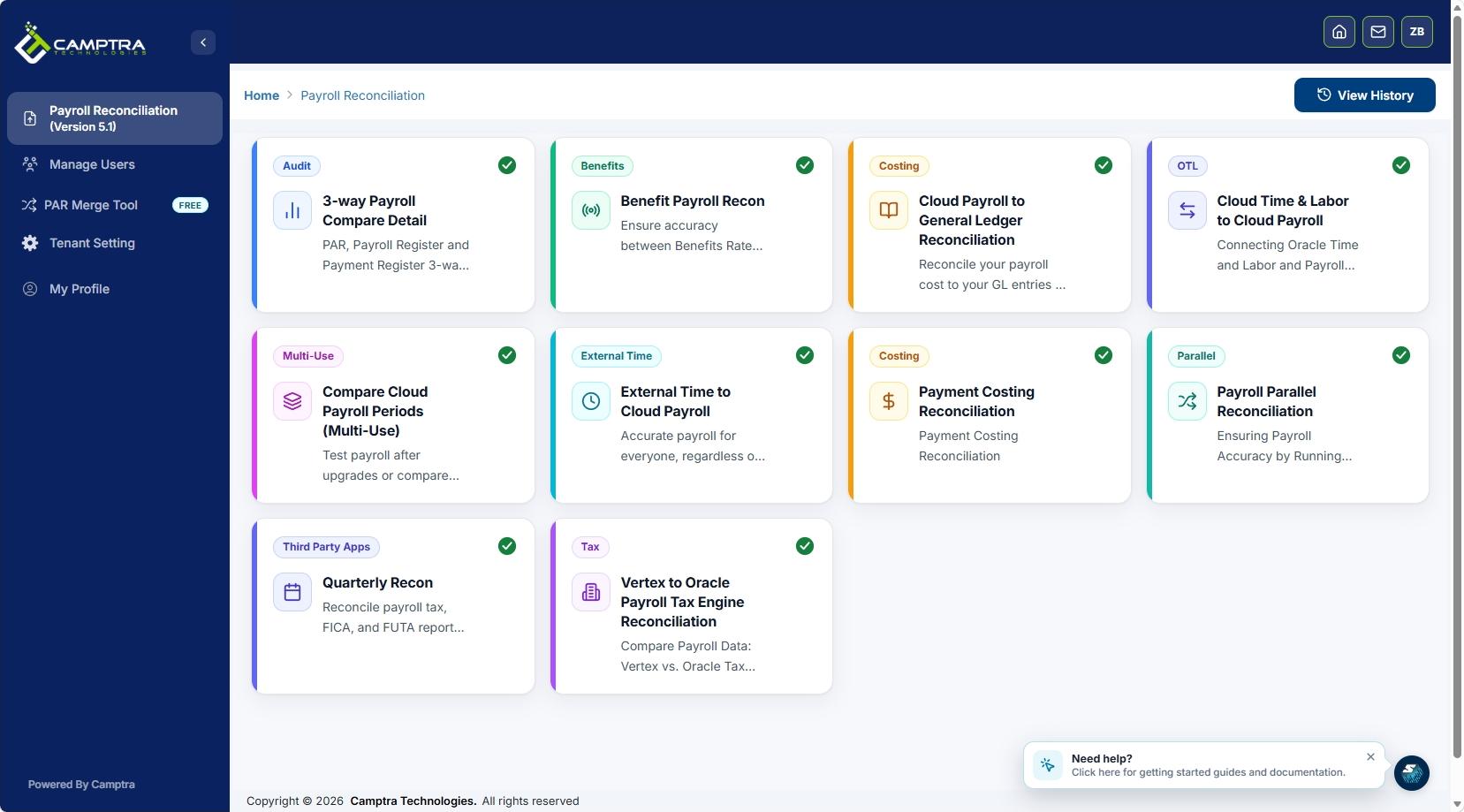
The toolset covers the full reconciliation scope: time and attendance, payroll, benefits, costing, tax, and general ledger — all in a single automated workflow with audit-ready outputs. For teams managing Oracle Cloud migrations or upgrades, parallel payroll validation lets you compare old and new environments side by side before cutting over. One healthcare system using Camptra’s toolset achieved its earliest financial close on record while significantly reducing payroll audit time. Request a demo to see how quickly your team can move from manual reconciliation to a per-cycle automated process.
Sources
- What Is Payroll Reconciliation? A How-To Guide
- Improve Payroll Reconciliation & Variance Analysis | BSI
FAQ
What is the most effective way to reconcile payroll at enterprise scale?
Automated per-cycle reconciliation with defined materiality thresholds is the most effective approach. Run gross-to-net, bank disbursement, tax withholding, and headcount matches every payroll cycle, and route exceptions to owners with resolution SLAs before the bank file transmits.
How often should high-transaction-volume payroll accounts be reconciled?
Per-cycle reconciliation is the baseline control — every payroll run, not just month-end. Monthly reconciliation extends to GL account balances and accruals; year-end covers cumulative W-2, 941, and benefits reporting alignment.
What are the three main types of payroll reconciliation?
The three primary types are GL reconciliation (payroll journal entries vs. ERP chart of accounts), bank reconciliation (net pay disbursed vs. bank statement cleared), and tax and filing reconciliation (withholding totals vs. Form 941, W-2, and FUTA/SUTA). Enterprise teams run all three, with headcount reconciliation as a fourth critical control.
How do you perform a payroll headcount reconciliation?
Compare the active employee count in your payroll system to the active headcount in your HRIS for the pay period. Any delta — employees in payroll but not HRIS, or vice versa — requires investigation before the run finalizes. Camptra’s Payroll Recon Toolset automates this comparison for Oracle Cloud Payroll environments, flagging discrepancies before they disburse.
What variance threshold should trigger a payroll investigation?
Variances above that threshold require mandatory sign-off; variances below it can be auto-closed with a log entry if they fall within your materiality floor. Your finance and tax leads should agree on the threshold before you configure it.
Recommended
- Payroll Reconciliation Steps for Oracle Teams: 2026 Guide | Camptra Technologies
- From Uncertainty to Confidence: Why We Built the Oracle Cloud Benefits Payroll Reconciliation Tool | Camptra Technologies
- Payroll General Ledger Reconciliation Best Practices | Camptra Technologies
- Blog | Camptra Technologies | Camptra Technologies
